TL;DR: A well-structured Amazon PPC campaign is essential for maximizing ROI, minimizing wasted ad spend, and scaling your business. This guide walks you through the optimal campaign setup, ad group logic, and scalable architecture for both new and growing sellers.
Key Takeaways
- A clear Amazon PPC campaign structure separates Sponsored Products into automatic, manual keyword, and product targeting campaigns for better control and optimization.
- Ad groups should be tightly themed around specific product types, keywords, or customer intents to improve relevance and Quality Score.
- Beginners should start with a simple three-campaign model (Auto, Manual Broad, Manual Exact) and scale into more granular structures as data accumulates.
- Regular optimization using tools like SellerSprite’s Amazon PPC optimization strategies ensures long-term profitability.
- Scalable architecture includes catch-all campaigns, category targeting, and negative keyword management to prevent internal competition and ad waste.
Table of Contents
Note on marketplaces: This guide is specifically optimized for the US market.
Why Amazon PPC Campaign Structure Matters
Amazon’s pay-per-click (PPC) advertising platform is one of the most powerful tools available to sellers—but only if used correctly. A poorly structured campaign can lead to wasted ad spend, keyword cannibalization, and missed sales opportunities. On the other hand, a well-organized Amazon PPC campaign structure gives you full control over your budget, improves ad relevance, and drives higher conversion rates.
For new sellers, the complexity of Amazon Ads can be overwhelming. You’re faced with choices: Should you use automatic or manual campaigns? How many ad groups should you create? What’s the best way to organize keywords? These decisions form the foundation of your advertising success.
Even experienced brand sellers and marketing managers often struggle with scalability. As your catalog grows from 5 to 50 SKUs, maintaining a clean, data-driven structure becomes critical. That’s why we’ve created this comprehensive guide—to walk you through every step of building an effective, scalable Amazon PPC campaign structure that delivers results.
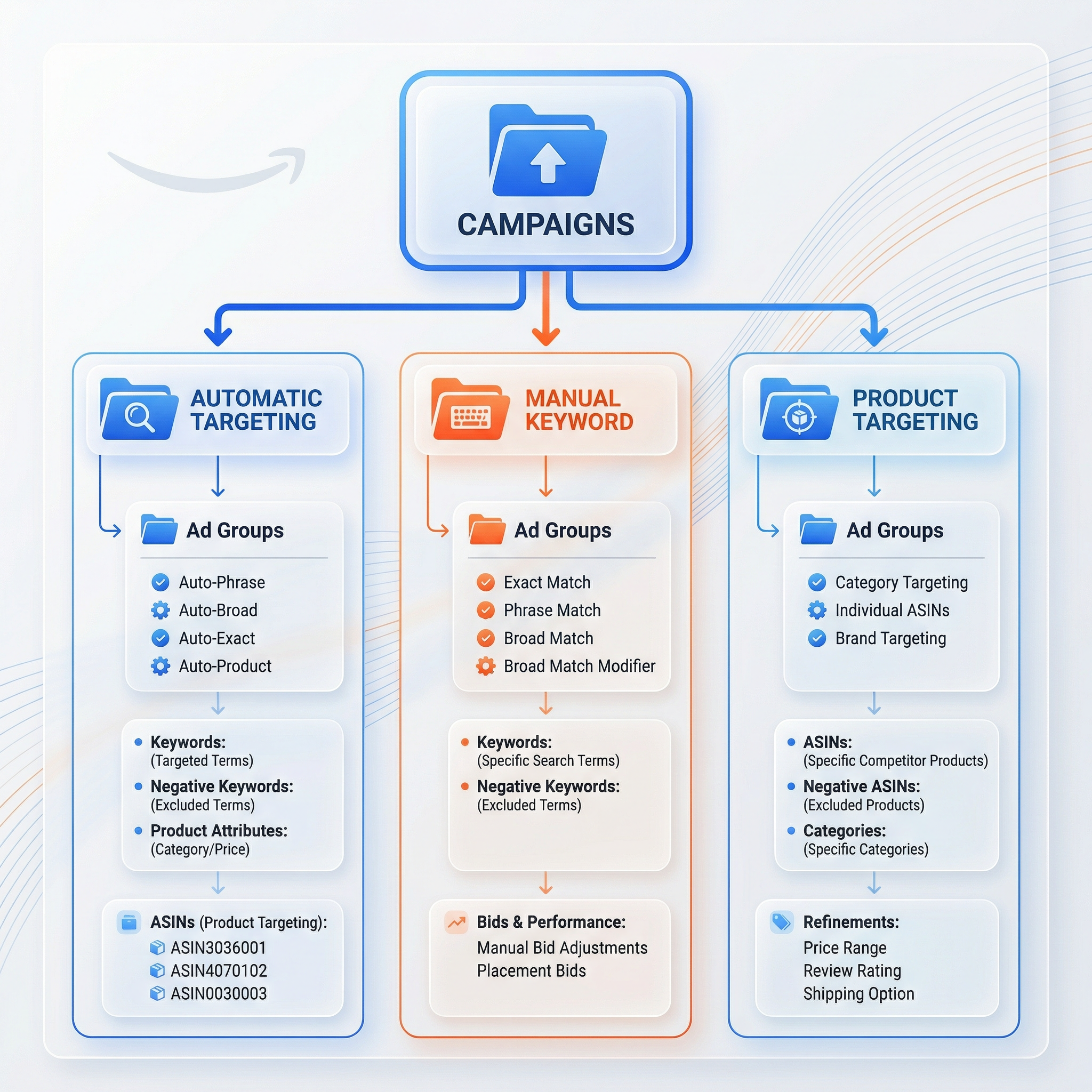
Understanding Amazon Campaign Types
Before diving into campaign structure, it’s essential to understand the three main types of Amazon Sponsored Products campaigns:
1. Automatic Targeting Campaigns
In automatic campaigns, Amazon decides which keywords and products to target based on your product listing. This is ideal for new products with limited keyword data. Amazon uses your title, bullet points, backend search terms, and customer behavior to serve your ads.
There are four match types within automatic targeting:
- Close Matches: Targets shoppers searching for products very similar to yours.
- Loose Matches: Reaches broader queries related to your product.
- Substitutes: Shows your ad when customers view competing products.
- Complements: Displays your product alongside items often bought together.
Automatic campaigns are excellent for discovery. They help uncover high-performing keywords you may not have considered. However, they should never be your only campaign type.
2. Manual Targeting – Keyword Campaigns
Manual keyword campaigns give you full control over which keywords trigger your ads. You can choose between match types: Broad, Phrase, and Exact.
- Broad Match: Triggers ads for variations of your keyword, including synonyms and related searches. Offers a wide reach but less precision.
- Phrase Match: Requires the exact phrase to appear in the customer’s search query, allowing for some surrounding words.
- Exact Match: Only triggers when the search query matches your keyword exactly or very closely.
Manual keyword campaigns are the backbone of any mature Amazon PPC strategy. They allow for precise bid control, performance tracking, and optimization based on real data.
3. Manual Targeting – Product Targeting Campaigns
Also known as "product targeting" or "category targeting," these campaigns let you show ads on specific product detail pages or within entire categories.
For example, you can target:
- Competitor ASINs to intercept shoppers considering alternatives.
- Complementary products (e.g., phone cases on iPhone listings).
- Broad categories like "Kitchen & Dining > Cookware" to capture high-intent buyers.
Product targeting is especially useful for cross-selling, launching new products, and capturing market share from competitors. For more insights, check out our guide on Amazon PPC category targeting and catch-all campaigns.
Step-by-Step Amazon PPC Campaign Setup
Now that you understand the campaign types, let’s build a winning structure from the ground up. Follow these steps whether you’re launching your first product or restructuring an existing portfolio.
Step 1: Define Your Campaign Goals
Are you trying to:
- Launch a new product?
- Boost sales during a promotion?
- Defend market share against competitors?
- Gather keyword data?
Your goal will influence your campaign structure. For example, a launch campaign focuses on discovery (automatic + broad match), while a mature product uses exact match and product targeting for efficiency.
Step 2: Create a Campaign Naming Convention
Clear, consistent naming helps you manage dozens or hundreds of campaigns. Use a format like:
[Product Line]_[Campaign Type]_[Match Type]_[Date]
Example: Wireless_Earbuds_Auto_Discovery_2025 or Yoga_Mats_Manual_Exact_Branded_2025
This makes filtering and reporting much easier in Amazon Advertising Console or tools like SellerSprite’s weekly PPC optimization dashboard.
Step 3: Set Up Your First Three Campaigns
Start with this proven beginner-friendly structure:
1. Auto Campaign – Discovery Engine
- Purpose: Uncover new keywords and customer search behavior.
- Bid: Start at $0.75–$1.00.
- Budget: $10–$20/day per product.
- Duration: Run for 2–4 weeks, then mine search term reports.
2. Manual Broad/Phrase Campaign – Reach & Relevance
- Purpose: Capture a wide range of relevant searches.
- Keywords: Use 10–20 high-potential keywords from research or auto campaign data.
- Match Types: Start with Broad and Phrase.
- Bid: $0.80–$1.20 depending on competition.
3. Manual Exact Campaign – Conversion Focus
- Purpose: Convert high-intent shoppers searching for your exact product.
- Keywords: Branded terms, exact product names, and high-converting terms from reports.
- Match Type: Exact only.
- Bid: $1.00–$1.50 to dominate top placements.
This three-tiered approach balances discovery, reach, and conversion—giving you a solid foundation to scale.
Smart Ad Group Logic for Maximum Relevance
Your campaign structure doesn’t stop at the campaign level—ad groups are where precision happens. A well-organized ad group improves your relevance score (Amazon’s version of Quality Score), lowers your ACOS, and increases conversions.
Best Practices for Ad Group Organization
Follow these principles to build high-performing ad groups:
1. One Product or Product Type Per Ad Group
Avoid mixing unrelated products. For example, don’t put “wireless earbuds” and “Bluetooth speakers” in the same ad group. Instead, create separate groups for:
- True Wireless Earbuds
- Neckband Bluetooth Headphones
- Sports Earbuds with Mic
2. Group Keywords by Search Intent
Not all keywords are created equal. Segment them by intent:
- Informational: "best wireless earbuds under $50."
- Comparative: "AirPods vs Samsung Galaxy Buds."
- Transactional: "buy Jabra Elite 75t."
Transactional keywords belong in high-bid exact match campaigns. Informational ones work better in broad match or auto campaigns.
3. Limit Keywords Per Ad Group (5–15 Recommended)
Too many keywords dilute performance. Keep ad groups tight. For example:
- Ad Group: Waterproof Running Earbuds
- Keywords: waterproof earbuds, sweatproof wireless earbuds, running earbuds 2025, gym earbuds with mic
This ensures your ad copy, images, and landing page align perfectly with the search query.
Building a Scalable and Maintainable Campaign Architecture
As your business grows, your Amazon PPC structure must evolve. A scalable architecture prevents chaos, reduces management time, and supports data-driven decisions.
1. Tiered Campaign Model
Adopt a tiered approach based on product lifecycle:
- Launch Phase: Auto + Broad campaigns for discovery.
- Growth Phase: Add phrase and exact match, begin product targeting.
- Mature Phase: Optimize bids, add negative keywords, run competitor ASIN campaigns.
2. Use of Catch-All Campaigns
A “catch-all” campaign captures long-tail or unexpected keywords that don’t fit into your main campaigns. It typically uses broad match with lower bids and serves as a safety net.
For example, if you sell pet products, a catch-all campaign might pick up searches like “dog water bowl for large breeds” or “cat feeder with timer.” You can then move high-performing terms into dedicated ad groups.
Learn more in our guide on Amazon PPC category targeting and catch-all campaigns.
3. Negative Keyword Strategy
Prevent wasted spend by adding negative keywords at both campaign and ad group levels. For example:
- If you sell premium earbuds, add “cheap” or “inexpensive” as negatives.
- If you don’t sell kids’ products, exclude “for kids” or “toddler.”
Regularly review search term reports and add irrelevant or low-converting queries as negatives.
4. Portfolio Management
For brands with multiple products, use Amazon Advertising Portfolios to group related campaigns. This allows for shared budgets, unified reporting, and bulk optimizations.
Example portfolio: Premium_Audio_Line_2025 containing all campaigns for wireless earbuds, headphones, and accessories.
Pro Tips for Amazon PPC Optimization
A great structure is just the beginning. Ongoing optimization is key to profitability. Here are actionable tips:
1. Weekly Search Term Report Analysis
Download your search term report every week. Look for:
- High-impression, low-click keywords (optimize bids or pause).
- High-click, low-conversion terms (add as negative or lower bid).
- New converting keywords (add to manual campaigns).
2. Bid Adjustments Based on Performance
Use a tiered bidding strategy:
- Top of Search: Bid 20–30% higher for exact match keywords with high conversion rates.
- Product Page: Lower bids for product targeting if ACOS is high.
- Downgrade Underperformers: Reduce bids on phrase/broad match terms with ACOS > target.
3. Leverage Automation Tools
Manual optimization is time-consuming. Tools like SellerSprite automate bid adjustments, keyword harvesting, and negative keyword suggestions—saving hours per week and improving performance.
For example, SellerSprite’s AI can identify which keywords from your auto campaign are converting and automatically add them to a manual exact match campaign with optimized bids.
4. A/B Test Ad Creatives and Landing Pages
Even with perfect targeting, poor creatives kill performance. Test different:
- Main images (lifestyle vs. product-only)
- Bullet points (benefit-focused vs. feature-focused)
- Prices and promotions (e.g., “20% off” badge)
FAQ
What is the best Amazon PPC campaign structure for beginners?
The best structure for beginners includes three core campaigns: 1) An automatic targeting campaign to discover high-performing keywords, 2) A manual broad/phrase campaign to capture relevant traffic, and 3) A manual exact match campaign to convert high-intent shoppers. Keep ad groups focused on one product type or theme, and use consistent naming. This simple yet effective model provides visibility, control, and scalability as you grow.
How do I optimize my Amazon PPC campaign for higher ROI?
To optimize for ROI, start by analyzing your search term reports weekly to identify converting keywords and irrelevant spend. Add high-performing keywords to manual exact campaigns with aggressive bids, and add poor performers as negative keywords. Use tools like SellerSprite to automate bid adjustments and keyword harvesting. Focus on improving relevance through tight ad groups and A/B testing your product listings. Finally, scale what works—double down on campaigns with ACOS below your target.
What are the differences between automatic and manual targeting in Amazon PPC campaigns?
Automatic targeting lets Amazon choose keywords and products to target based on your listing, making it ideal for new products and keyword discovery. Manual targeting gives you full control—you decide which keywords or ASINs to target. Manual campaigns allow for precise bid management, performance tracking, and optimization. While automatic campaigns are easier to set up, manual campaigns deliver better long-term ROI when optimized correctly.
Next Steps
- Review your current Amazon PPC campaigns and assess whether they follow a clear, scalable structure.
- Set up a new campaign using the three-tier model (Auto, Manual Broad, Manual Exact) for your top product.
- Sign up for SellerSprite to automate keyword harvesting, bid optimization, and weekly reporting.
References
- Amazon Advertising Help – Campaign Types View
- SellerSprite Blog – Amazon PPC Optimization Strategies View
- SellerSprite Blog – Weekly PPC Optimization View
- SellerSprite Blog – Amazon PPC Launch Keywords View
By SellerSprite Success Team
The SellerSprite Success Team combines deep expertise in Amazon advertising, data analytics, and e-commerce growth. With years of hands-on experience helping thousands of sellers optimize their PPC campaigns, we deliver actionable strategies rooted in real-world performance. Our content is designed to empower both new and experienced sellers with tools and insights to scale profitably.