TL;DR: Before you source a single product, plug six non‑negotiable inputs into an FBA calculator, including packaged weight, dimensions, category, selling price, COGS, and inbound shipping, to see if your idea turns a profit after all Amazon fees.
Key Takeaways
- The FBA calculator's accuracy hinges on using real packaged weight and dimensions, not supplier estimates.
- Six data points, from product dimensions to inbound shipping, form the foundation of any reliable profit forecast.
- Running what‑if scenarios on price and cost helps you reject losers and negotiate better supplier deals before committing.
Table of Contents
Note on marketplaces: This guide is specifically optimized for the US market, but the input principles apply globally.
Quick Answer
An FBA calculator gives you a realistic profit estimate only when you feed it accurate, real‑world data. The core purpose is to simulate Amazon's fee structure, including pick & pack, weight handling, storage, and referral fees, against your expected selling price and costs. Without precise inputs, you're guessing, and guessing leads to margin erosion. For a deeper dive into how FBA calculators work, see our comprehensive guide.
FBA calculator accuracy depends on input quality
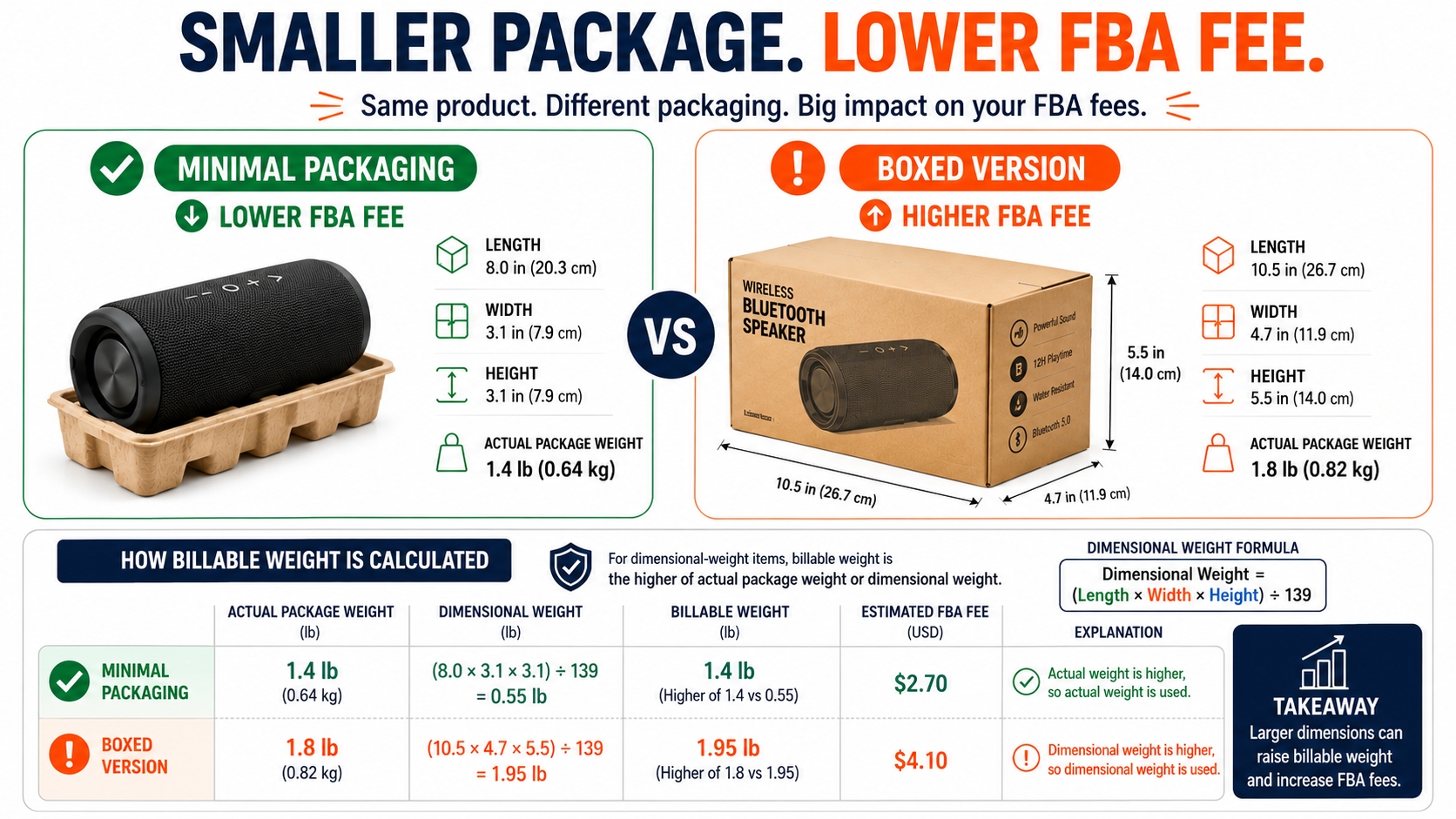
The difference between a 20% net margin and a 5% net margin often comes down to whether you use the supplier's “product weight” or the actual "packaged weight" that Amazon will charge you for. Amazon uses dimensional weight or actual weight, whichever is greater, so failing to account for packaging can inflate your assumed profit. Similarly, getting dimensions wrong by a few inches can shift your product into a higher fee tier, and Amazon's fee schedule is unforgiving when it comes to size tiers. Always measure the final boxed product, not the item alone.
💡 Key Insight
The calculator is only as reliable as the data you enter. Never use estimates when precise measurements are just a scale and tape measure away.
FBA Calculator Inputs Checklist
Here are the six inputs every FBA calculator needs. We'll walk through each with practical sourcing tips.
| Input | What to Enter | Why It's Critical |
|---|---|---|
| Product dimensions | Length × width × height of the packaged unit (not the product alone) | Determines fulfillment fee tier; dimensional weight can override actual weight |
| Product weight | Weight of the packaged unit in pounds (lbs) | Affects pick & pack and weight handling fees; Amazon charges the greater of physical or dimensional weight |
| Category | The correct Amazon product category (e.g., Home & Kitchen, Electronics) | Referral fee percentage varies by category, typically 8%–45% |
| Selling price | The price you expect to sell the item for on Amazon.com | Directly influences referral fee and net revenue |
| COGS (Cost of Goods Sold) | Your landed cost per unit, including manufacturing, prep, labeling, etc. | Core variable to calculate gross and net profit |
| Inbound shipping | The cost to ship one unit from your supplier or prep center to Amazon's warehouse | Often overlooked; can range from $0.50 to $3+ per unit depending on origin and weight |
Product dimensions
Measure the item after packaging (poly bag, box, bubble wrap) exactly in inches. Amazon charges based on the larger of the unit's weight or dimensional weight (length × width × height ÷ 139). Even a small increase can push your product into Oversize or Large Standard. For instance, a package measuring 17.9 × 11.9 × 3.9 inches is considered Large Standard, but if any dimension ticks up to 18 inches, it becomes Small Oversize with substantially higher fees. Always round up to the next inch because Amazon does.
Product weight
Use a digital scale to weigh the final packaged unit. If it comes out to 1.2 lbs, enter 1.2, as Amazon rounds up to the next 0.01 lb for fee calculation. This weight must include the product, packaging, poly bag, inserts, and tape. A supplier might quote a "product weight" of 1 lb, but with a sturdy box and bubble wrap it could be 1.5 lbs. That 0.5 lb difference can add $0.50–$1.00 in fulfillment fees per unit, eroding your margin.
Category
Referral fees vary significantly: Home & Kitchen at 15%, Electronics at 8% (with a $0.30 minimum), Clothing & Accessories at up to 17%, etc. Selecting the wrong category could mean using a 15% fee when it should be 8%, underestimating profit, or vice versa. Always double‑check Amazon's fee schedule for your exact product type. If you're unsure, Amazon's fee preview tool inside Seller Central can confirm the category after listing creation.
Selling price
Don't pull this number out of thin air; research competitor pricing using tools that show the market price band. A realistic starting point is the median selling price of the top 5–10 organic competitors. Avoid anchoring on the lowest price unless you have a cost advantage. Later, you'll test multiple price points in the calculator to see how margins shift.
COGS
Include everything it takes to get a sellable unit into your hands: supplier unit cost, inspection, labeling, prep service, customs duties, and freight forwarding. Many sellers forget the cost of pre‑FBA preparation, which can be $0.50–$1.50 per unit. If your factory quotes $5 per unit, your landed COGS might actually be $7 or more. Use your detailed cost breakdown here, and this is the foundation of your profit projection.
Inbound shipping
Estimate the cost per unit to ship from your location (or 3PL) to Amazon FBA fulfillment centers. This may involve air freight, sea shipment, or UPS/FedEx ground. For a typical 40‑ft container, per‑unit shipping might be $0.60–$1.20 depending on volume and destination. If you're shipping small quantities via express, it could be $3–$5 per unit. Never enter $0; Amazon does not ship your inventory to its warehouse for free.
Dimensional weight and packaging notes
Dimensional weight (Dim Wt) can dramatically increase your fees. The formula is (Length × Width × Height) ÷ 139. For example, a product weighing only 1 lb but with package dimensions 18″×14″×4″ yields a Dim Wt of (18×14×4)/139 = 7.25 lbs. Amazon charges based on 7.25 lbs, not 1 lb, so your fulfillment fee jumps from about $3.50 to over $6. If your product is lightweight but voluminous, consider vacuum‑sealing or redesigning packaging to reduce cubic size. Always calculate Dim Wt and compare it to actual weight; in most calculators you'll enter the greater of the two as your "shipping weight."
Step‑by‑Step Calculation
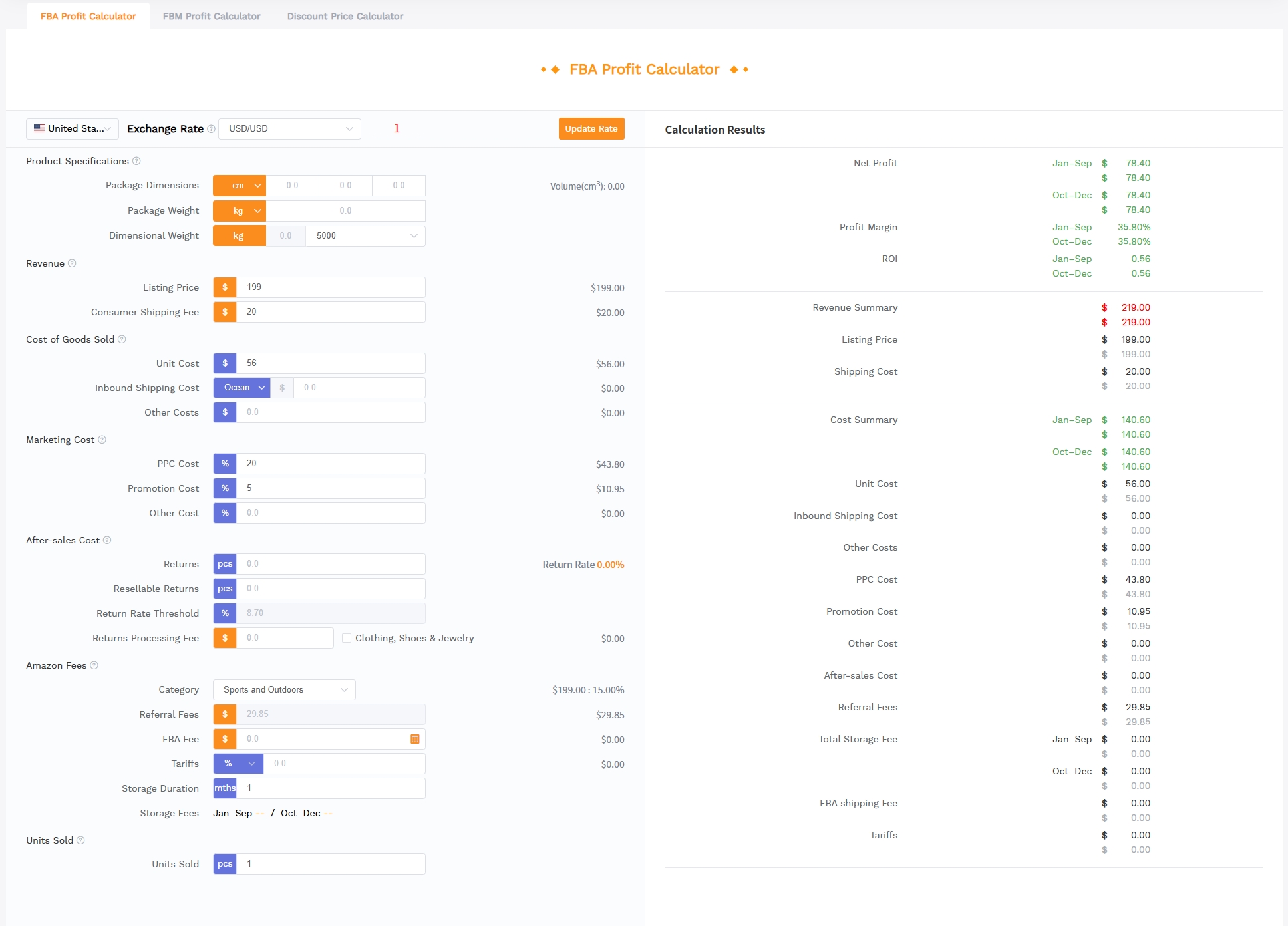
Let's put theory into practice with a real‑world example using the SellerSprite FBA Profit Calculator. We'll evaluate a hypothetical kitchen gadget.
Enter product data
Start with the essentials: packaged dimensions (15 in × 10 in × 4 in) and weight (2.5 lbs). Select the correct category Home & Kitchen in this case. Then, input your expected selling price, $24.99. The calculator automatically estimates the referral fee (15% of $24.99 = $3.75) and the FBA fulfillment fee based on the dimension/weight tier. In this example, a 2.5‑lb standard package might incur a fulfillment fee of around $7.71. At this stage, you're already seeing a ballpark net before costs.
🔍 Checkpoint
Did you use the actual packaged weight? If your product alone is 2 lbs but with a box it's 2.5 lbs, entering 2 lbs would underestimate fees by $0.50–$1.00 per unit, making your profit look better than it really is.
Enter cost data
Now add your COGS: let's assume $5 per unit landed (manufacturing $3, sea freight $1, prep/labeling $1). Then add inbound shipping to Amazon, say $0.80 per unit if you're sending a pallet via LTL. The calculator subtracts these from the gross revenue remaining after Amazon fees. This gives you a realistic pre‑advertising net profit.
Review fee breakdown
The tool presents a line‑item breakdown: Selling Price $24.99 – Referral Fee $3.75 – FBA Fulfillment $7.71 – COGS $5.00 – Inbound Shipping $0.80 = Net Profit $7.46. That's a net margin of 29.85%, which is good. But imagine if you had used the supplier's weight of 2 lbs; the fulfillment fee might drop, skewing your net profit and margin. That small difference could mislead sourcing decisions, especially when scaling to thousands of units. Always verify with real packaged data.
Compare margin scenarios
Now run "what‑if" scenarios: change the selling price to $19.99 (net drops to $3.21, only 16.06% margin) and to $29.99 (net jumps to $11.71, 39.05% margin). Also adjust COGS: if you negotiate a $4.5 landed cost, even at $24.99 your net becomes $7.96 (31.85% margin). This exercise sets your price strategy and tells you the maximum COGS you can afford. A good rule of thumb: aim for a post‑advertising net margin of at least 15–20%, but for initial sourcing, target 25%+ to leave room for PPC and promotions.
How to Use Results Before Sourcing
The calculator's output isn't just numbers; it's your go/no‑go decision tool. Before you commit to a supplier or product, use the results to filter, negotiate, and set expectations.
Reject low‑margin ideas
If the net margin is below 15%, seriously consider shelving the idea. Low margins leave no room for error, returns, cost fluctuations, or the advertising spend that's often necessary to gain traction. For example, a $15 product with a $2 net profit (13% margin) becomes break‑even after $2 in PPC per sale. Be ruthless: the market is full of products, and a lean margin won't sustain your business.
Negotiate supplier cost
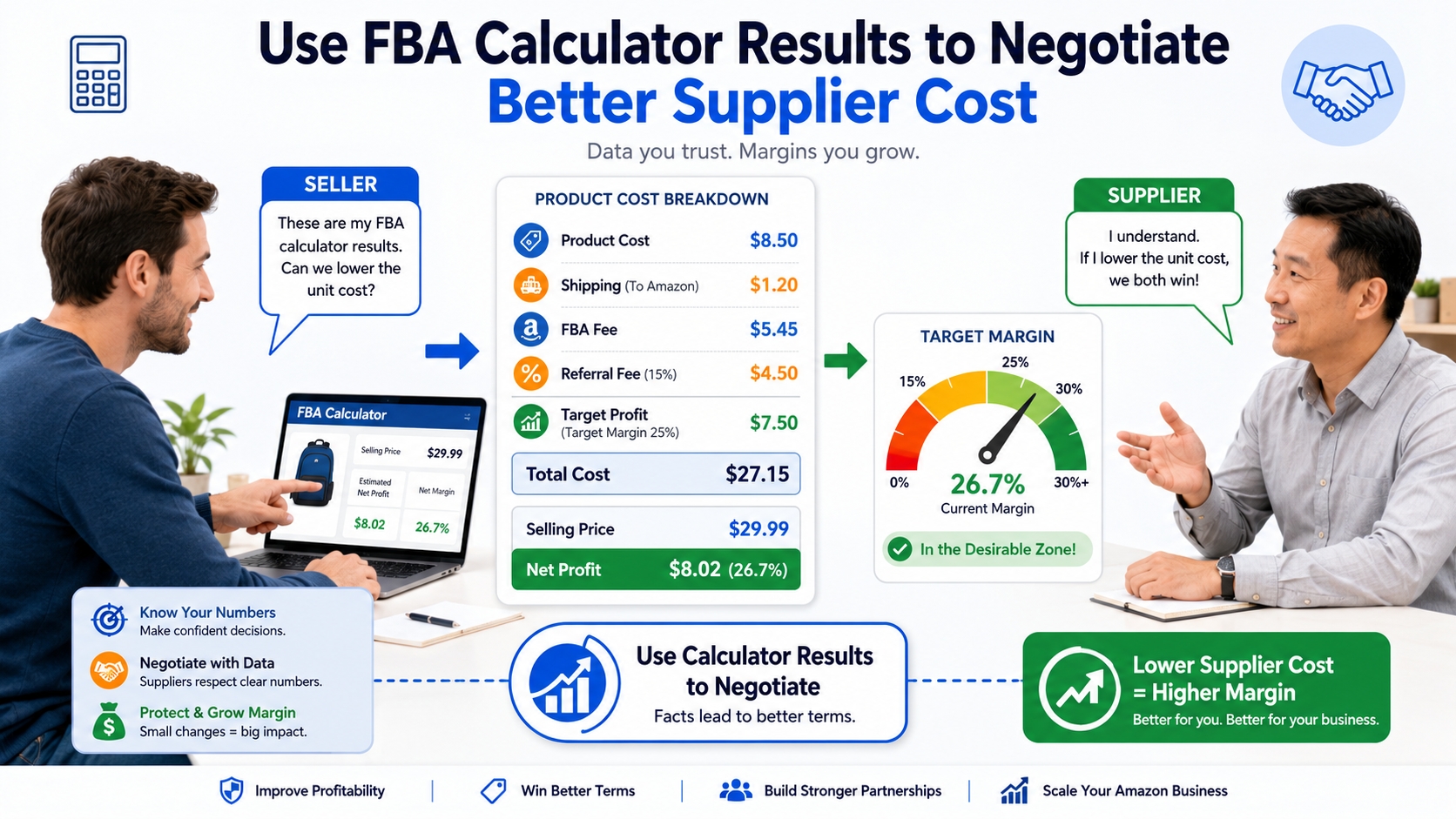
Present your target COGS to suppliers using the calculator as evidence. If your model needs a landed cost of $4.50 to achieve a healthy 25% margin, share this number and ask if they can meet it. Many suppliers can adjust materials or quantities to hit a price point if they know it's a firm requirement. If they can't, you move on, having saved yourself from a low‑profit venture.
Test price range
Experiment with a band of prices, not just your ideal price. If the market is competitive at $19.99, see if $22.99 still gives a margin you can live with. Also simulate discounted launch prices; many sellers lose money on initial sales to gain reviews, but you need to know the floor. The calculator helps you model everything from aggressive penetration pricing to premium positioning, ensuring you never sell at a loss unawares.
Mistakes to Avoid
Even experienced sellers make these input errors. Steer clear of them to keep your forecasts reliable.
Using supplier weight instead of packaged weight
A 1‑lb product with bubble wrap, a branded box, and packing tape can easily tip the scale at 1.3 lbs. That 0.3‑lb differential can shift your fulfillment fee by $0.30–$0.80 per unit. Over 1,000 units, that's $300–$800 of hidden cost. Always weigh the final packaged unit on a scale accurate to 0.1 oz. This is the single most common reason new sellers see their actual profit fall short of projections.
Ignoring returns
FBA calculators typically don't factor in return costs, however, Amazon charges a return processing fee for many categories, and if the item can't be resold, you bear the loss. In apparel, return rates can exceed 15%, while in electronics they might be 5%. Even a 3% return rate on a $25 item with a $10 cost means you lose $0.30 per unit on average. Build a returns allowance of 3–5% of revenue into your post‑calculator model, or use the calculator's advanced settings if available.
Not recalculating after packaging changes
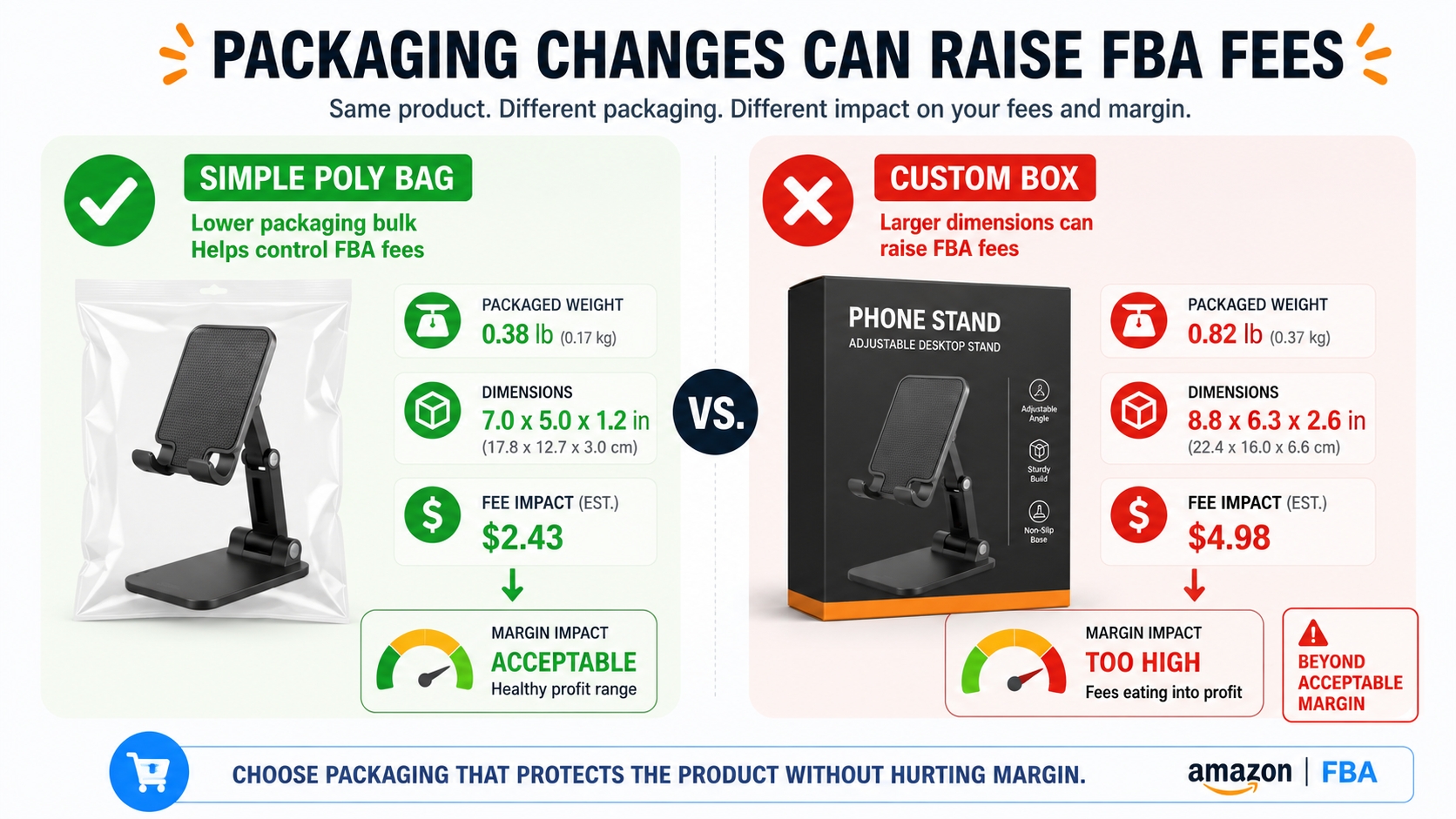
A packaging redesign, even one that improves brand perception, can alter both weight and dimensions. Maybe your elegant custom box adds 0.2 lbs and half an inch on each side. That could push your product from Large Standard into Small Oversize, increasing fulfillment fees by 20% or more. Before finalizing any packaging change, re‑run the calculator with the new specs. The branding uplift must justify the added logistics cost. Many a profitable product turned marginal after a well‑intentioned packaging upgrade.
Next Steps
- Sign up for SellerSprite and use the free FBA Calculator to evaluate your product idea with real numbers.
- Read our in‑depth Amazon FBA Fees Explained to understand every charge that hits your bottom line.
FAQ
What is an Amazon FBA calculator?
An FBA calculator is a tool that estimates your net profit after accounting for Amazon's fulfillment and selling fees. You input product dimensions, weight, selling price, and costs, and it breaks down referral fees, pick & pack, weight handling, and storage costs, showing your potential margin.
Should I use product weight or packaged weight in an FBA calculator?
Always use packaged weight, the weight of the final ready‑to‑ship unit including boxing, bubble wrap, poly bag, and inserts. Amazon weighs the package when it arrives, so if your input is lighter than reality, your profit projection will be too optimistic.
How do dimensions affect FBA calculator results?
Dimensions determine the product's size tier and may trigger dimensional weight pricing. A slightly oversized package can shift you from "large standard" to "small oversize," dramatically increasing fees. Always measure the packaged unit and round up to the nearest inch.
Can an FBA calculator help before sourcing?
Absolutely. It lets you run "what‑if" scenarios before investing in inventory. By plugging in supplier estimates and target selling prices, you can quickly see if a product concept is viable and identify the maximum COGS you can afford.
What margin should I look for before sourcing an FBA product?
Aim for a net margin of at least 20% after all fees, including COGS and inbound shipping. Below 15%, the business becomes fragile to price wars, returns, and advertising costs. Some sellers target 30%+ to allow for promotions, but 25% is a solid baseline for a new product.
References
- Amazon FBA Fee Schedule (Seller Central) View
- Amazon FBA Fees Explained View
- Amazon Calculator Guide View
By SellerSprite Success Team
The SellerSprite Success Team combines years of Amazon marketplace experience with data‑science expertise, helping sellers of all sizes dominate search results through proven operational strategies and cutting‑edge tooling.
Last updated: 2026-07-23