TL;DR: SellerSprite's Keyword Mining tool empowers Amazon sellers to uncover high-performing keywords, optimize product listings, and strengthen search visibility with a repeatable, data-driven workflow. This expanded guide explains not only how to use the tool step by step, but also how to validate keyword quality, prioritize buyer intent, apply terms across listings naturally, and turn research into measurable ranking and conversion gains.
Key Takeaways
- SellerSprite Keyword Mining is a powerful Amazon keyword research tool that helps sellers move beyond guesswork by surfacing high-volume, relevant, and often lower-competition search terms for product listings.
- The tool supports both new and experienced sellers with data-driven insights for keyword optimization and Amazon SEO, making it easier to balance demand, relevance, competition, and trend direction before updating a listing.
- You can export keyword data, analyze competitor listings, and integrate findings directly into your Amazon product research workflow, then validate the final keyword set against listing performance, advertising data, and seasonal search behavior.
Table of Contents
Note on marketplaces: This guide is specifically optimized for the US market. Search behavior, title rules, and conversion patterns can differ across marketplaces, so sellers expanding internationally should localize both keyword research and listing language rather than simply translating US keywords word for word.
Introduction to Amazon Keyword Research
Amazon is one of the world's largest ecommerce marketplaces, but even the best product can underperform if shoppers never see it. That's why Amazon keyword research matters. By identifying the exact phrases customers use at different stages of the buying journey, sellers can improve discoverability, attract more qualified traffic, and raise the odds of conversion once a shopper lands on the listing.
For new sellers, this process can feel overwhelming. Where do you start? What tools should you use? How do you know which keywords will actually drive sales instead of just impressions? The answer lies in using a dedicated Amazon keyword research tool like SellerSprite's Keyword Mining feature, then applying those insights with a clear prioritization framework.
It is also important to understand that Amazon SEO is not just about stuffing keywords into a title. Amazon's own educational resources emphasize that listing optimization works best when relevance, product detail page quality, and shopper experience all improve together. In practice, that means your keyword strategy should help shoppers understand what the product is, who it is for, and why it is a fit, quickly and clearly.
Whether you're a beginner launching your first ASIN or a seasoned brand managing a large catalog, mastering keyword mining is essential for long-term success on Amazon. In this guide, we'll walk you through how to use SellerSprite's powerful tool to uncover profitable keywords, organize them by intent, and apply them in a way that supports both ranking and conversion.
Why Use SellerSprite for Keyword Mining?
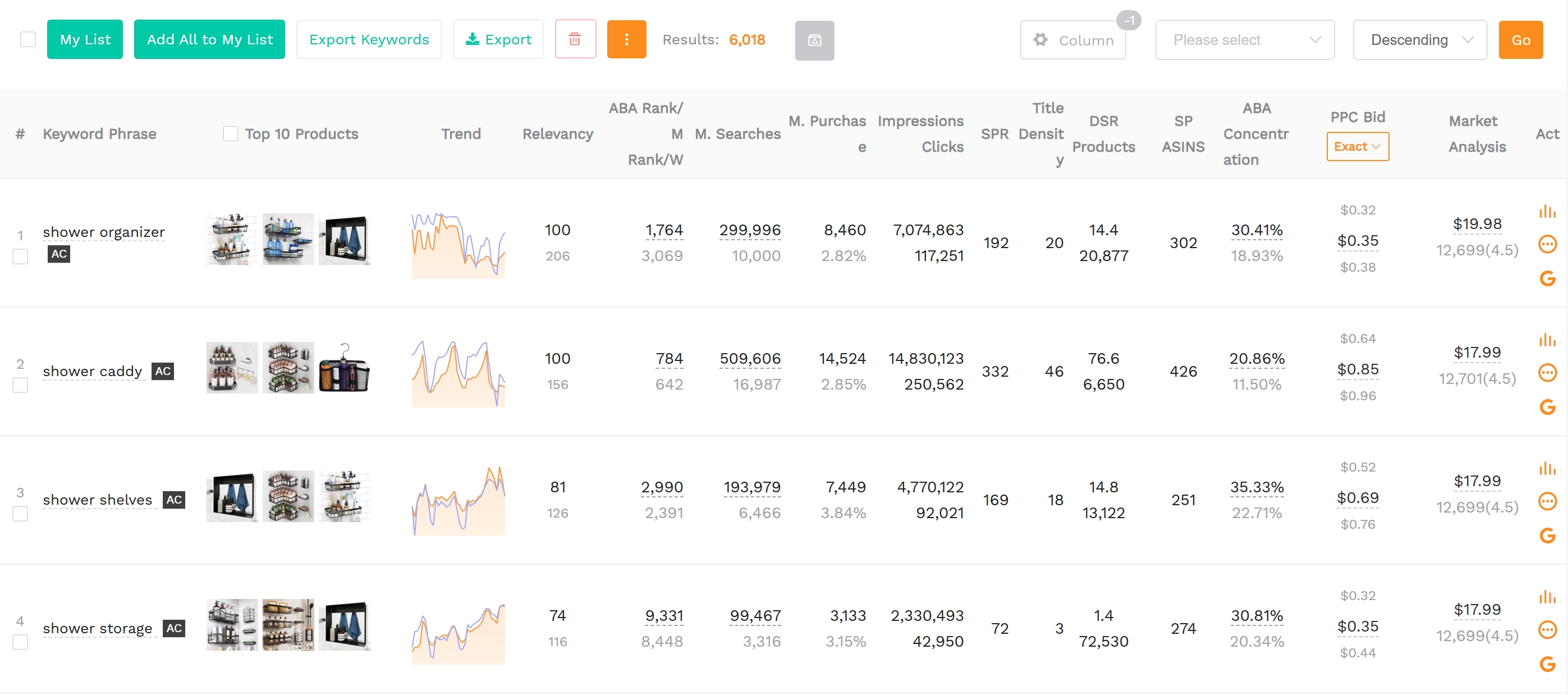
Among the many Amazon keyword research tools available, SellerSprite stands out for its accuracy, ease of use, and deep integration with Amazon search behavior. Rather than giving you a flat list of keyword ideas, it helps you compare terms by practical decision-making signals such as search volume, competition, relevance, and trend direction.
SellerSprite's keyword mining function pulls insight from Amazon autocomplete patterns, competing product listings, and marketplace search behavior. It provides key metrics like monthly search volume, competition level, relevance score, and trend history, giving you a more complete picture of whether a keyword is merely popular or actually useful for your product.
This matters because not every large keyword deserves a place in your listing. A broad term may drive visibility but also attract the wrong audience, while a highly specific long-tail term may produce fewer searches yet convert better because the shopper's intent is clearer. SellerSprite makes it easier to identify that difference, which is especially valuable when launching new products, refreshing stagnant listings, or entering crowded categories.
Unlike generic SEO tools, SellerSprite is built specifically for Amazon sellers. It supports an Amazon-native workflow where research can start from seed keywords, competitor ASINs, or adjacent products, then move directly into listing optimization, ad testing, and catalog expansion. That makes it useful not only for content creation, but also for assortment planning, PPC refinement, and ongoing competitive monitoring.
There is also a strong practical fit with Amazon's own guidance. Amazon Ads recommends using search term data to understand how shoppers discover products and then applying high-value queries to titles, bullet points, and descriptions when they are genuinely relevant. SellerSprite helps sellers do that earlier and faster by identifying opportunities before they are obvious from manual research alone.
Step-by-Step Guide to Using Keyword Mining
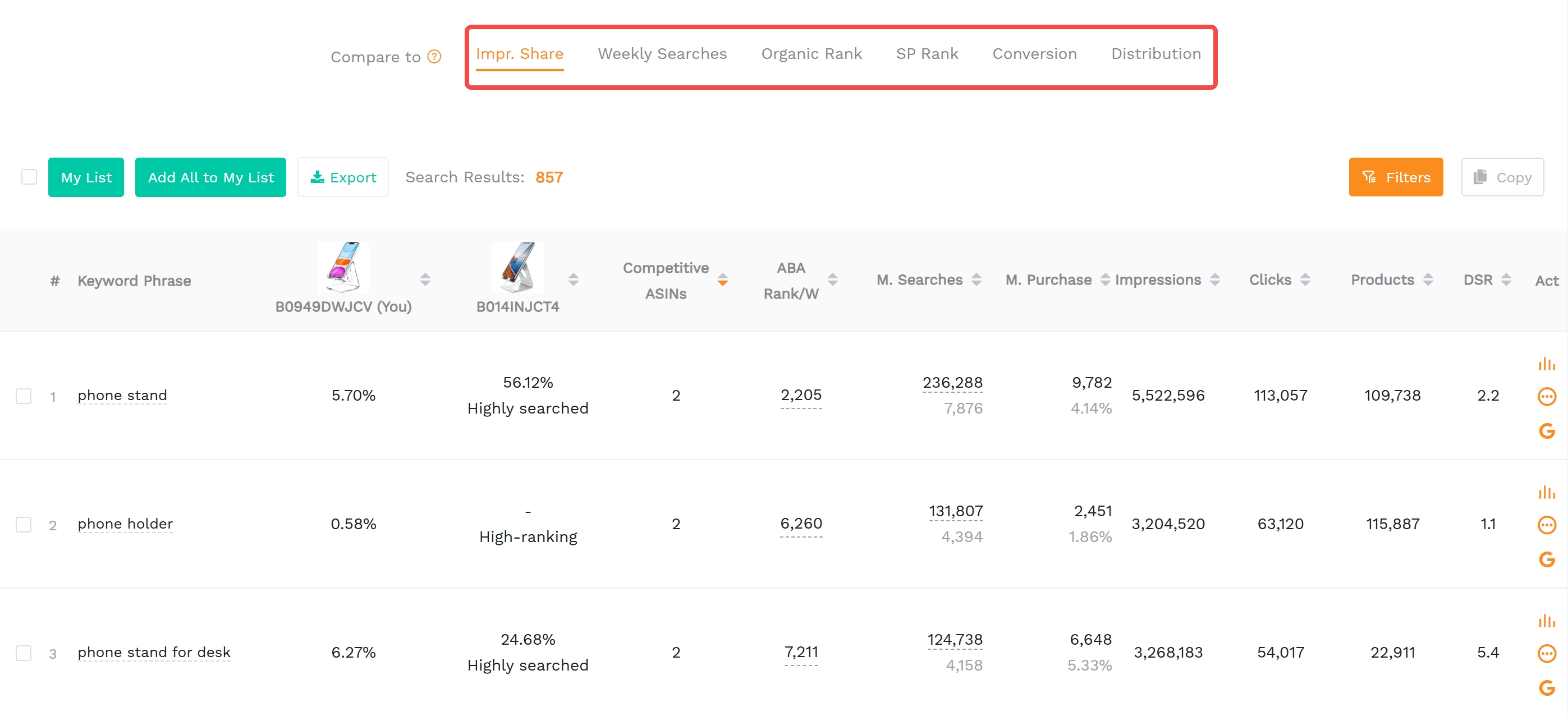
Ready to start finding winning keywords? Follow this step-by-step process using SellerSprite's Keyword Mining tool. The goal is not just to collect as many keywords as possible, but to build a clean, prioritized keyword list you can confidently deploy in your listing and advertising workflow.
Step 1: Log In and Access Keyword Mining Tool
Go to SellerSprite's Keyword Mining and log in to your account. If you don't have one, sign up for free to get a 3-day free trial firstly to all features.
Before typing your first keyword, clarify the product stage you are working on. Are you launching a new item, relaunching a poor performer, or defending rank on an existing bestseller? The answer changes what "good keyword" means. A launch-focused seller may accept broader discovery terms, while a mature listing may prioritize highly relevant, conversion-oriented phrases with clearer buying intent.
Step 2: Enter a Seed Keyword
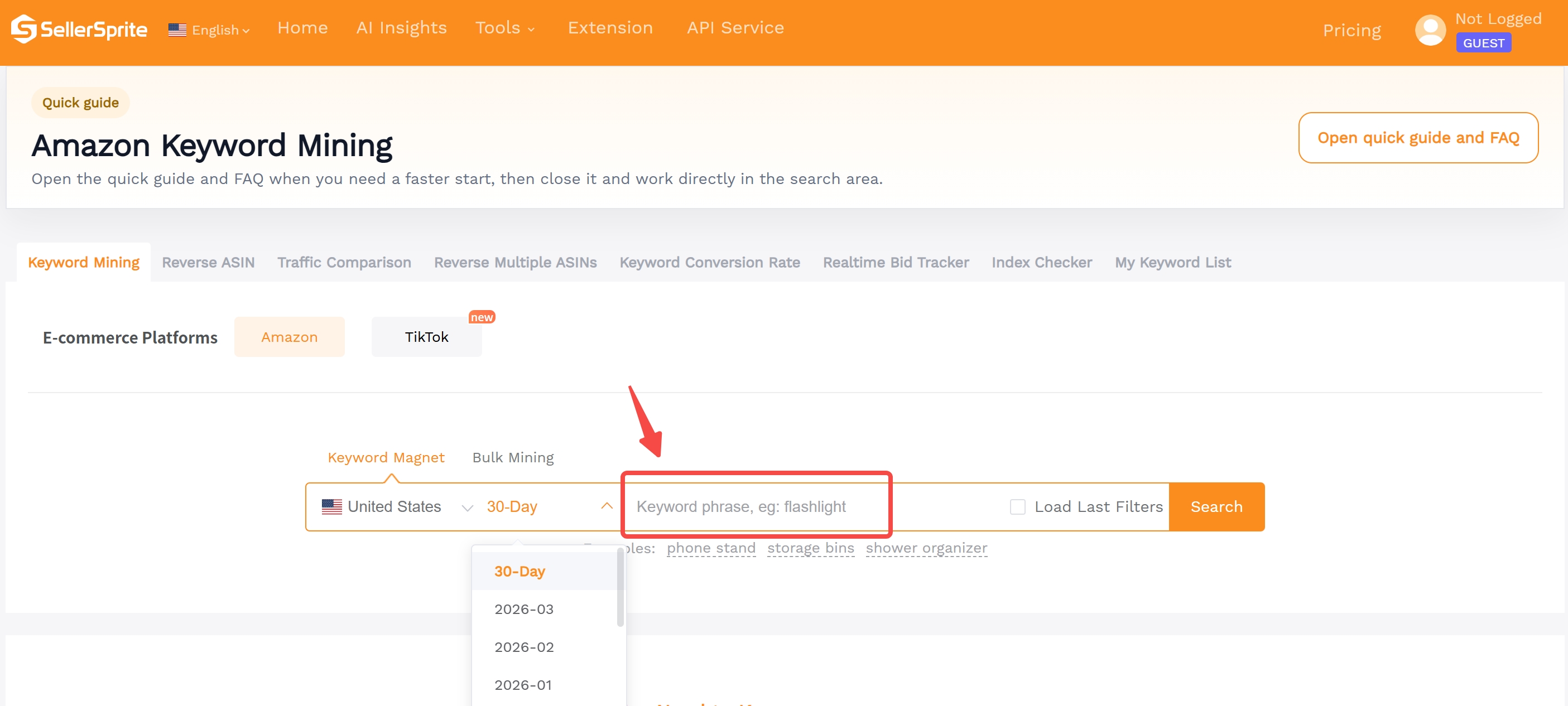
Start by entering a broad seed keyword (e.g., "wireless earbuds") related to your product. SellerSprite will generate hundreds of related keyword suggestions based on real Amazon search data.
For best results, do not rely on a single seed. Run several variations that reflect materials, use cases, target users, and differentiators. If your product is a protein shaker bottle, for example, you may want to test seeds based on audience ("for gym"), feature ("leak proof"), capacity ("32 oz"), and scenario ("for meal replacement"). This helps uncover different clusters of demand rather than a narrow slice of the market.
Competitor ASIN mining is equally valuable because it reveals how established listings are positioned. A strong competitor may already rank for a mix of category-defining keywords, benefit-led phrases, and niche long-tail variations. Studying those patterns helps you avoid starting from zero.
Step 3: Analyze Keyword Metrics
Review the results table, which includes:
- Search Volume: Average monthly searches, useful for estimating potential visibility and demand
- Competition: How many products are related to this keyword, which helps gauge how difficult it may be to win traction
- Relevance Score: How well the keyword matches your product, an essential filter because irrelevant traffic rarely converts
- Trend Graph: Seasonal or growing interest, helping you distinguish evergreen demand from temporary spikes
At this stage, think in terms of tiers. Your primary keywords are the most relevant, highest-opportunity phrases that deserve placement in the title and early bullets. Secondary keywords support discoverability and can be distributed across bullets, description copy, or backend search terms. Exploratory keywords may be promising but should be tested first through ads or monitored before becoming core listing terms.
A practical rule is to prioritize relevance first, then demand, then competition. A keyword with massive search volume but weak product fit can lower conversion efficiency and make your listing less persuasive. On the other hand, a slightly smaller but highly aligned term often brings better shoppers and more stable organic performance over time.
Step 4: Filter and Export High-Potential Keywords
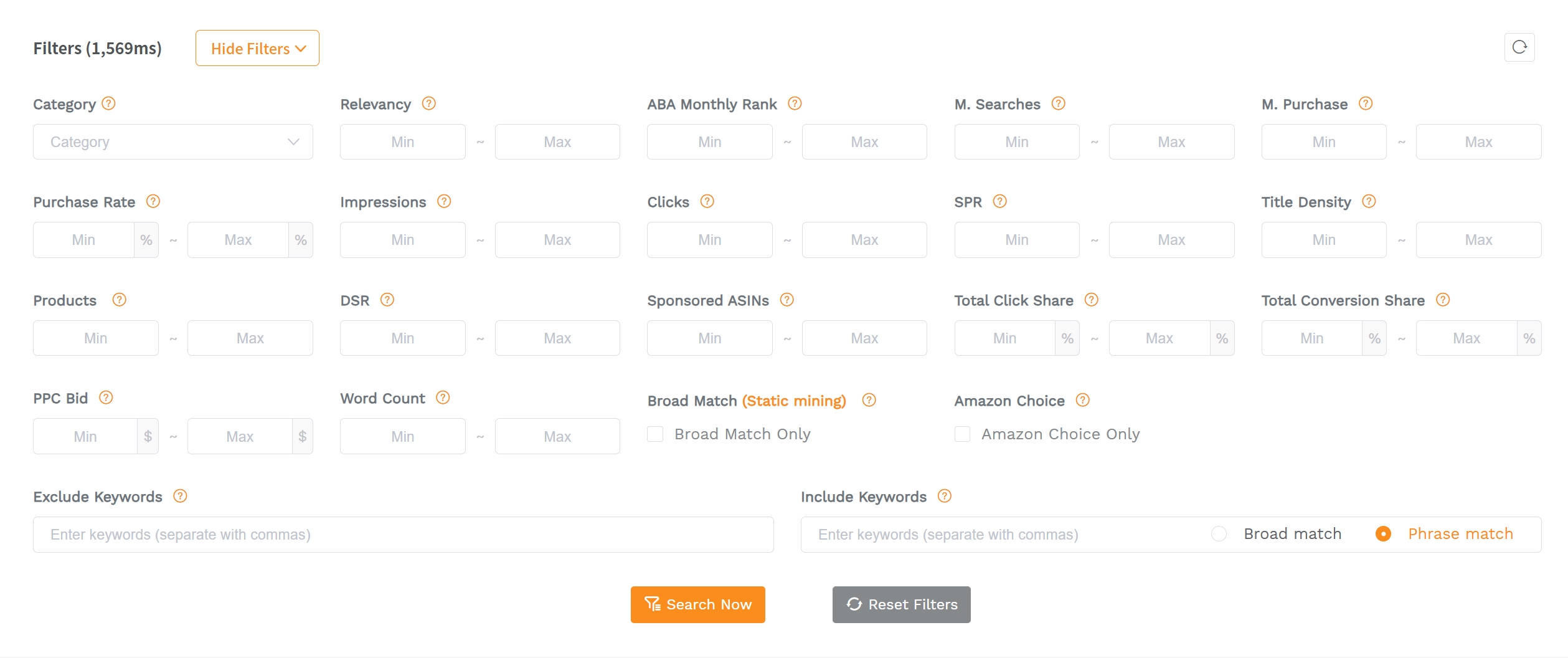
Use filters to narrow down keywords with high volume and low competition. Look for "long-tail" phrases (e.g., "waterproof wireless earbuds for gym") because they're less competitive and often more conversion-friendly.
It also helps to remove terms that are too broad, ambiguous, or attribute-mismatched. If your product is not waterproof, not BPA-free, or not intended for kids, eliminate those phrases even if traffic looks attractive. Precision protects both conversion rate and customer satisfaction.
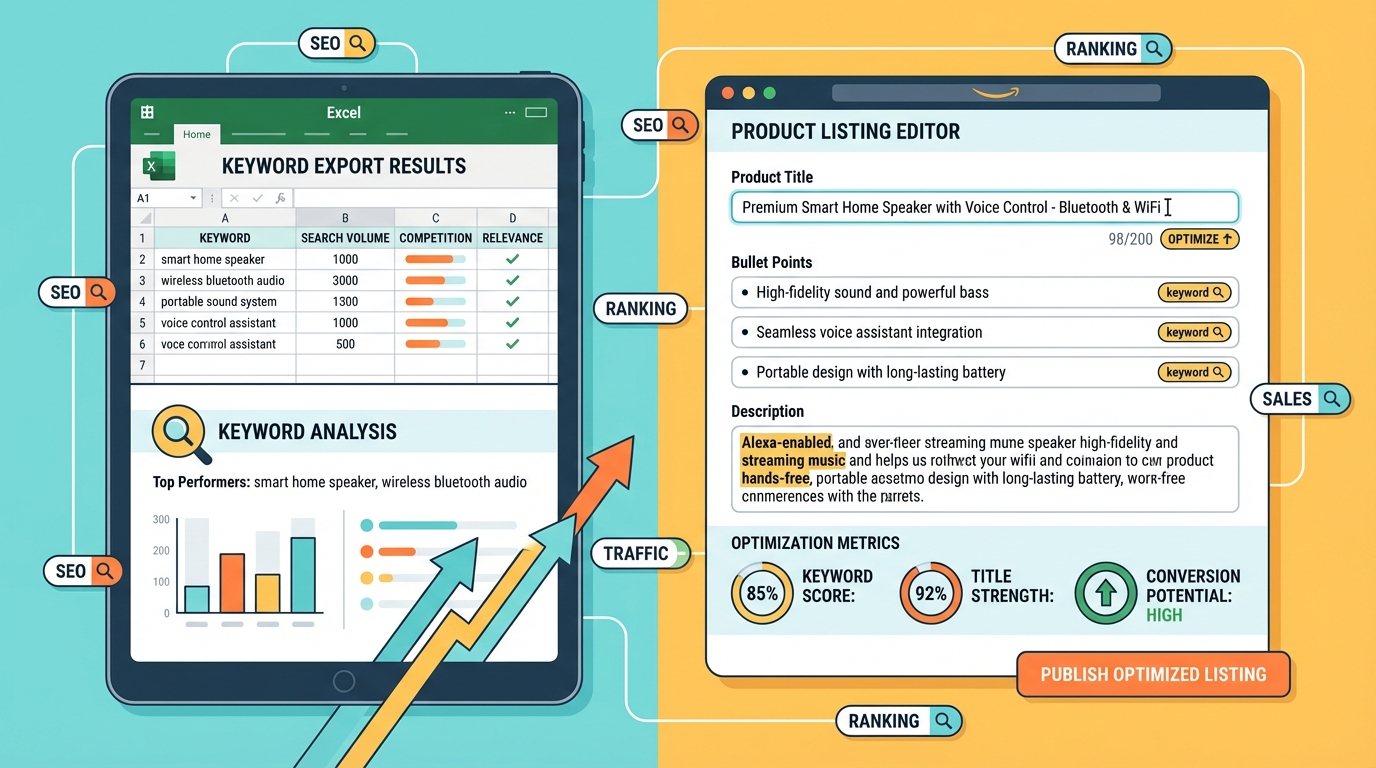
Once you've selected your target keywords, export them as an Excel file for use in your listing optimization workflow. Many sellers create a simple working sheet with columns for keyword tier, monthly demand, search intent, content placement, and test status. That turns research into a usable content plan instead of a one-time brainstorm.
Step 5: Apply Keywords to Your Listing
Integrate your chosen keywords into your product title, bullet points, description, and backend search terms. Avoid keyword stuffing, and focus on natural language that speaks to customer intent.
A good implementation sequence is: place the most important keyword in the title if it fits naturally, reinforce it with supporting value propositions in the first bullets, and use the description to expand on use cases, materials, compatibility, and differentiation. Backend search terms can capture meaningful variants that do not read naturally in front-end copy.
Keep clarity and compliance in mind while writing. Amazon's own guidance stresses informative, easy-to-scan product detail pages, and current title policies emphasize concise, consistent titles. In other words, strong keyword optimization should make the listing more understandable, not more cluttered.
Keyword Optimization Tips for Amazon SEO
Finding great keywords is only half the battle. To truly improve your Amazon product visibility, you need to apply them strategically and then measure whether they are improving both discoverability and shopper response.
1. Prioritize Customer Intent
Not all high-volume keywords are worth targeting. Focus on keywords that reflect purchase intent, clear product understanding, or immediate use-case relevance. Terms like "best," "for travel," "BPA free," or "for sensitive skin" often signal a shopper who is evaluating options more seriously than someone using a very broad category keyword.
Intent also helps you map keywords to page elements. High-intent core phrases belong in high-visibility areas such as titles and opening bullets, while exploratory informational phrases may work better in description copy or ad testing first.
2. Use Long-Tail Keywords Strategically
Long-tail keywords may have lower search volume, but they often convert better because they're more specific. For example, "organic baby shampoo for sensitive skin" is more targeted than "baby shampoo." The more precise the query, the more likely the shopper is searching with a clearly defined need.
Long-tail phrases are especially useful for newer listings that cannot easily compete on the broadest category terms. By accumulating traffic and conversion from specific, relevant searches, a product can build stronger performance history while gradually expanding into more competitive keywords.
3. Monitor Performance Over Time
Use SellerSprite's trend data to track keyword performance. If a keyword's volume is declining, consider replacing it. If it's growing, double down on it in future listings, ad groups, and seasonal merchandising plans.
This is where a feedback loop becomes powerful. Review organic ranking movement, click-through rate, conversion rate, and ad search term reports after making listing updates. If visibility rises but conversion stays flat, you may have a relevance or messaging issue. If conversion improves but impressions remain weak, you may need stronger top-of-listing keyword placement or additional ad support.
4. Stay Ahead of Competitors
Regularly analyze top-ranking competitors using SellerSprite. See which keywords they're ranking for and identify gaps in your own strategy. This competitive intelligence is gold for growth-focused brands because it helps you spot not only shared category terms, but also underused positioning angles.
Pay close attention to changes in competitor titles, bullets, price positioning, and review themes. If multiple leading listings begin emphasizing the same attribute, it may signal a rising shopper priority. That can inform both your keyword map and your product messaging.
Whenever possible, pair SellerSprite insights with Amazon's own reporting sources such as Search Query Performance, Amazon Search Terms, or Sponsored Products search term reports. These sources can help confirm which queries actually generate clicks, add-to-carts, and purchases for your brand or category, making your optimization decisions even more defensible.
FAQ
What is the best Amazon keyword research tool for Amazon sellers?
SellerSprite's Keyword Mining tool is widely regarded as one of the best Amazon keyword research tools because it combines broad keyword discovery with actionable marketplace metrics. Rather than forcing sellers to guess which search terms matter, it helps evaluate demand, competition, relevance, and trend direction in one workflow. For sellers who want both speed and practical decision support, that makes it especially effective.
How does SellerSprite help with keyword mining for Amazon listings?
SellerSprite extracts keyword insight from Amazon search behavior, then organizes that information into metrics sellers can act on. This makes it easier to identify primary keywords for titles, secondary keywords for bullets and descriptions, and long-tail phrases worth testing in backend search terms or PPC campaigns. In short, it turns raw keyword ideas into a structured optimization plan.
Can I improve my Amazon product visibility using keyword optimization tools?
Absolutely. Tools like SellerSprite's Keyword Mining improve product visibility by helping you target search terms that are both relevant and commercially useful. When those keywords are applied naturally to a clear, compliant, conversion-friendly listing, and supported by competitive pricing, strong imagery, and healthy inventory, they can improve ranking, click-through rate, and sales performance over time.
Next Steps
- Start using SellerSprite's Keyword Mining to uncover high-performing keywords for your niche, then group your findings into primary, secondary, and long-tail targets.
- Read our comprehensive Amazon Keyword Research Guide to deepen your understanding of Amazon SEO, buyer intent, and listing structure.
- Explore how SellerSprite compares to other keyword tools and why it's the top choice for serious sellers looking for a repeatable, data-backed optimization workflow.
References
- Amazon SEO: 7 ways to improve your product's search rankings View
- How to improve your product detail page for advertising View
- Optimize products for advertising View
- Product detail page rules View
- Search Query Performance dashboard View
- Amazon Search Terms report View
- Search term report for Sponsored Products View
By SellerSprite Success Team
The SellerSprite Success Team consists of Amazon marketplace experts, data analysts, and e-commerce strategists with over a decade of combined experience. We help sellers grow through data-driven tools and actionable insights, backed by real-world testing and continuous innovation in Amazon SEO, product research, listing optimization, and competitive intelligence.