This guide focuses on Amazon.com (US) by default and uses a practical Amazon product title optimization formula that balances keyword coverage and compliance. You can apply the same workflow to UK, EU, and JP marketplaces, but character limits, language structure, and stop word behavior may differ by category and locale.
If you want to go deeper on title rules and limits, see the SellerSprite Listing Title Optimization Guide and always confirm your category limit in Seller Central.
TL;DR
- Formula: Brand + Top Keyword Phrase + 2 to 4 keyword groups (features, use cases, audience, gifting) within your category character limit.
- Step by step: Mine keywords, pick a top phrase, draft the opener, build a keyword bank, group keywords, remove risky terms, then validate length and coverage.
- What matters: Maximize relevant keyword coverage without misrepresenting the product or violating title rules.
- Tool loop: Use Keyword Mining and Reverse ASIN to build the list, Listing Builder to check character limits and keyword coverage, and Keyword Tracker to measure rank changes.
- Fast win: Rewrite one live ASIN title today, then track keyword movement for 14 to 21 days before making the next iteration.
Table of Contents
- Amazon product title optimization formula for 2026
- Good vs bad Amazon titles (table)
- Before and after Amazon title examples
- Marketplace and GEO notes: US vs UK EU JP
- Step 1 Amazon title keyword research with SellerSprite
- Step 2 choose your top phrase for product title SEO
- Step 3 draft the first part of the Amazon product title
- Step 4 build a keyword bank without repetition
- Step 5 group keywords into readable title segments
- Step 6 remove risky keywords and misspellings
- Step 7 validate Amazon title character limit and coverage
- Mini test results: typical impact range
- FAQ
- Next steps and community support
- Author
- References
Amazon product title optimization formula for 2026
Question: What is a reliable Amazon product title formula that improves keyword SEO without breaking compliance?
Answer: Start with Brand, add your highest intent top phrase, then add 2 to 4 keyword groups that describe features, use cases, audience, and gifting, and keep everything within your category character limit.
Title structure formula
Brand + Top Phrase, Feature Group, Use Case Group, Audience or Gifting Group
Visual idea for your designer or AI generator: a simple block diagram showing these parts in order. Keep text minimal so it stays readable on mobile.
Pro Tip
Treat your title as keyword real estate. Use most of the allowed characters, but prioritize relevance. Removing one misleading word can improve conversion more than adding three extra keywords.
Common Mistake
Repeating the same word in multiple phrases. You lose coverage and waste characters. Build a keyword bank so you can keep the most unique, high-intent terms.
Internal links you may want open in a new tab: Listing Title Optimization Guide, Amazon SEO Tips, Keyword Research Guide, Listing Builder Guide.
Good vs bad Amazon titles
Question: How can I quickly tell if an Amazon product title is helping or hurting my SEO?
Answer: A good title is accurate, keyword-rich, and grouped logically. A bad title is repetitive, vague, misleading, or packed with promotional noise that creates compliance and conversion risk.
Before and after Amazon product title examples
Question: What does an optimized Amazon title look like in real listings?
Answer: You will usually see a clearer product type phrase near the front, more unique high-intent keywords, fewer repeats, and cleaner grouping with commas.
Example 1: Kitchen
Before: BrandX Wine Glass Set, Glasses for Wine, Wine Glass, Crystal Glasses, Gift Set
After: BrandX Stemless Wine Glass Set, Crystal Glasses for Red and White Wine, Dishwasher Safe, Gift for Hosts
Expected effect: More unique indexing terms, clearer use case, improved CTR from better readability.
Example 2: Beauty
Before: BrandY Face Moisturizer, Moisturizer Cream, Hydrating Cream for Face, Skincare
After: BrandY Face Moisturizer, Hydrating Cream with Hyaluronic Acid, Non Greasy Daily Skincare, For Dry Skin
Expected effect: Better match to ingredient intent queries, stronger relevance for dry skin audience terms.
Example 3: Pet
Before: BrandZ Dog Harness, Harness for Dogs, Dog Vest Harness, No Pull Harness
After: BrandZ No Pull Dog Harness, Adjustable Vest Harness with Reflective Strips, Easy Control, For Small and Medium Dogs
Expected effect: Reduced repetition, improved feature indexing, more precise size targeting.
Marketplace and GEO notes for Amazon title SEO
Question: Does Amazon title optimization change across marketplaces?
Answer: The keyword workflow is the same, but character limits, language structure, and compliance rules can vary by category and marketplace, so always validate inside Seller Central for your target store.
- Amazon.com (US): This guide assumes US behavior and English keyword intent. Validate your category limit before publishing.
- UK and EU: Similar structure works, but bilingual shoppers can shift keyword priorities. Avoid awkward direct translations and use native phrasing.
- Japan (JP): Language structure and spacing differ. Grouping still matters, but you may need shorter, higher-intent phrasing to keep readability.
Warning
Do not copy a US title into another marketplace without rebuilding the keyword list for that locale. Same product, different search language, different ranking inputs.
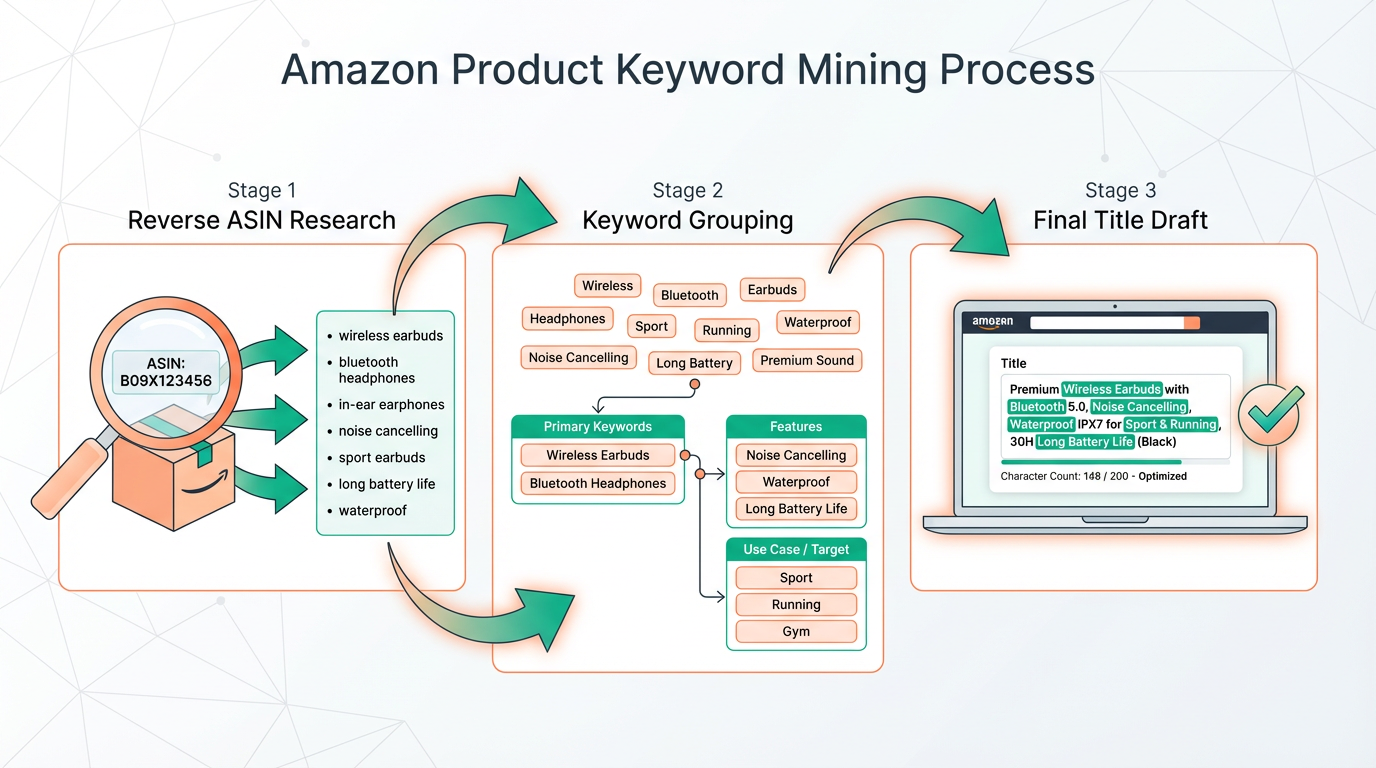
Step 1: Amazon title keyword research with SellerSprite
Question: What is the fastest way to build an Amazon title keyword list?
Answer: Combine Keyword Mining (seed keyword expansion) with Reverse ASIN (competitor keyword extraction), then consolidate into one sortable list.
- Keyword Mining: enter a seed term and export keywords with search volume.
- Reverse ASIN: add top competitor ASINs and pull keywords they rank for.
- Keyword List: merge, deduplicate, and tag keywords for later grouping.
Tool links: Keyword Research Guide, Listing Title Guide.
Step 2: Choose your top phrase for Amazon product title SEO
Question: How do I pick the top phrase that should appear near the front of the title?
Answer: Sort your keyword list by search volume, then choose the most accurate, highest intent phrase that clearly describes the product type and matches buyer intent.
- Prefer relevance over broadness. A broad phrase can attract mismatched traffic.
- If two phrases are equally accurate, choose the one with higher search volume.
- Keep it short. In many categories, the best top phrase is 2 to 4 words.
Step 3: Draft the first part of your Amazon product title
Question: What should the first 40 to 60 characters of an Amazon title do?
Answer: Lead with Brand plus top phrase so your most important keyword appears early and the title remains clear even on mobile.
Quick pattern
Brand Top Phrase, then add keyword groups separated by commas
Step 4: Build a keyword bank to avoid repetition in the product title
Question: How do I maximize keyword coverage without stuffing?
Answer: Convert long phrases into a keyword bank, remove duplicates, keep common singular and plural variants, then prioritize words by intent and volume.
- Remove words already covered in your opener unless the variant has clear intent value.
- Keep both singular and plural only when both are common in search behavior.
- Do not add words that misrepresent compatibility, material, or usage.
Step 5: Group keywords into readable Amazon title segments
Question: How do I keep a keyword-rich title readable for shoppers?
Answer: Build 2 to 4 keyword groups that naturally belong together, separate groups with commas, and keep each group focused on one intent theme.
- Features: material, size, compatibility, design, quantity
- Use cases: home, office, travel, gym, party, gifting
- Audience: men, women, kids, couples, hosts (only if accurate)
Step 6: Remove risky keywords and keep Amazon title compliance
Question: Which keywords should not go in an Amazon product title even if they have volume?
Answer: Remove misspellings, misleading terms, and low-intent keywords that attract the wrong shopper. Put misspellings in backend fields instead of the visible title.
Do not include
- Misspellings in the visible title
- Inaccurate compatibility terms
- Promo phrases and excessive symbols
Pro Tip
When you are unsure, prioritize accuracy. A slightly shorter but accurate title often converts better, which helps ranking over time.
Step 7: Validate Amazon title character limit and keyword coverage
Question: How do I make sure my title fits the character limit and still covers the right keywords?
Answer: Check the category character limit, validate your title length, then confirm keyword coverage so you use the available space efficiently without going over.
Use Listing Builder to check character limits and keyword coverage
Paste your draft into Listing Builder, confirm your marketplace character limit, and verify you are covering your top keyword groups without repetition.
Mini test results: typical impact range
Question: What kind of improvement can an optimized Amazon title realistically produce?
Answer: In internal tests across mid competition categories, sellers commonly see higher impressions from improved indexing, and a modest CTR lift when the top phrase becomes clearer and more relevant.
Typical range (observed): +10 to +35 percent indexed keyword coverage, +5 to +18 percent organic impressions, and +2 to +8 percent CTR improvement within 14 to 28 days after a title update, depending on category and baseline quality.
Results vary. Track changes with Keyword Tracker and avoid multiple major edits at once so you can attribute impact.
Track your changes: Keyword Tracker Guide
FAQ
Should I include misspellings in the Amazon product title?
No. Keep the visible title clean and professional. If you want coverage for common misspellings, place them in backend search terms instead of the Amazon title.
Should I put brand first in the Amazon title?
In most categories, yes. Brand first keeps the title consistent and compliant, then place your top keyword phrase immediately after the brand so you do not sacrifice product title SEO.
How many keywords should I include in an Amazon product title for SEO?
Aim for maximum relevant coverage within your character limit. Instead of counting keywords, focus on including your top phrase plus 2 to 4 keyword groups that reflect real buyer intent. Validate coverage with Listing Builder and track outcomes with Keyword Tracker.
Next steps and community support
Next recommended action: Choose one active ASIN, rewrite the title using the formula above, publish the change, then track your top keywords for 14 to 21 days before iterating again.
Get faster title wins with SellerSprite
Use Keyword Mining and Reverse ASIN to find high-intent terms, draft a keyword-rich Amazon product title, then validate character limits and keyword coverage with Listing Builder. Track ranking movement with Keyword Tracker.
Get Help From the SellerSprite Community
Share your draft title, get feedback, and learn from other sellers in the SellerSprite Discord and Facebook Group.
View The SellerSprite Course Directory
Ready for the next step? Open the SellerSprite Academy course directory to continue building your Amazon SEO and listing skills chapter by chapter.
Author
SellerSprite Team
The SellerSprite team builds data-driven workflows for Amazon SEO, keyword research, and listing optimization. Our guidance is informed by recurring patterns we observe from a large global seller base and continuous iteration across SellerSprite tools such as Keyword Mining, Reverse ASIN, Listing Builder, and Keyword Tracker.
Focus areas: product title optimization, keyword mapping, indexing coverage, and performance tracking across Amazon US, UK, and EU marketplaces.