TL;DR: Effective Amazon keyword rank tracking involves monitoring both organic and sponsored positions to measure SEO health and PPC efficiency. This guide provides a 7-step workflow to turn rank data into actionable growth strategies.
Key Takeaways
- Understand that rankings are a performance signal, not the end-goal; focus on conversion and profit metrics.
- Always track organic and sponsored rankings separately to distinguish between SEO health and ad-driven visibility.
- Use a tiered keyword strategy to prioritize high-intent 'money' terms while exploring long-tail growth opportunities.
Table of Contents
- Why Keyword Rank Tracking Matters
- Understand Amazon Rankings: Organic vs. Sponsored
- Define Your Rank-Tracking Goal and KPI Stack
- Step 1: Build the Right Keyword Set
- Step 2: Configure Tracking Correctly
- Step 3: Establish a Baseline Snapshot
- Step 4: How to Read Rank Tracking Like a Pro
- Step 5: Diagnose Rank Drops and Spikes
- Step 6: Turn Rank Data Into Actions
- Step 7: Automate Monitoring
- Advanced: Experiments and Correlation
- Common Mistakes to Avoid
- FAQ
- References
Note on marketplaces: This guide is specifically optimized for the US market.
Why Keyword Rank Tracking Matters (And What It Can't Tell You)
In the world of Amazon SEO, rank tracking is your early warning system. By monitoring how you track Amazon keyword rankings, you gain insights into whether your optimization efforts are bearing fruit or if a competitor is eating your lunch. However, it is vital to remember that a high rank is a means to an end, not the end itself.
Rankings are a signal, not a KPI by themselves
A product ranking #1 for a term with zero search volume is useless. Rankings signal visibility, but sales and profitability are what keep your business alive. Use Amazon keyword rank tracking to gauge market share and search visibility, but always verify if those rankings translate into sessions and conversions.
What rank tracking helps you do
Effective tracking allows you to measure the impact of listing changes, spot indexing problems before they tank your sales, and prioritize which keywords need more PPC aggressive bidding or SEO adjustments. It provides the data needed for a proactive Amazon SEO rank tracker strategy.
What rank tracking cannot prove
Rank tracking shows *what* happened, but not always *why*. Without context, such as a sudden change in price, a stockout, or a competitor's aggressive coupon, tracking cannot prove causality. It is a piece of the puzzle, not the whole picture.
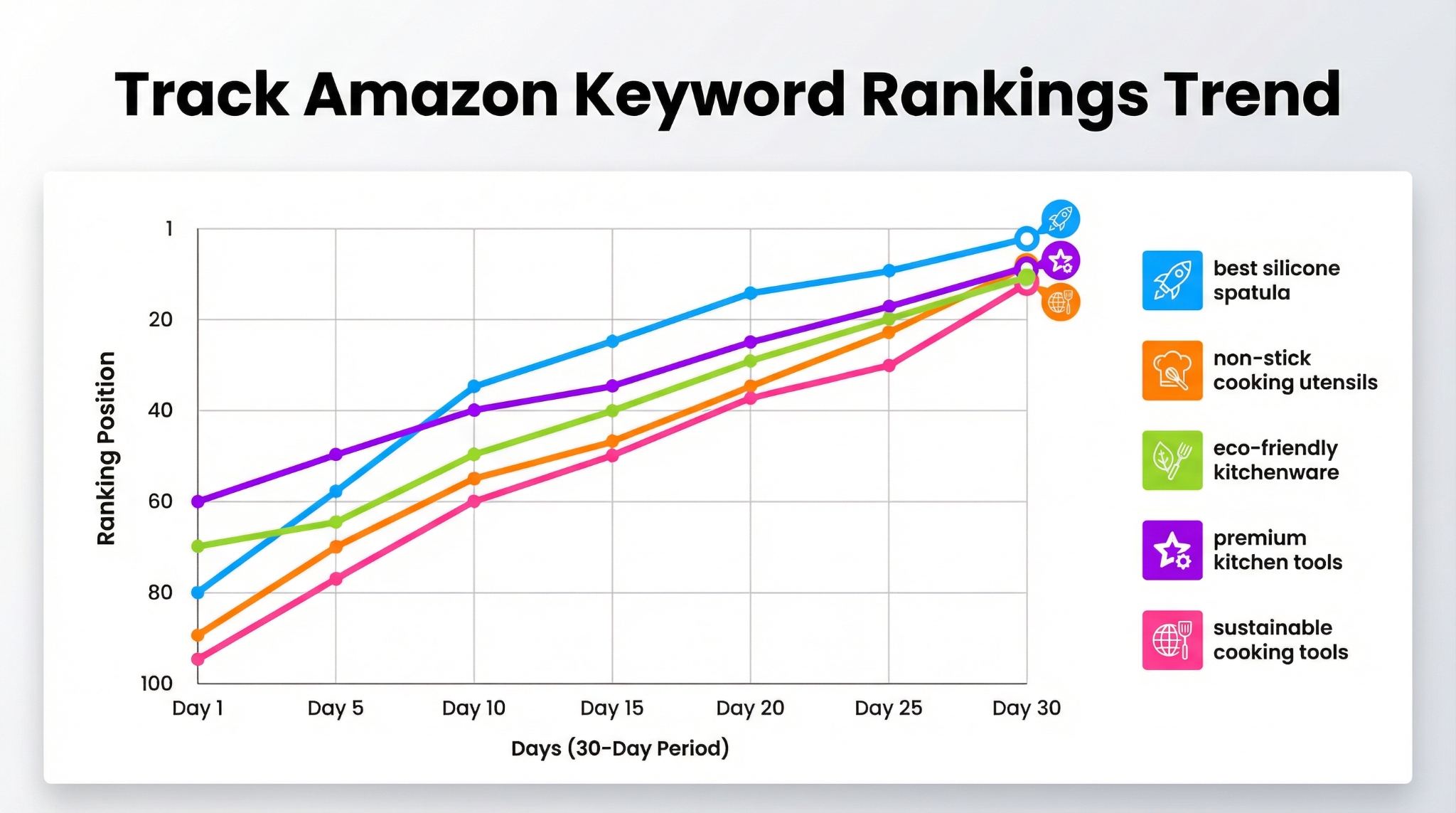
Understand Amazon Rankings: Organic vs. Sponsored + "Where You Rank" Actually Means
The Amazon Search Engine Results Page (SERP) is complex. Understanding the difference between Amazon organic keyword ranking and Amazon sponsored keyword ranking is the first step toward true optimization.
Organic rank vs. Sponsored placement
Organic rank is earned through relevance, sales velocity, and historical performance. Sponsored placement is paid for via Amazon PPC. They move differently: organic rank is sticky and builds over time, while sponsored rank can change instantly based on your bid and budget.
The SERP reality: placements, carousels, and badges
"Ranking #5" might mean you are actually the 15th item a customer sees because of "Highly Rated" carousels, editorial recommendations, and Top-of-Search ads. Modern Amazon search term optimization requires looking at the total visual share of voice, not just the numerical organic position.
Personalization & noise
Amazon results can vary based on the shopper's location, browsing history, and device. This is why using a dedicated Amazon keyword tracker is more accurate than manual searching, as it provides a standardized view of the marketplace.
Define Your Rank-Tracking Goal and KPI Stack
Before you start tracking, you need to know what victory looks like. Different stages of a product lifecycle require different ranking goals.
Pick your tracking goals
- Launch: Focus on rapid indexing and reaching the top 50 for core terms.
- Defense: Ensure you stay in the Top 3 for your most profitable "brand" keywords.
- Recovery: Identify keywords that dropped after a stockout to target them with PPC.
Define success metrics around rank
Success isn't just a number; it's a stack of metrics. Monitor your Rank Thresholds (Top 10/20) alongside conversion metrics like CTR and CVR. Finally, correlate these with profit metrics like TACoS to ensure your pursuit of rank isn't destroying your margins.
Step 1: Build the Right Keyword Set (So You Don't Track Junk)
Tracking too many irrelevant keywords creates noise. You need a structured list that reflects buyer intent and your product's strengths. Learn more about selecting these in our Amazon Keyword Research Guide.
Create 3 keyword tiers
- Tier 1: Core "Money" Keywords: High search volume, high relevance terms that drive 80% of your sales.
- Tier 2: Long Tails: Specific attributes (e.g., "organic cotton baby blanket") that have lower competition but higher conversion.
- Tier 3: Experimental: New trends or competitor terms you want to test for future growth.
Remove misleading keywords
Ensure you are not tracking keywords from the wrong subcategory or terms with ambiguous intent. If you sell a "computer desk," tracking "desk" might be too broad and provide misleading ranking data.
Step 2: Configure Tracking Correctly
Accuracy depends on your configuration. A professional Amazon keyword tracking tool allows you to set these parameters precisely.
Marketplace & Location
Always track in the specific marketplace where you sell (e.g., Amazon.com for the US). Some tools even allow for geo-based tracking to see how rankings differ across different zip codes.
Device Type: Mobile vs. Desktop
Mobile shoppers see fewer items per screen than desktop users. Since mobile accounts for over 50% of Amazon traffic, tracking your mobile rank is essential for a complete Amazon keyword position tracking strategy.
Step 3: Establish a Baseline Snapshot
You cannot measure progress without a starting point. Before starting any new SEO or PPC campaign, take a comprehensive baseline snapshot of your current rankings across all keyword tiers.
Record context variables
Rankings don't exist in a vacuum. Note your price, active coupons, inventory levels, and recent review count at the time of the snapshot. This allows you to build a "change log" so that when ranks move, you can explain why.
Step 4: How to Read Rank Tracking Like a Pro
Amateurs obsess over daily rank numbers. Professionals look at the ranking trends Amazon data provides to see the bigger picture.
Focus on trend lines and thresholds
Instead of worrying about dropping from #3 to #5, look at the 7-day or 30-day trend. Is the general movement upward? Use "ranking distribution" to see what percentage of your keyword set is in the Top 10 or Top 50.
Spot seasonality vs. true decline
Compare your current ranking volatility with Year-over-Year (YoY) data if possible. If all products in your niche are dropping in rank, it might be a category-wide reshuffle by Amazon's algorithm rather than a failure of your listing.
Step 5: Diagnose Rank Drops and Spikes
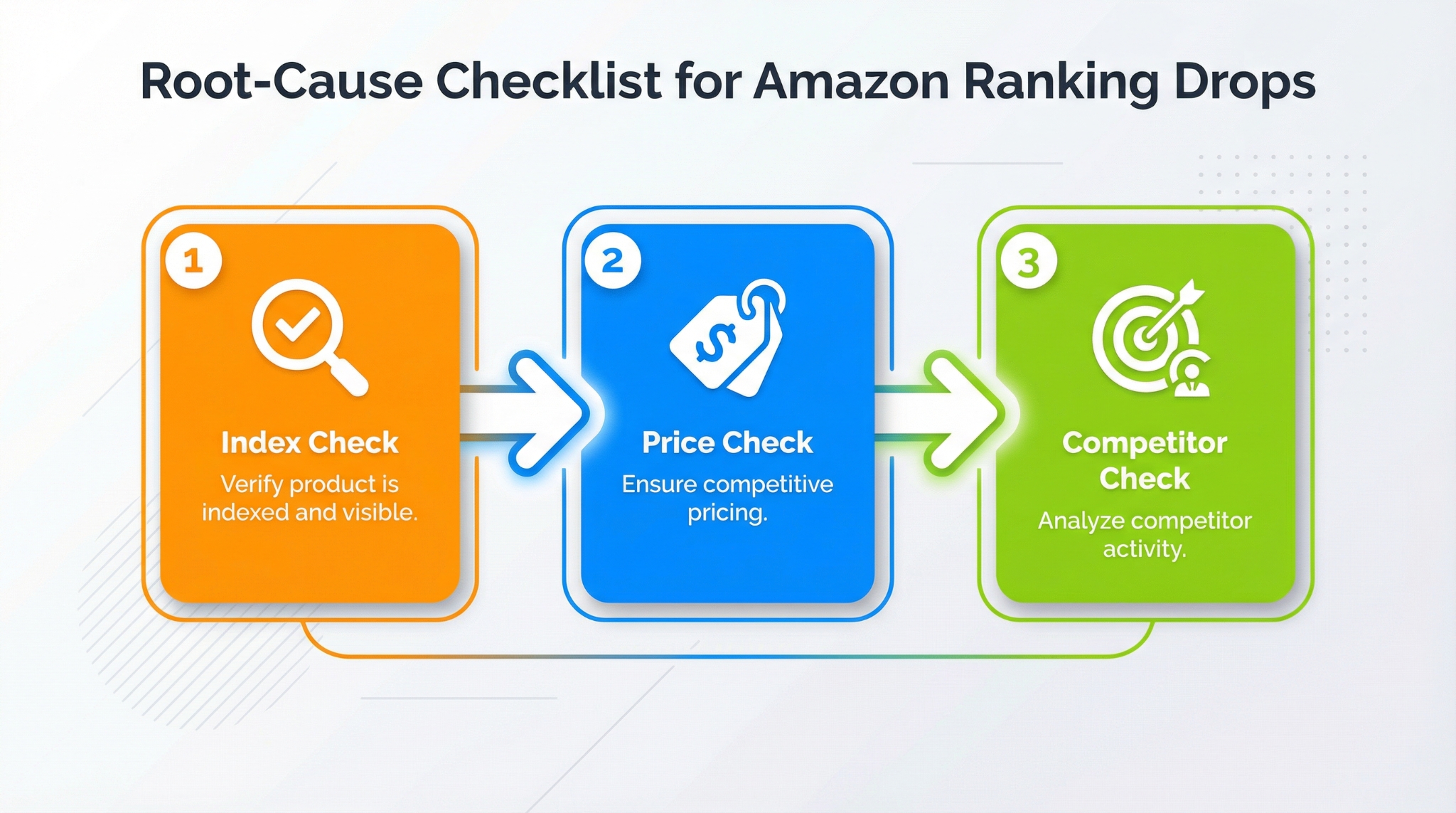
When your Amazon organic rank checker shows a sudden drop, don't panic. Follow a structured debugging process.
Check indexing first
Did you stop showing up entirely? Perform an Amazon keyword indexing check. If you aren't indexed, it's usually due to listing suppression, category changes, or adult product flags.
Check demand and ad pressure
Sometimes your organic rank is the same, but high PPC bidding from competitors has pushed the organic results further down the page. This "ad pressure" can reduce your CTR even if your rank is stable.
Step 6: Turn Rank Data Into Actions
Data is useless without action. Use your Amazon keyword tracking insights to adjust your strategy.
If you rank but don't convert
This indicates a mismatch between the keyword and your listing content. Improve your CTR by testing a new main image or adding a coupon. Improve CVR by updating your A+ content or bullet points to better address the customer's intent for that specific keyword.
If you're losing rank to competitors
Identify what they are doing differently. Do they have a lower price? Better reviews? Use PPC defensively by bidding on your core terms to maintain visibility while you address the underlying listing issues.
Step 7: Automate Monitoring: Alerts, Cadence, and Team Workflow
You shouldn't be checking rankings every hour. Set up an automated Amazon SEO rank tracker workflow.
Set alert rules
Configure alerts for significant changes, such as exiting the Top 10 for a money keyword or losing indexing entirely. This allows you to focus on other parts of your business until action is required.
Weekly operating rhythm
Spend Monday reviewing changes and triaging drops. Midweek, implement listing or PPC tests. On Friday, measure the impact and log the results. Consistency is key to long-term ranking success.
Advanced: Experiments, Segmentation, and Correlation
For brand owners, tracking keyword ranking trends Amazon provides can be taken to a deeper level through segmentation. Track by keyword clusters (e.g., all "gift" related terms vs. all "utility" related terms) to see which segments of your market are growing.
Common Mistakes to Avoid
- Tracking too many keywords: This creates "noise" and makes it hard to see real progress on terms that actually drive sales.
- Reacting too fast: Amazon's algorithm is volatile. Don't rewrite your whole listing because of a 2-day dip.
- Confusing "rank up" with "profit up": Always keep an eye on your ACoS and margins. High rank is expensive if it requires constant high-bid PPC.
FAQ
How long does it take for a new product to start ranking for keywords on Amazon?
Usually, initial indexing happens within 24-48 hours of a listing going live. However, achieving stable rankings typically takes 2 to 4 weeks as Amazon collects data on your click-through and conversion rates.
What is the difference between organic keyword ranking and sponsored ranking on Amazon?
Organic ranking is your "earned" position based on relevance and sales history. Sponsored ranking is your "paid" position achieved through Amazon PPC bidding. Tracking both is essential for a balanced visibility strategy.
Can I track my competitors' keyword rankings on Amazon using third-party tools?
Yes. Tools like SellerSprite allow you to input a competitor's ASIN and monitor their keyword rankings. This is a powerful way to see which keywords are driving their success and where you can win market share.
What's a "good" keyword rank for a new product?
A "good" rank depends on the keyword's volume. Generally, aiming for the Top 10 for your primary "money" keywords and Top 50 for broader, high-volume terms is a healthy goal for a new product launch.
Next Steps
- Start tracking your core keywords today with SellerSprite's Keyword Tracker.
- Audit your current keyword tiers and remove low-relevance noise.
- Set up automated alerts for your top 5 most profitable keywords.
References
By SellerSprite Success Team
The SellerSprite Success Team consists of seasoned Amazon sellers and data analysts dedicated to helping e-commerce entrepreneurs master the Amazon algorithm. With years of experience in SEO, PPC, and market analysis, they provide actionable insights backed by real-time data.