TL;DR: Amazon account security and password management means protecting the sign-in, recovery channels, people, and applications that can access your seller business. Use unique passwords, configure Amazon's available authentication options, limit permissions, and verify unexpected requests independently. If you suspect unauthorized activity, secure access and contact Amazon through official channels rather than waiting for sales or account-health metrics to change.
Key Takeaways
- Protect the recovery path, not just the password. The email account, authentication devices, and recovery details belong in the same security plan.
- Give people their own authorized access. Employees, agencies, and software connections should not depend on a shared owner password.
- Different problems require different responses. A forgotten password, a lost authentication method, and an unauthorized account change are not interchangeable.
- Marketplace monitoring is not security monitoring. Sales, ratings, BSR, and keyword changes cannot establish whether someone accessed your account.
Table of Contents
- Quick Answer: What Should Sellers Protect First?
- What Amazon Account Security and Password Management Covers
- Build a Practical Password Management Process
- Use Passkeys, Two-Step Verification, and Recovery Backups
- Control Employee, Agency, and Application Access
- Recognize Phishing Without Relying on Appearance
- What to Do After a Suspected Account Compromise
- A Security Checklist With Owners and Review Triggers
- Where SellerSprite Fits, and Where It Does Not
- The Bottom Line
- FAQs
- References
Scope: This guide is for Amazon sellers, with US Seller Central documentation as its primary reference. Menu labels, authentication prompts, and available permissions can vary by account and marketplace. Use the requirements shown in your own account; the operational checklists below are recommendations, not Amazon policy deadlines.
Quick Answer: What Should Sellers Protect First?
Start with the Amazon sign-in, the email account used for recovery, the authentication methods attached to that sign-in, and everyone or every app with permission to act. Amazon's security guidance recommends separate user access and reviewing account details when a compromise is suspected.
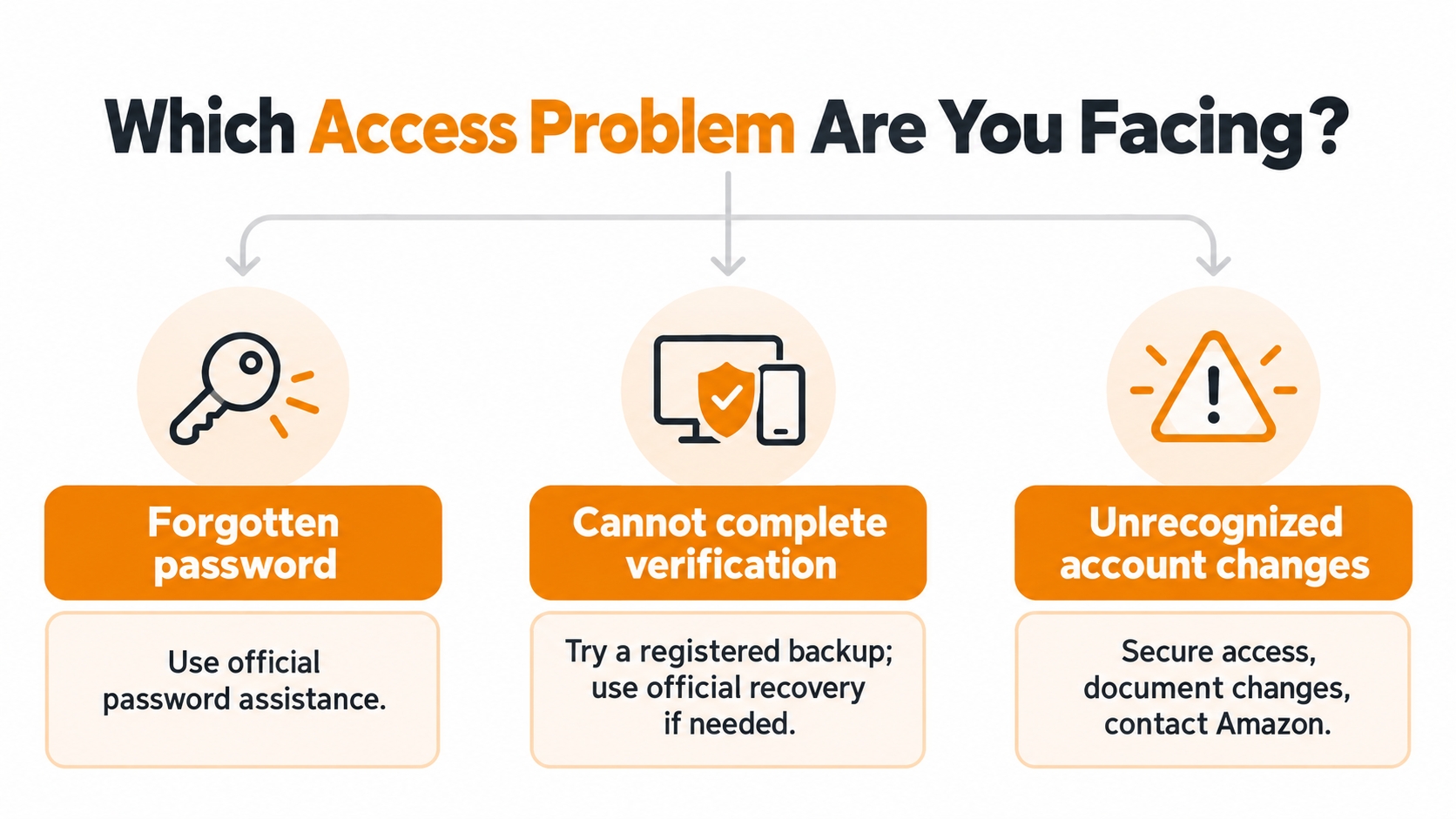
A forgotten password calls for password assistance. An unavailable verification device calls for backup authentication or account recovery. Unexpected changes to payment settings, users, or listings call for incident response, even if you can still sign in.
Suspect unauthorized access now? Use a trusted device and independently open Seller Central. Go to the incident-response checklist rather than following instructions in the suspicious message.
What Amazon Account Security and Password Management Covers
Think of account security as control over who can act on the business. A secure owner login is not enough if an old agency still has permissions, a recovery phone belongs to a former employee, or a forgotten integration retains access.
Account security is also different from Account Health. Amazon describes Account Health Rating as a measure of deactivation risk related to certain selling policies. It is not a password-strength score or a certificate that every user and application is authorized.
Keep separate records for access problems, selling-policy notices, and listing or intellectual-property disputes. A new offer on an ASIN or a drop in sales is not, by itself, evidence that your login was compromised. Confirm what changed inside the account before choosing a support or reporting route.
Build a Practical Password Management Process
Password management should make the right behavior easy to repeat. Separate everyday credential storage from password changes and recovery so staff do not improvise when access breaks.
Create Unique Passwords and Store Them Securely
Use a different, long, randomly generated password for Amazon, your email, and other business tools. CISA's guidance on strong business passwords recommends at least 16 characters and a password manager; that is general security guidance, not a statement of Amazon's minimum password requirement.
Protect the password manager itself with strong authentication. Do not put passwords, one-time codes, or authenticator setup secrets in a shared spreadsheet, team chat, or support ticket. A vault helps with storage, but it does not justify giving contractors the owner's login.
Change a Password When You Can Still Sign In
Amazon's documented seller path is Settings > Login Settings > Edit next to Password. Follow the current form to enter the required credentials and save the change. If your interface uses Login & Security instead, follow that account's displayed controls.
Change exposed or reused credentials promptly, especially after a suspected breach. Follow current Amazon instructions and your organization's credential policy, but do not treat a scheduled password change as a substitute for removing unnecessary permissions.
Reset a Forgotten Password Through Amazon
Open Amazon's sign-in page independently and use its password-assistance option. Complete the verification shown for the registered email address or phone number, then create a new password. Where buyer and seller services share the same Amazon sign-in, a password change affects that shared sign-in, not a separate seller-only password.
Resetting a password is not the same as recovering a lost verification method. If the remaining obstacle is two-step verification, use the recovery route described below rather than repeatedly resetting the password.
Use Passkeys, Two-Step Verification, and Recovery Backups
An authentication method must protect access without leaving the business dependent on one unavailable person or device. Configure the options Amazon provides and plan how you will recover access before changing phones or handing over responsibilities.
Set Up a Passkey Where Available
Amazon's Seller Central passkey guidance recommends passkeys as a phishing-resistant sign-in option. A passkey uses supported device authentication, such as a fingerprint, face scan, or device PIN, rather than asking you to type a reusable password. Follow the setup option in your Login & Security settings.
Keep the device and any account that syncs the passkey secure. Each person should use their own permitted seller access, not share the owner's device or passkey-provider account. A passkey does not remove the need to review permissions or recovery methods.
Maintain Two-Step Verification and a Usable Backup
Amazon also documents two-step verification using an authenticator app, SMS, or voice call. Authenticator apps can generate supported codes without a cellular connection. Maintain a registered backup method and follow the authentication requirements displayed for your sign-in.
Before replacing a device, confirm that the new or backup method works. Keep authenticator enrollment QR codes and secret keys private. Never send a current verification code to a caller, contractor, or supposed support agent.
Use Official Recovery When Verification Is Unavailable
Try a registered backup method first. If you still cannot sign in, follow Amazon's two-step verification recovery guidance and the options shown on the sign-in screen. Amazon may require identity verification; Selling Partner Support cannot bypass that verification process.
Submit requested identity documents only through the official recovery flow. Do not send them to a third party promising faster access. After recovery, review your authentication and contact details rather than leaving the account in a temporary recovery state.
Control Employee, Agency, and Application Access
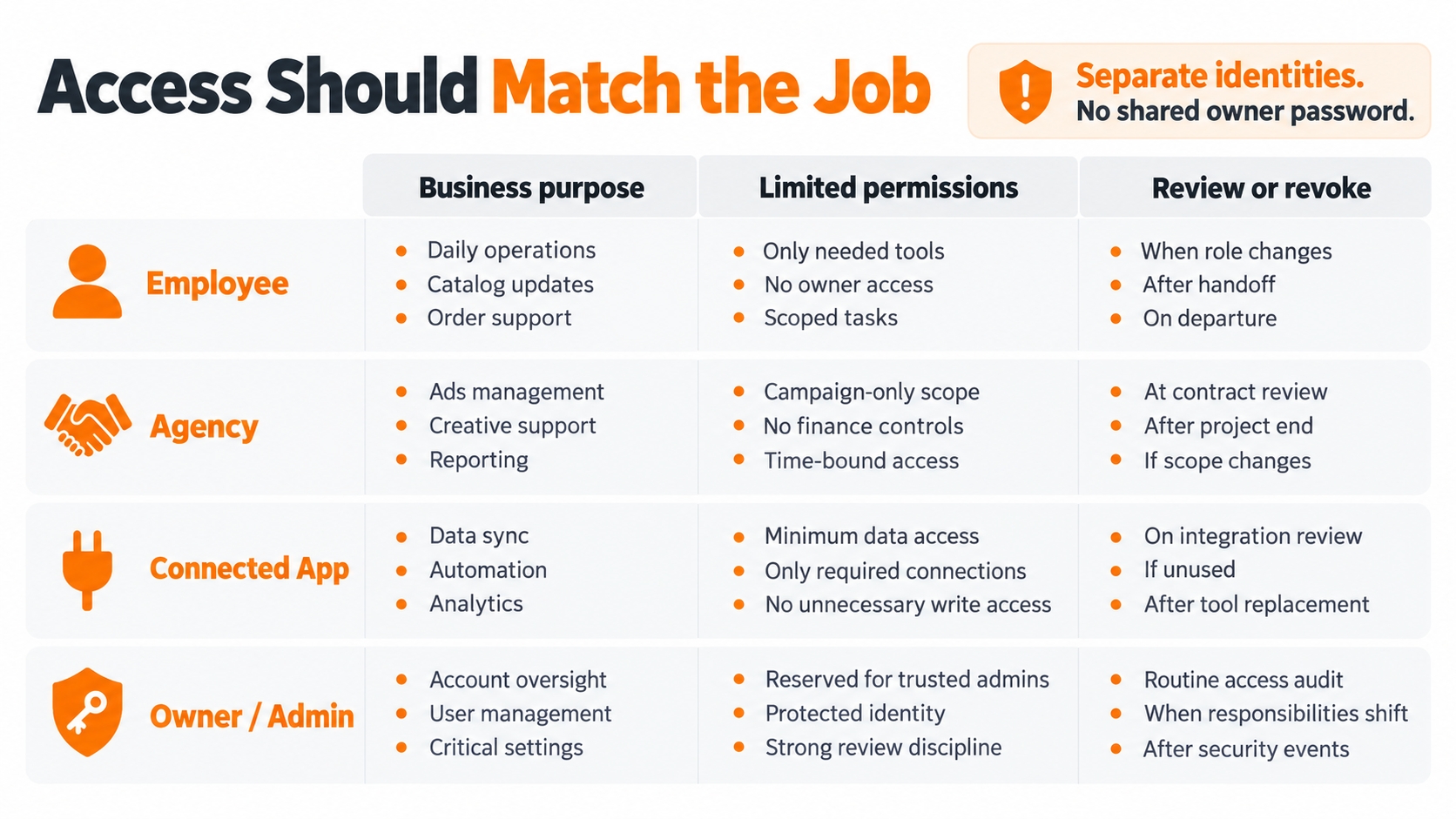
A useful access policy answers three questions: who needs access, what must they do, and when should access end? Give each person or integration only the permissions necessary for the work, and record who approved them.
Amazon's instructions for setting and editing user permissions describe access for employees and service providers. Permission management requires a Professional selling plan; use the appropriate employee or service-provider route available in your account rather than sharing the primary login.
| Access type | Define the permitted work | Review when |
|---|---|---|
| Employee | Limit access to assigned operational tasks; avoid unrelated administration. | The role changes or employment ends. |
| Agency or service provider | Approve the required services and duration; identify an internal sponsor. | The engagement ends or its scope changes. |
| Connected application | Record its purpose, requested access, and business owner. | The tool is replaced, unused, or no longer trusted. |
| Owner or administrator | Reserve sensitive administration for designated, accountable people. | Responsibility or recovery arrangements change. |
Audit App Authorizations Separately
A connected application is not the same as an invited employee. Amazon's SP-API documentation describes revoking seller OAuth access through Apps and Services > Manage Your Apps > Disable authorization for the relevant application. Review integrations separately from human permissions.
Do not assume a password reset removes every app authorization or active session. Use the available authorization and device/session controls, and seek official support when the options are unclear. Use official permission or authorization flows for tools; do not give a vendor your password or live verification code.
Recognize Phishing Without Relying on Appearance
A familiar logo, polished writing, or a reference to your business does not establish that a message is genuine. CISA warns that phishing can use personalized details and even appear to come from a compromised known contact.
Treat unexpected requests to verify payout details, enter a code, download a file, or urgently restore access as reasons to pause. The safest next step is not replying to the message: independently open Seller Central or use an established support route to check the claim.
Example, not a real Amazon notice: A message says your disbursement is blocked and asks for your password and verification code. Do not use its button or supplied phone number. Open the account through your saved official route and investigate the payment issue there.
Teach staff a simple rule: verify the request outside the conversation that delivered it. Report suspicious messages through Amazon's current reporting instructions and your internal security contact. If credentials were entered, move to containment immediately rather than treating the event as only an unwanted email.
What to Do After a Suspected Account Compromise
Unauthorized payment changes, unknown users, or unexplained account edits deserve prompt investigation. Use the following response sequence as an internal playbook; a password reset is one action, not proof that the incident is finished.
1. Move to a Trusted Device and Contain Exposure
Stop using a device or browser suspected of compromise for sensitive account work. Involve your IT or security provider to assess it, and use a known-clean device for recovery. Do not delay containment while trying to produce perfect screenshots.
2. Secure the Sign-In and Recovery Channels
When you retain access, change exposed credentials and check recovery contacts and authentication methods. If the associated email account may also be compromised, secure it as part of the same response. Review unfamiliar mailbox forwarding rules, recovery changes, and available session controls with your email administrator.
3. Review Permissions and Sensitive Settings
Amazon's account-security guidance identifies email preferences, payment information, user permissions, storefront details, and listings as areas to check. Also review connected apps, and document unauthorized changes before correcting them when this can be done without prolonging exposure.
4. Contact Amazon and Preserve a Clear Timeline
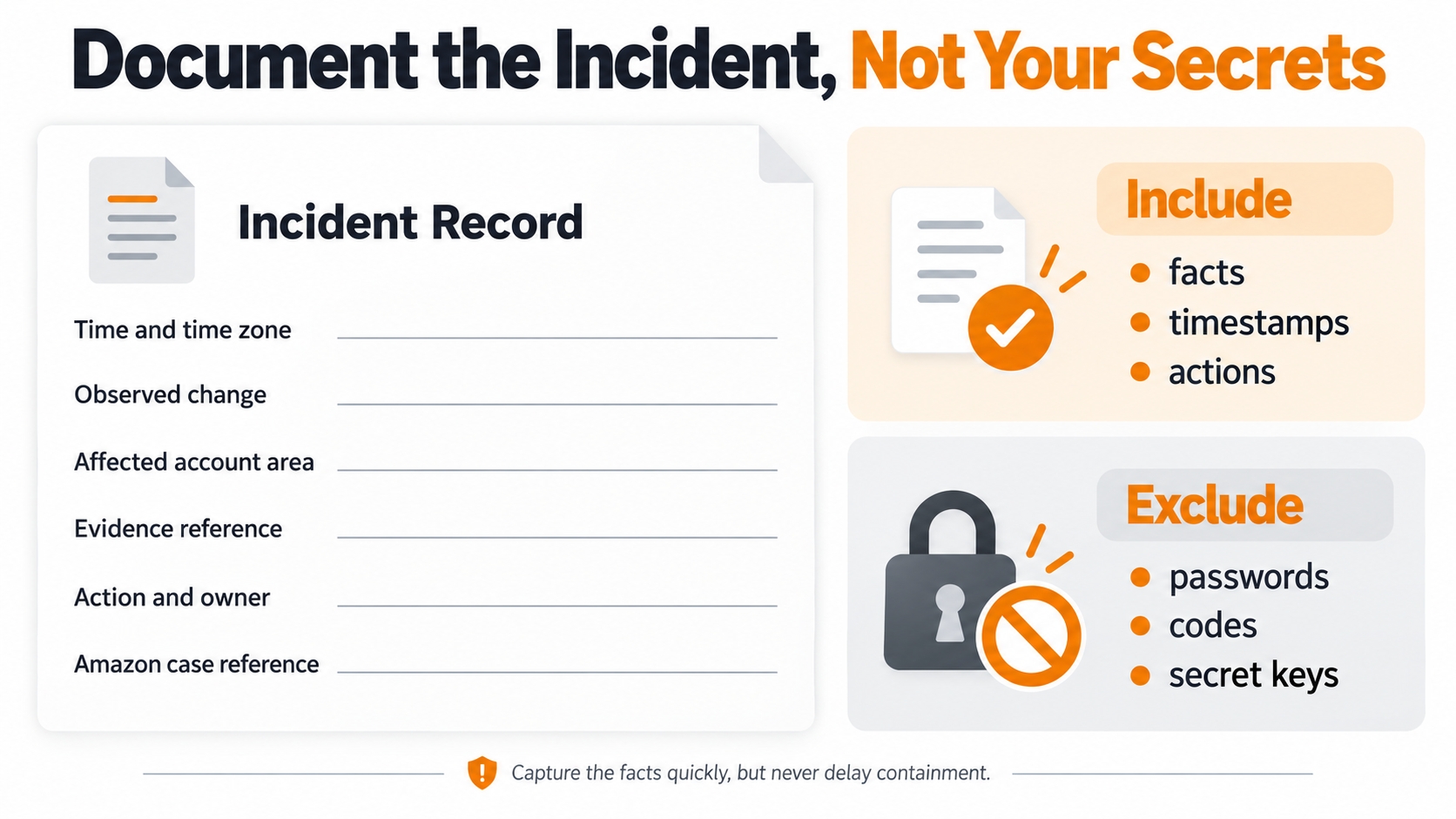
Open a case through an independently accessed Amazon support channel and identify the suspected compromise. Record the first observation, affected settings or ASINs, actions already taken, and case number. For suspected payment diversion, involve the business's finance owner and contact the relevant financial institution through an established channel.
5. Restore Operations Only After Reviewing Access
Confirm authorized users can work, remove obsolete access, review unresolved settings, and document who owns follow-up. If Amazon also issued an account-health notice, handle that official process separately; restoring a login does not itself resolve a selling-policy issue. CISA recommends defined incident responsibilities, continuity planning, and practice rather than an improvised response.
A Security Checklist With Owners and Review Triggers
Security is easier to maintain when each check has an owner and a review trigger. The schedule below is a suggested operating routine, not an Amazon-mandated monthly audit.
| Check | Evidence to record | Suggested trigger |
|---|---|---|
| User and provider access | Current purpose, internal owner, and any access end date. | Monthly, plus immediately after role or contract changes. |
| Authentication and recovery | Confirmation that registered methods remain controlled and usable; no secret values. | Before device changes or planned absence; after suspicious activity. |
| Application authorizations | App name, purpose, access reviewer, and keep/revoke decision. | Monthly and when adding or retiring a tool. |
| Payment and notification settings | Named reviewer and confirmation of any approved change. | Whenever a change is reported or detected. |
| Incident readiness | Support route, responsible contacts, and date of the latest practice exercise. | Periodically and after a real incident. |
Measure the gaps your team can close: unexplained active users, unused app authorizations, recovery methods tied to departed staff, and time taken to revoke access after offboarding. These are internal operational measures, not Amazon security scores. Store the register in a controlled location without passwords or recovery secrets.
Where SellerSprite Fits, and Where It Does Not
SellerSprite belongs on the marketplace-observation side of this workflow. It should not be presented as an authentication service, intrusion detector, password manager, or Amazon account-recovery channel.
SellerSprite's Product & Keyword Tracker documents monitoring of product price, sales, ratings, BSR, and keyword performance. Use supported observations and their timestamps to compare affected ASINs before and after an operational issue, alongside your own Amazon reports and incident timeline.
That comparison can help describe business impact, but a price change or ranking drop does not identify who accessed an account. Keep identity verification, permission changes, payment corrections, and recovery inside official Amazon workflows. Secure the separate SellerSprite login as you would any other business tool.
The Bottom Line
A practical Amazon account-security plan has four outcomes: controlled sign-in, accountable access, usable recovery, and a documented response to unexpected changes. Passwords are only one part of that system.
Start with the weakest dependency: an exposed credential, an owner login shared with an agency, a recovery method nobody controls, or an integration nobody owns. Fix that dependency, assign a reviewer, and keep marketplace analysis separate from security decisions.
FAQs
How do I change my Amazon Seller Central password?
When signed in, open Settings, then Login Settings, and edit the Password field. Follow Amazon's form and any verification prompts. If you forgot the password, use password assistance instead of the signed-in change form.
What should I do if I cannot receive my verification code?
Try a previously registered backup method. If no usable method remains, follow Amazon's two-step verification recovery process and complete the requested identity checks. A password reset does not replace this verification, and support cannot bypass it.
Does Amazon Seller Central support passkeys?
Amazon's seller documentation describes passkeys for Seller Central and recommends them as a phishing-resistant option. Use the setup and authentication requirements displayed for your account, and keep recovery methods current.
Should I share my owner login with a VA or agency?
Use Amazon's appropriate employee or service-provider permission flow rather than sharing the owner login. Define the work, limit the access, and remove it when the relationship ends. Availability depends on your selling plan and account.
Does changing my password remove every connected app?
Do not rely on that assumption. Review application authorizations separately in Manage Your Apps and disable access that is no longer approved. Human permissions and available device/session controls also deserve their own review.
Does a healthy Account Health Rating mean my account is secure?
No. The rating concerns deactivation risk associated with specified selling policies. It does not certify password strength, approved integrations, or the absence of unauthorized access.
Can SellerSprite recover a hacked Amazon account?
Use official Amazon recovery and support channels for access problems. In this workflow, SellerSprite is used for product and keyword observations to understand marketplace impact, not to authenticate account owners or restore access.
References
- Amazon Seller Central: Keeping Your Account Information Secure View
- Amazon Seller Central: Change Login Settings View
- CISA: Require Strong Passwords View
- Amazon Seller Central: Passkey Verification View
- Amazon Seller Central: Two-Step Verification View
- Amazon Seller Central: Use an Authenticator App for Two-Step Verification View
- Amazon Seller Central: Two-Step Verification FAQ and Account Recovery View
- Amazon Seller Central: Set and Edit User Permissions View
- Amazon SP-API Documentation: Revoke Authorizations View
- CISA: Teach Employees to Avoid Phishing View
- Amazon Seller Central: Account Health Rating Program Policy View
- SellerSprite: Product & Keyword Tracker Guide View
- CISA: Secure Your Business View
By SellerSprite Content Team
SellerSprite publishes practical guidance on Amazon marketplace research and seller operations. Account-specific recovery and security investigations should be handled with Amazon and, where appropriate, your IT or security provider.
Last updated: October 10, 2026