TL;DR: Effective Amazon Merch keyword research goes beyond obvious design terms. It targets buyer intent, occasion, and product type modifiers to rank higher in Amazon's organic search while staying compliant with Merch by Amazon's strict metadata rules.
Key Takeaways
- Merch keywords must reflect what shoppers actually type into Amazon's search bar, not just the design's visual theme.
- Strategic placement of primary keywords in titles and secondary keywords in bullets/description improves discoverability without risking enforcement.
- Using a structured workflow like SellerSprite's seed-to-cluster method helps uncover high-intent, low-competition long-tail opportunities.
Table of Contents
Note on marketplaces: This guide is specifically optimized for the US market.
Quick Answer
Amazon Merch is a print‑on‑demand platform where keyword research works differently than on Seller Central. Because you don't control the product's physical attributes (size, material, color), your listing's discoverability depends almost entirely on how well you match search terms with buyer intent. The most successful Merch sellers treat each keyword as a miniature landing page, which means every word must serve a purpose: informing, persuading, and satisfying Amazon's A10 algorithm.
Merch keywords should describe buyer intent, not just the design
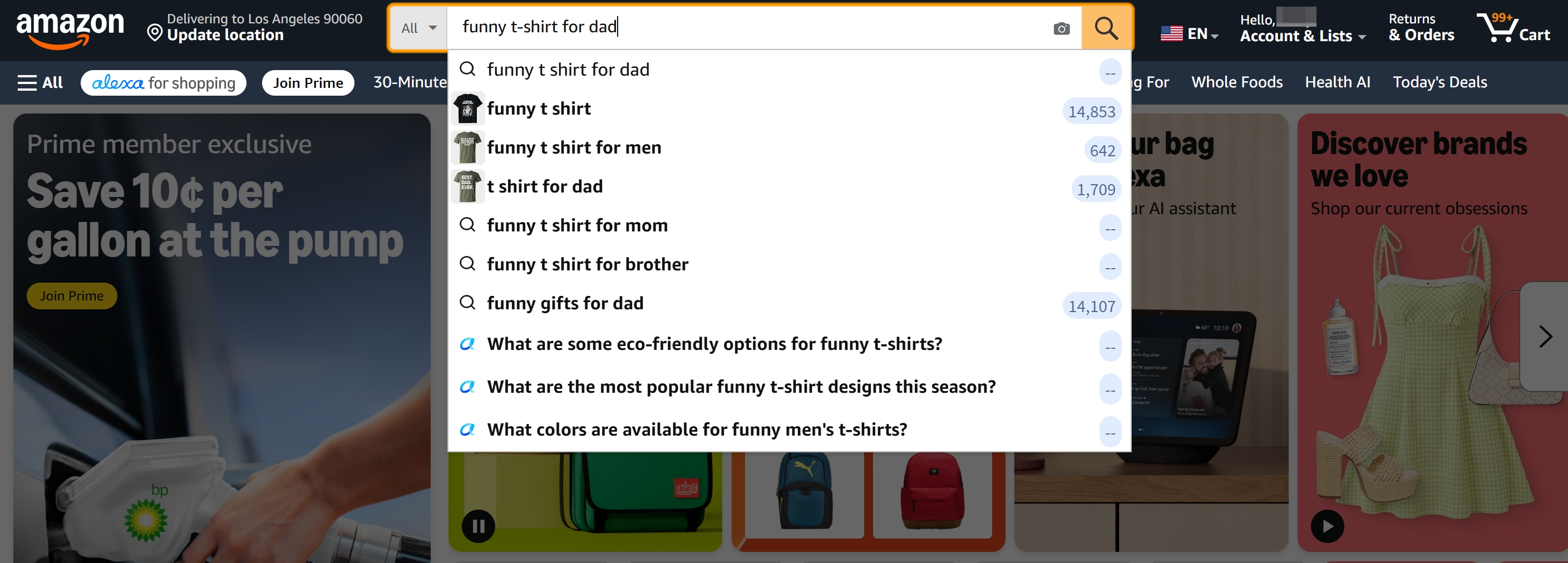
A common mistake is to fill your title with descriptive phrases like "funny cat astronaut" or "cute avocado pun." While those tags help describe the graphic, they rarely mirror how a real customer searches. Buyers type queries like "gifts for cat lovers under $20" or "funny space t‑shirt for men." That's the intent layer, which indicates the reason behind the purchase. When you align your keywords with gifting occasions, recipient demographics, and product categories, you effectively reset your listing's visibility from pure design‑match to demand‑match.
How Amazon Merch SEO Differs From Standard FBA SEO
Although both Amazon Merch and FBA listings live on the same marketplace, the ranking signals are weighted differently. FBA sellers can influence click‑through rate with multiple product images, Enhanced Brand Content, and A+ pages. Merch sellers, however, operate inside a fixed template: a single mockup image, a title, two feature bullets, and a description. That means your text must do all the heavy lifting: not just to rank, but to compel a click on a crowded search results page.
Design‑led search intent
In standard FBA, customers often search by product type ("wireless bluetooth headphones"). On Merch, many searches start with a mood, joke, niche passion, or personal identity. For example, "introvert t‑shirt" or "funny engineer mug." This is design‑led intent: the buyer is looking for a product that visually communicates a message. Your keyword strategy must bridge the gap between that message and the actual product category. A t‑shirt design showing a coffee bean might rank for "coffee lover gift," but if you only use "coffee bean t‑shirt," you'll miss the gifting traffic that drives higher conversion rates. Pro tip: use our Amazon Merch on Demand guide to see how whole‑listing structure supports design‑led queries.
Product type modifiers
Amazon Merch supports multiple garment types: standard t‑shirt, premium t‑shirt, v‑neck, long sleeve, sweatshirt, hoodie, and PopSocket. Surprisingly, many sellers omit these terms from their metadata, assuming Amazon auto‑detects the product type. While Amazon does classify your product, incorporating a primary product modifier in the title such as “Funny Cat Astronaut Hoodie”, still strengthens keyword relevance. It also helps your listing surface for filtered searches when a shopper selects "Hoodie" under category. However, never list every possible garment in your title; doing so looks spammy and may trigger a policy flag. A single, logical modifier that matches the mockup is best practice.
Occasion and audience modifiers
The biggest untapped keyword category for Merch is occasion and audience data. Instead of "Funny Cat T‑shirt," a title like "Funny Cat T‑shirt Gift for Cat Moms – Birthday Present for Cat Lovers" unlocks multiple search phrases: "gift for cat moms," "birthday present for cat lovers," and even "cat mom birthday." These long‑tail strings have significantly lower competition than broad terms like "cat t‑shirt" and often convert better because they match precise shopping missions. Following our niche research guide, you can quickly identify which audience‑occasion combinations drive the most sales in your design category.
Examples of good vs. weak keywords
| Weak Keyword | Strong Keyword | Why It’s Better |
|---|---|---|
| cat t‑shirt | funny cat t‑shirt gift for women | Adds sentiment, gender, and gifting intent |
| funny avocado design | cute avocado hoodie for teen girls | Specifies product type and target demographic |
| math pun shirt | math teacher appreciation gift – pun t‑shirt | Combines occupation, occasion, and design theme |
This side‑by‑side view makes it clear: a weak keyword describes the design; a strong keyword describes the buyer and the moment. Aim for the right‑hand column.
Keyword Fields to Plan
Amazon Merch gives you exactly four places to weave in your target keywords: the product title, two bullet points, the description, and (indirectly) your brand name. Because each field is indexed differently by Amazon's algorithm, a thoughtful distribution strategy prevents cannibalization and maximizes coverage. Think of these fields as a triage system: the title gets the highest‑priority terms, bullets handle secondary modifiers, and the description captures long‑tail variations and supplementary information.
Product title
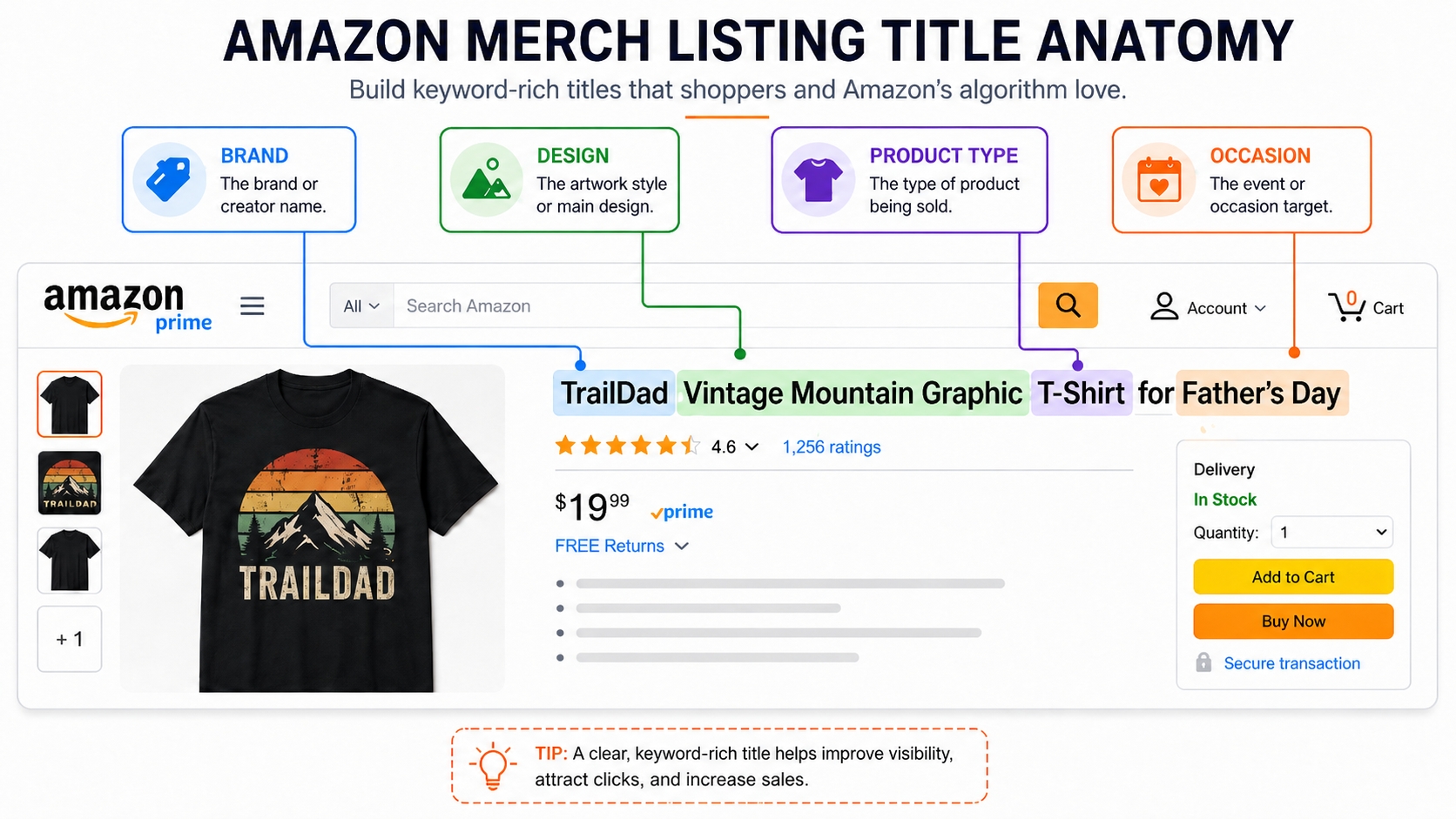
The title is the most heavily weighted field. Amazon recommends a format like [Brand] + [Design/Theme] + [Product Type] + [Occasion/Audience]. For example: "CoolNerdDesigns Funny Math Teacher T‑shirt – Appreciation Gift for Educators." This structure front‑loads the core keyword ("funny math teacher t‑shirt") while leaving room for gifting modifiers at the end. Characters in Merch titles are limited (60 characters for most products), so every word must earn its place. Never sacrifice readability for keyword cramming; a title that reads like "shirt gift math teacher funny pun tee humor present" will repel shoppers and may be down‑ranked by Amazon's anti‑stuffing filters.
Bullet points
You get two bullet points, each with a character limit of 256. Use them to expand on keywords that didn't fit naturally in the title. For example, if your design is a dog pun, bullet one could reinforce: "Makes a great birthday or Christmas gift for dog moms and dads who love funny pet apparel." Bullet two could layer in additional occasions: "Perfect for Mother's Day, Father's Day, or just because." While bullets influence search ranking less than the title, they still contribute to relevance, especially for long‑tail matching. More importantly, bullets help shoppers confirm they're in the right place, reducing bounce and improving conversion signals that feed back into ranking.
Description
The description field allows up to 2000 characters, but the first 200 or so appear above the fold on mobile. Use the opening sentences to restate the primary keyword in a natural sentence. For instance, "This funny dog t‑shirt features a hilarious pun design that's perfect for dog dad gifts." Then expand into garment details (soft preshrunk cotton, unisex fit, available in multiple colors) and use cases ("Great for casual Fridays, dog park visits, or gifting"). Sprinkle in any remaining long‑tail keywords you haven't used elsewhere, but maintain a conversational tone. Unlike FBA, Merch descriptions do not support HTML or A+ content, so plain‑text keyword integration is your only tool.
Brand name considerations
Many Merch sellers overlook the brand name as an SEO lever. While Amazon's algorithm does not weigh the brand field as heavily as the title, it still indexes it. If you have a registered brand that contains a core keyword, e.g., “CoolCoffeeTees”, that brand name can passively boost relevance for coffee‑related searches. However, never change your brand name for each design; that can trigger a verification hold or be interpreted as brand misrepresentation. Use a consistent, relevant brand name across your portfolio, and let it work overtime in the background. For a deep dive into setting up a strong brand presence, see our Amazon Merch toolkit.
Compliance warning for protected terms
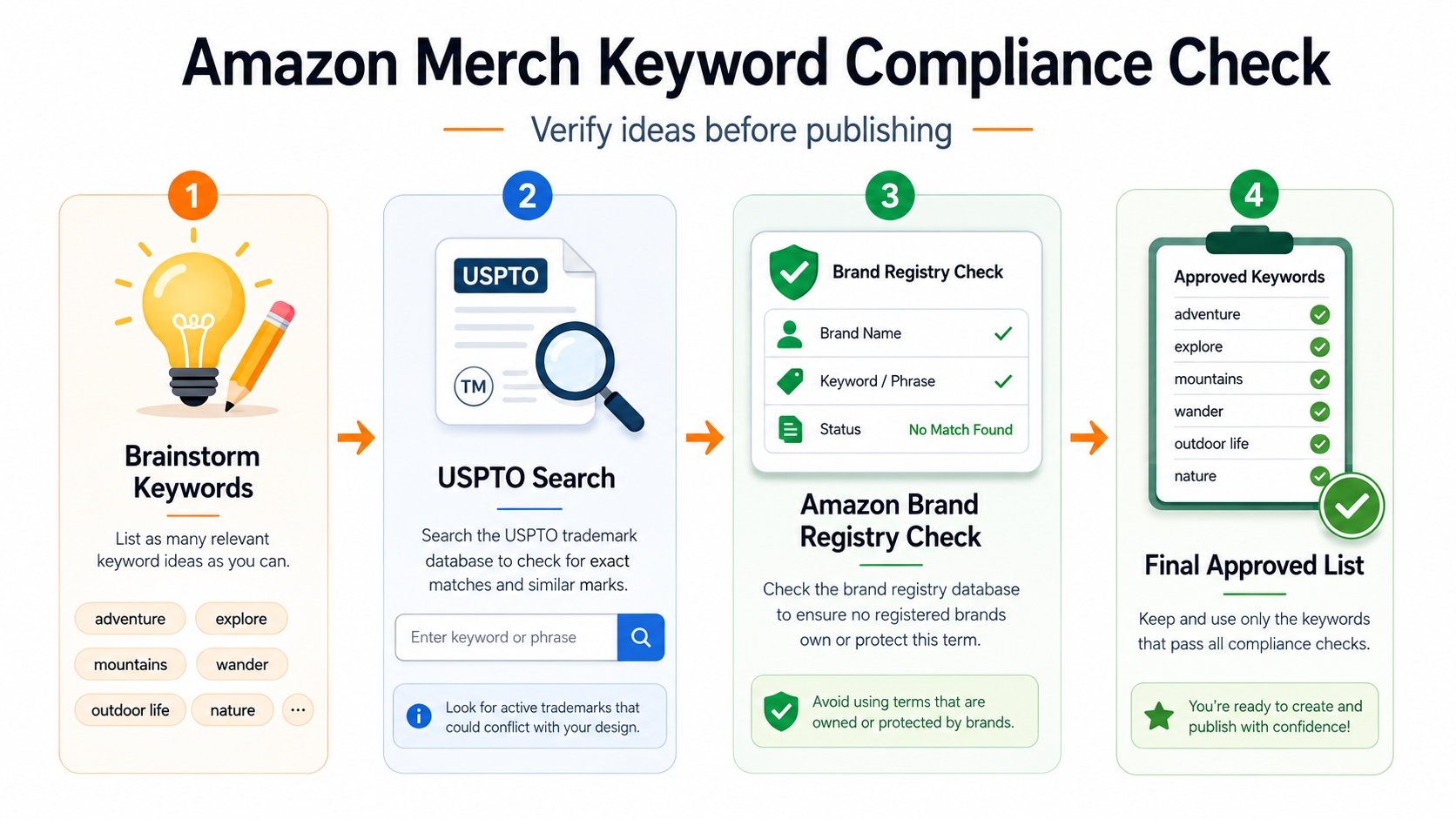
⚠ Compliance Alert: Amazon's Merch errors relating to trademark, copyright, and policy‑protected terms are the #1 reason for rejection. Words like "Disney," "Nike," "Super Bowl," and even common phrases in certain contexts can be off‑limits. Before finalizing any keyword list, run your terms through the USPTO TESS database and cross‑reference with Amazon's own Brand Registry alerts. A single sanctioned term can lead to a permanent account restriction, so this step is non‑negotiable.
Additionally, stay away from "meta‑keywords" that imply a guarantee (e.g., "best," "#1") or make health claims unless you have explicit permission. Amazon's automated scanners are aggressive, and human review often results in a hard rejection if any questionable term appears.
SellerSprite Keyword Workflow
Theory is only as good as the results it gets. This is where SellerSprite's research toolkit turns abstract keyword ideas into a live, actionable plan. We'll walk through a process that starts with a basic design concept and ends with a fully optimized listing's keyword map. Each step uses a specific feature inside SellerSprite to maintain speed and accuracy.
Start with seed design concepts
Open SellerSprite's Keyword Research tool and enter a broad seed phrase that captures your design idea. For a t‑shirt featuring a corgi dog lifting weights, you might start with "corgi shirt" or "corgi gym shirt." The tool immediately returns related search terms, their monthly search volume, and competition level. This top‑of‑funnel brainstorming phase is about volume, not quality, to help capture every plausible phrase that buyers might type.
Expand long‑tail variations
Use the "Keyword Mining" feature to spin your seeds into long‑tail gold. For "corgi shirt," the tool might suggest "corgi workout tank top," "corgi weightlifting hoodie," or "gym gift for dog lovers." Export these variations into a spreadsheet and begin tagging them by intent: direct purchase ("buy corgi tank"), informational ("is corgi good workout buddy?"), and gifting ("dog owner fitness gift"). Focus your retention on commercial and gifting intents; informational queries rarely convert on Merch because there's no brand content to educate the shopper.
Filter by relevance and demand
Now apply filters: search volume > 150/month, competition score SPR ≤ 20, and relevance score above 80. This slashes the list from hundreds to a manageable 10–15 candidates. Rank these candidates by a simple formula: (Monthly Search Volume × Relevance) / Competition Score. The highest‑scoring terms are your primary and secondary keyword targets. For example, "corgi workout shirt" with 700 searches, low competition, and 95 relevance might top the list, while "dog t‑shirt" with 5,000 searches but sky‑high competition drops to the bottom.
Cluster by audience and occasion
Group your filtered keywords into clusters: one for "fitness enthusiasts," another for "corgi owners," and a third for "gift shoppers." This clustering helps you decide which keywords go into the title (one cluster), which into bullets (second cluster), and which into the description (third cluster). It also prevents keyword cannibalization. If you squeeze all terms into the title, you end up with a messy string that confuses both shoppers and the algorithm. A clean cluster plan looks like this:
✓ Cluster Assignment Example:
- Title cluster: funny corgi workout t‑shirt, fitness gift for corgi owners
- Bullet cluster: dog mom gym shirt, corgi weightlifting hoodie, exercise apparel for pet lovers
- Description cluster: corgi lover present, birthday gift for dog dad, dog exercise fan gear
This structured approach ensures every search avenue is covered without overlap, and it makes your listing read naturally to both bots and humans.
Metadata Mistakes to Avoid
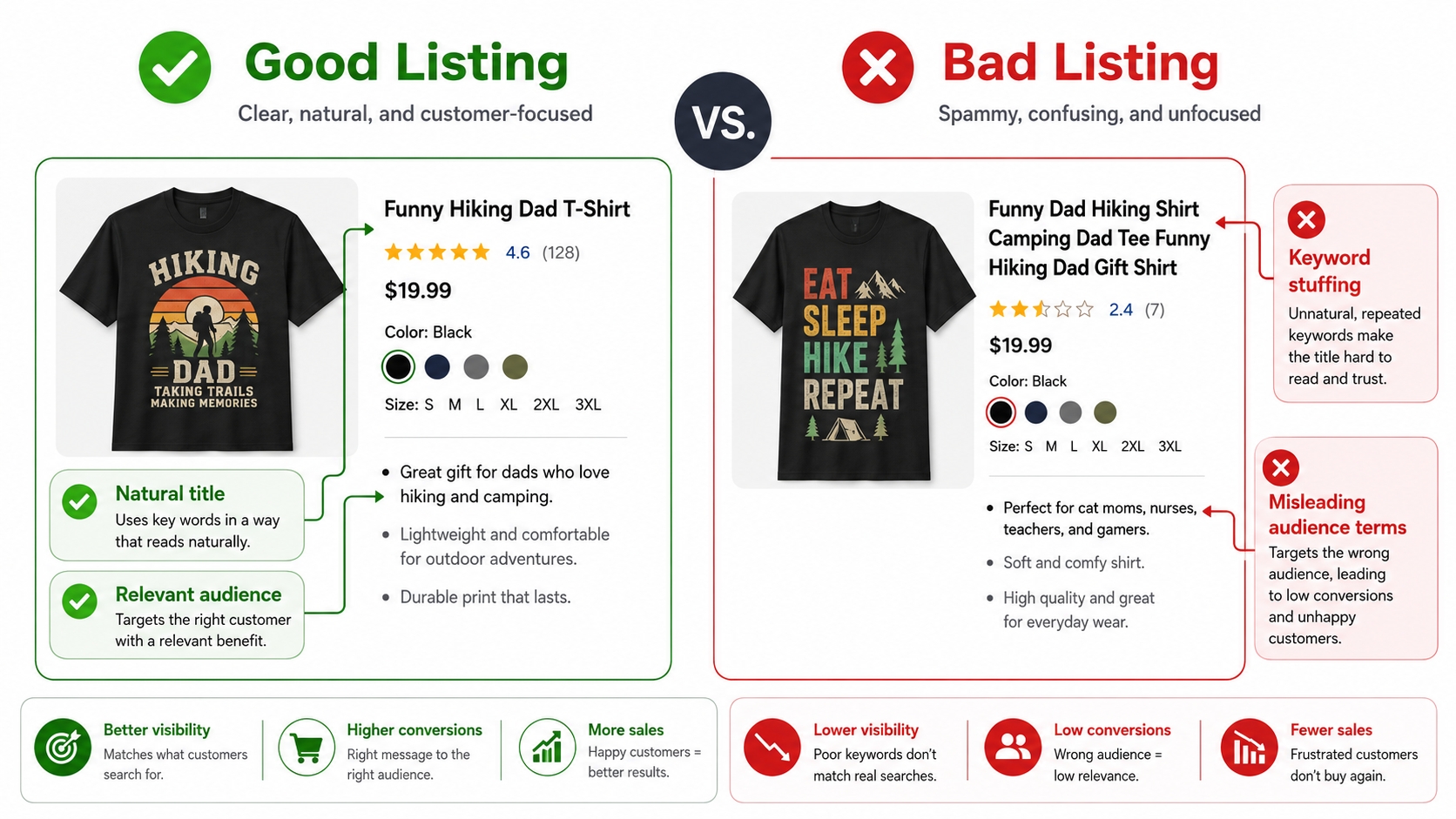
Even veteran sellers slip into habits that silently kill rankings or trigger account warnings. The three most expensive errors are keyword stuffing, trademarked phrases, and misleading audience terms. Let's examine each, along with a quick self‑audit you can perform on your existing listings.
Keyword stuffing
An old‑school tactic was to jam the title with every relevant keyword separated by commas or pipes, e.g., "Funny Shirt, Corgi Tee, Dog Gift, Pet Lover, Birthday Present." Today, Amazon's algorithm actively penalizes such repetition. It reads like spam and delivers a poor shopping experience. Instead, craft a single coherent sentence that flows naturally: "Funny Corgi T‑shirt – Perfect Gift for Dog Lovers on Birthdays and Holidays." The difference is night and day in both ranking and conversion. When auditing your current catalog, read each title aloud; if it sounds awkward out loud, it's probably stuffing.
Trademarked phrases
Many phrases that seem generic are actually trademarked, e.g., "Superhero Mom," "Game Day," or "Happiest Place on Earth." Using them, even inadvertently, can result in an instant takedown. Amazon's enforcement is automated and often does not distinguish between intentional infringement and honest mistakes. Before publishing, cross‑check every keyword through the USPTO TESS database. Also, maintain a blacklist spreadsheet of phrases you've verified as risky, and share it with any team members who draft listings. A five‑minute check can save your account.
Misleading audience terms
Using audience‑specific keywords that don't match the actual design, like labeling a generic kitten t‑shirt “gift for dog lovers”, is a policy violation under "misrepresentation." It also leads to negative customer feedback when the product doesn't meet expectations. Stay honest. If the design isn't explicitly for nurses, don't use "nurse" in the title even if you think nurses might like the joke. Amazon has gotten much better at detecting mismatch between the graphic and text, and long‑term, authenticity wins.
FAQ
How to do keyword research for Amazon Merch?
Start with a seed phrase that describes your design, then use a tool like SellerSprite's Keyword Research to find related terms. Expand into long‑tail variations that include product type, audience, and occasion. Filter out trademarked or misleading terms, and finally cluster the remaining keywords by relevance and intent for placement in your title, bullets, and description.
Where should I place keywords in an Amazon Merch listing?
Place your highest‑priority, high‑intent keywords in the title (front‑loaded for impact). Secondary keywords and supporting phrases go into the two bullet points. Long‑tail and descriptive modifiers work best in the product description. The brand name field also provides a minor indexing benefit if it contains a core keyword naturally.
What keywords should I use in a Merch title?
A strong Merch title combines: [Brand] + [Design Theme/Keyword] + [Product Type] + [Occasion or Audience]. For example, "PawsitiveVibes Funny Dog Dad T‑shirt – Birthday Gift for Pet Owners." Focus on clarity and readability; one well‑constructed title outperforms a dozen stuffed keywords.
Should Amazon Merch keywords include product types like t‑shirt or hoodie?
Yes, include the primary product type that appears in your mockup, e.g., "hoodie," "long sleeve tee," "sweatshirt." This helps your listing surface for filtered searches. However, avoid listing every possible garment; one accurate modifier is enough.
How to avoid keyword stuffing in Amazon Merch metadata?
Write in full, natural sentences rather than comma‑separated lists. Use a maximum of one or two primary keywords in the title, and let bullets and description carry the rest. Read your listing aloud; if it sounds robotic, rewrite.
Next Steps
- Sign in to SellerSprite and use the keyword research tools to audit your top five Merch listings. Identify any missing long‑tail or occasion keywords.
- Implement the clustering method to rewrite one title, one set of bullets, and one description as a test. Monitor the listing's search analytics for 14 days to measure the ranking impact.
References
By SellerSprite Success Team
The SellerSprite Success Team combines years of Amazon marketplace experience with data‑science expertise, helping sellers of all sizes dominate search results through proven keyword strategies and cutting‑edge tooling.
Last updated: 2026-07-13