TL;DR: Use this comprehensive Amazon negative keywords list to filter out irrelevant searches, reduce wasted ad spend, and improve campaign ROI, especially in high-competition categories.
Key Takeaways
- Negative keywords prevent your Amazon ads from showing for irrelevant or low-intent searches, protecting budget and improving ACoS.
- Use pattern-based exclusions like "free," "replacement," or "how to" to quickly build a scalable filtering system.
- Apply negative exact for precise waste terms and negative phrase for broader irrelevant variations across campaigns.
- Always validate exclusions with real search term report data; never assume intent without performance proof.
- Review and update your negative keyword list weekly to adapt to market changes and avoid blocking potential winners.
Table of Contents
- What Negative Keywords Are (And Why Sellers Need an Exclusion List)
- When to Exclude a Keyword (Simple Decision Rules)
- The Negative Keywords List (Copy/Paste Categories)
- Research Filtering: How to Use Negative Keywords Before You Build PPC
- PPC Application: Negative Exact vs. Negative Phrase (When to Use Each)
- Step-by-Step: Build Your Negative Keywords List the Smart Way (Repeatable SOP)
- Examples: Common Negative Keywords by Category
- Common Mistakes With Negative Keywords (And How to Avoid Them)
- FAQ
- References
Note on marketplaces: This guide is specifically optimized for the US market.
What Negative Keywords Are (And Why Sellers Need an Exclusion List)
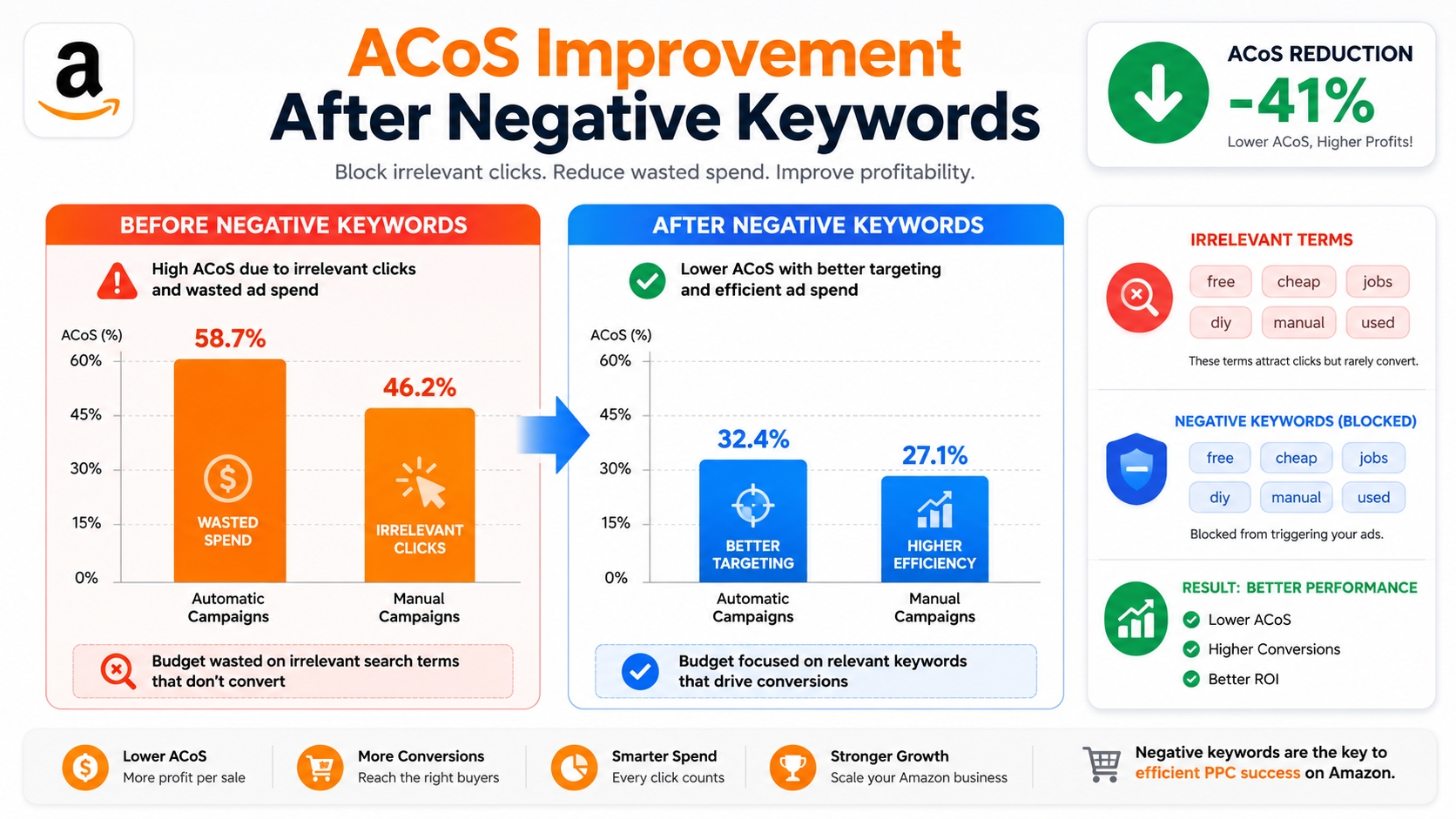
Negative keywords are search terms you exclude from your Amazon PPC campaigns so your ads don't appear for irrelevant or low-converting queries. They act as filters to ensure your budget is spent only on high-intent shoppers likely to convert.
Definition: A negative keyword is a term or phrase that tells Amazon not to trigger your ad when a customer searches for it, helping you avoid unprofitable clicks and improve targeting precision.
Why Exclusions Matter for Research AND PPC (Relevance First)
Many sellers focus on adding keywords but forget to remove bad ones. Without a solid exclusion strategy, even high-volume keyword lists can lead to wasted spend. According to a benchmark analysis, 37% of Amazon ad clicks come from non-converting search terms, most of which could have been filtered with proper negative keyword use.
Exclusions aren't just for PPC. During keyword research, filtering out irrelevant terms early ensures your product listings and content align with actual buyer intent, not noise.
The Outcome: Cleaner Keyword Lists, Lower CPC Waste, Better ACoS
A well-maintained negative keyword list leads to:
- Lower ACoS: Fewer wasted clicks = better return on ad spend.
- Higher conversion rates: Ads shown only to relevant shoppers.
- Improved campaign efficiency: Easier to scale profitable campaigns without budget bleed.
When to Exclude a Keyword (Simple Decision Rules)
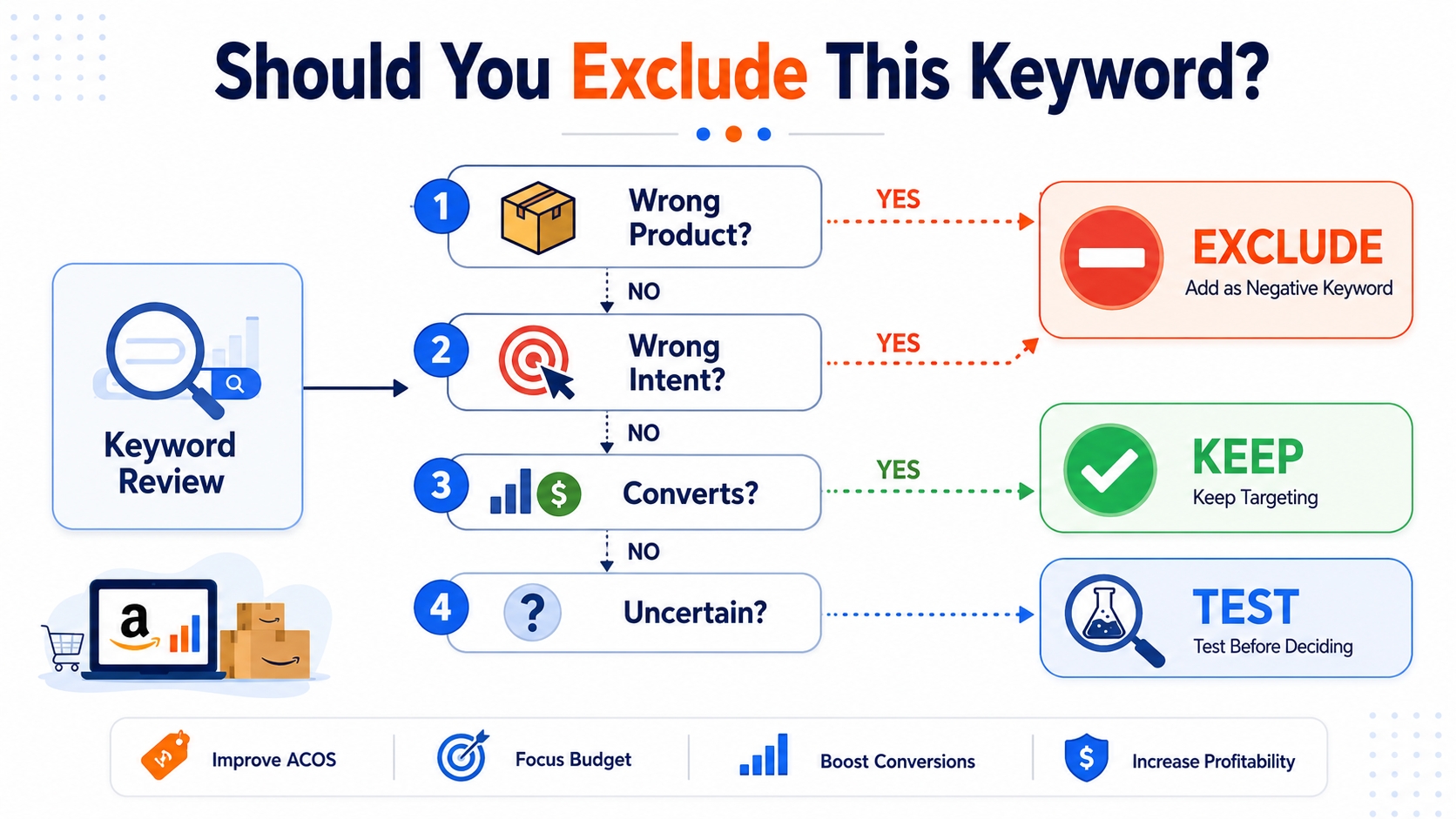
Not every keyword should be excluded. Use these decision rules to determine whether to block, keep, or test a term, based on intent, relevance, and performance.
The 3 "Must-Exclude" Reasons
Wrong Product Type (Buyer Expects Something Else)
If a search term refers to a completely different product than yours, exclude it. For example, if you sell blenders, exclude "juicer" even if it has high volume. The buyer wants a different outcome.
Wrong Intent (Info-Only, Job-Seeking, DIY, Unrelated)
Terms like "how to fix a blender" or "blender motor replacement tutorial" indicate research intent, not purchase intent. These rarely convert and inflate CPC costs.
Not Sellable/Safe for Your Offer (Policy, Compliance, Claims Mismatch)
Avoid terms that imply medical benefits (e.g., "blender for diabetes diet") unless you're FDA-compliant. Similarly, exclude "commercial-grade" if you only sell home appliances.
The 2 "Sometimes Exclude" Reasons
Too Broad (Burns Spend Before You're Ready)
High-volume terms like "kitchen appliances" may seem attractive but attract unfocused traffic. Consider excluding them until you've built conversion history on more specific terms.
Too Cheap/Price-Sensitive Intent (If You Sell Premium)
If your product is premium-priced, exclude terms like "cheap blender" or "under $20." These shoppers are unlikely to convert and only increase CPC drag.
The 1 "Never Exclude" Check: It Converts (Data Beats Assumptions)
Never exclude a keyword solely based on assumption. Always check your Search Term Report. If a term has generated sales even if odd, keep it or test it further.
The Negative Keywords List (Copy/Paste Categories)
Use these pattern-based categories to build your exclusion list. Always validate against your product category and positioning before applying.
Wrong-Item Keywords (Different Product)
"Replacement parts" / "refill" / "accessories" (if you sell the main item)
Example: If you sell air purifiers, exclude "HEPA filter replacement" unless you also sell filters.
"Case" / "cover" / "charger" (common mismatch traps)
These are among the most common irrelevant clicks. If you don't sell accessories, block them early.
"Compatible with [brand/model]" (if you're not compatible)
Avoid misleading impressions. Only allow compatibility claims if verified.
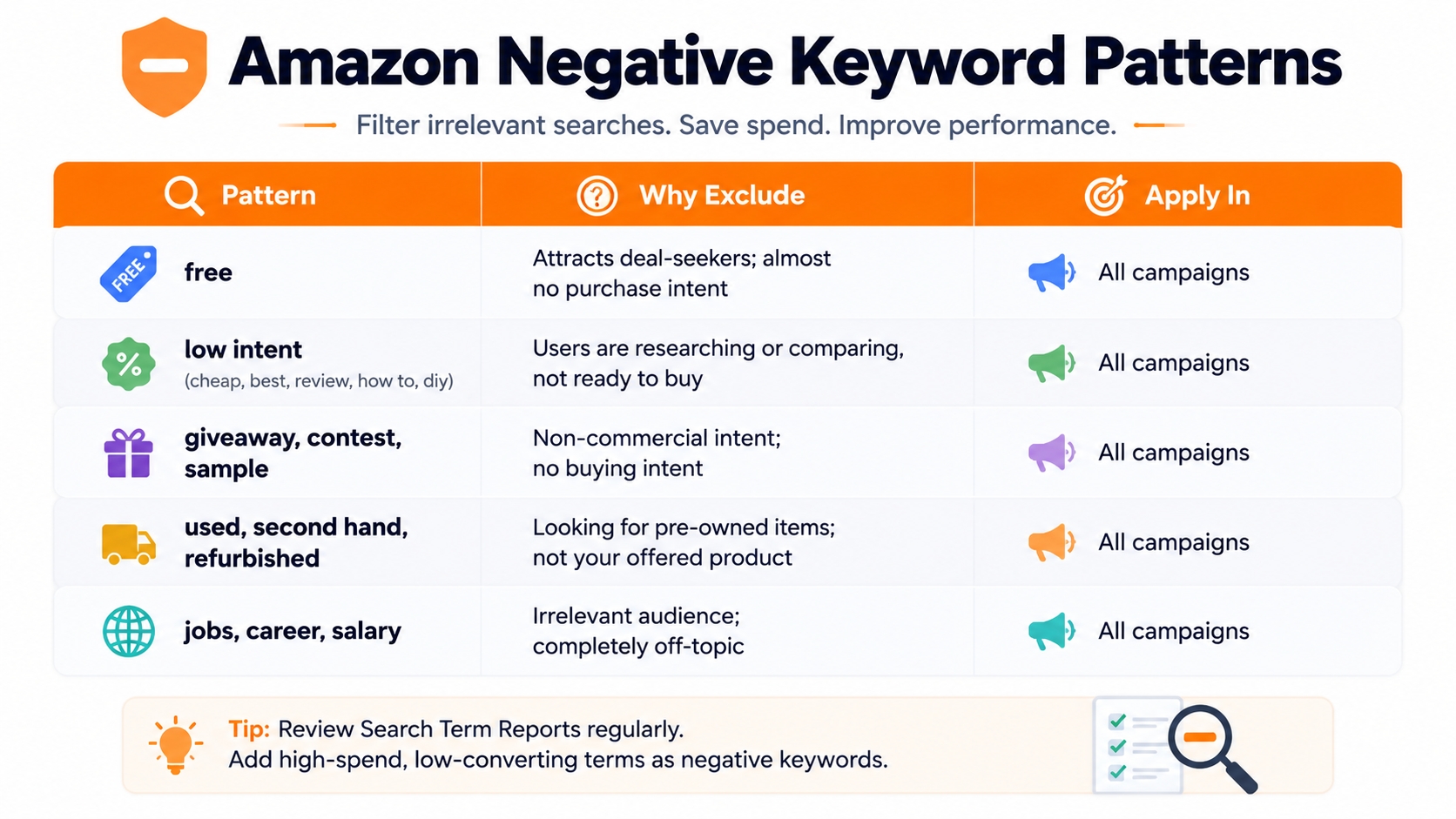
Free/Cheap Intent Keywords (Low Commercial Value)
"Free" / "cheap" / "under $X" (if you're not competing on price)
These attract bargain hunters, not buyers. Exclude unless you run discount campaigns.
"Coupon code" / "promo code" (often low conversion unless you run promos)
Shoppers searching for codes are often deal-focused and less likely to convert without an active offer.
Informational Intent Keywords (Research-Only)
"How to" / "instructions" / "tutorial" / "recipe"
These indicate learning intent, not buying. Block unless your content strategy targets this segment.
"Review" / "vs" / "comparison" (keep only if it converts in your niche)
Some comparison terms convert well (e.g., "Nespresso vs. Keurig pods"). Use data to decide.
Non-Buyer Audiences (Wrong Customer)
"Wholesale" / "bulk supplier" (if you're DTC retail)
These attract B2B buyers. If you don't offer bulk pricing, exclude them.
"For business" / "commercial" (if you sell consumer-only)
Commercial intent often implies different needs (durability, volume, compliance).
Size/fit/format Mismatches
Wrong sizes (e.g., "king" when you only sell "queen")
Prevents mismatched expectations and returns.
Wrong pack counts ("12 pack" when you sell single)
Avoids frustration from customers expecting bulk.
Wrong material ("leather" when you sell "silicone")
Material matters. Exclude terms that misrepresent your product.
Brand and Trademark Pitfalls (Use Carefully)
Competitor brand names (avoid unless you run legit conquesting)
Using competitor brands in targeting can work, but only if you're authorized or running a compliant conquest campaign.
"Official" / "authentic" (if you're not the brand)
These terms imply brand affiliation. Avoid unless you're an authorized seller.
Adult/Age or Restricted-Intent Terms (Category Dependent)
Restricted items, controlled claims, or regulated terms you can't support
Examples: "CBD for pets," "vape mods," “nicotine patches”, only use if compliant with Amazon's policy.
"Medical" claims terms (avoid unless compliant and allowed)
Terms like "treatment for arthritis" can trigger policy violations. Stick to allowed claims.
Research Filtering: How to Use Negative Keywords Before You Build PPC
Smart keyword research starts with filtering. Use negative keywords early to clean your list before launching ads.
Build an "Exclusion Layer" in Your Keyword Research Sheet
Columns: keyword | intent | exclude? | reason | notes
Structure your research spreadsheet to flag exclusions upfront. This creates a reusable filter system.
Filter Out "False Opportunities" (High Volume, Wrong Intent)
High search volume doesn't equal high value. Use tools like SellerSprite Keyword Conversion Rate to analyze intent and filter out misleading terms early.
Keep a "Watchlist" Instead of Hard-Deleting Borderline Terms
Don't delete uncertain terms; instead, flag them for testing in low-budget campaigns.
Turn Exclusions Into Clusters (So You Scale Filtering Fast)
Group exclusions by pattern (e.g., all "free" terms) so you can apply them across products and campaigns efficiently.
PPC Application: Negative Exact vs. Negative Phrase (When to Use Each)
Choosing the right negative match type is critical for precision and scalability.
Negative Exact: Block One Specific Search Term
Best for: "clicks but no orders" on a precise query
Example: Block [blender motor repair] exactly if it gets 50 clicks and zero sales.
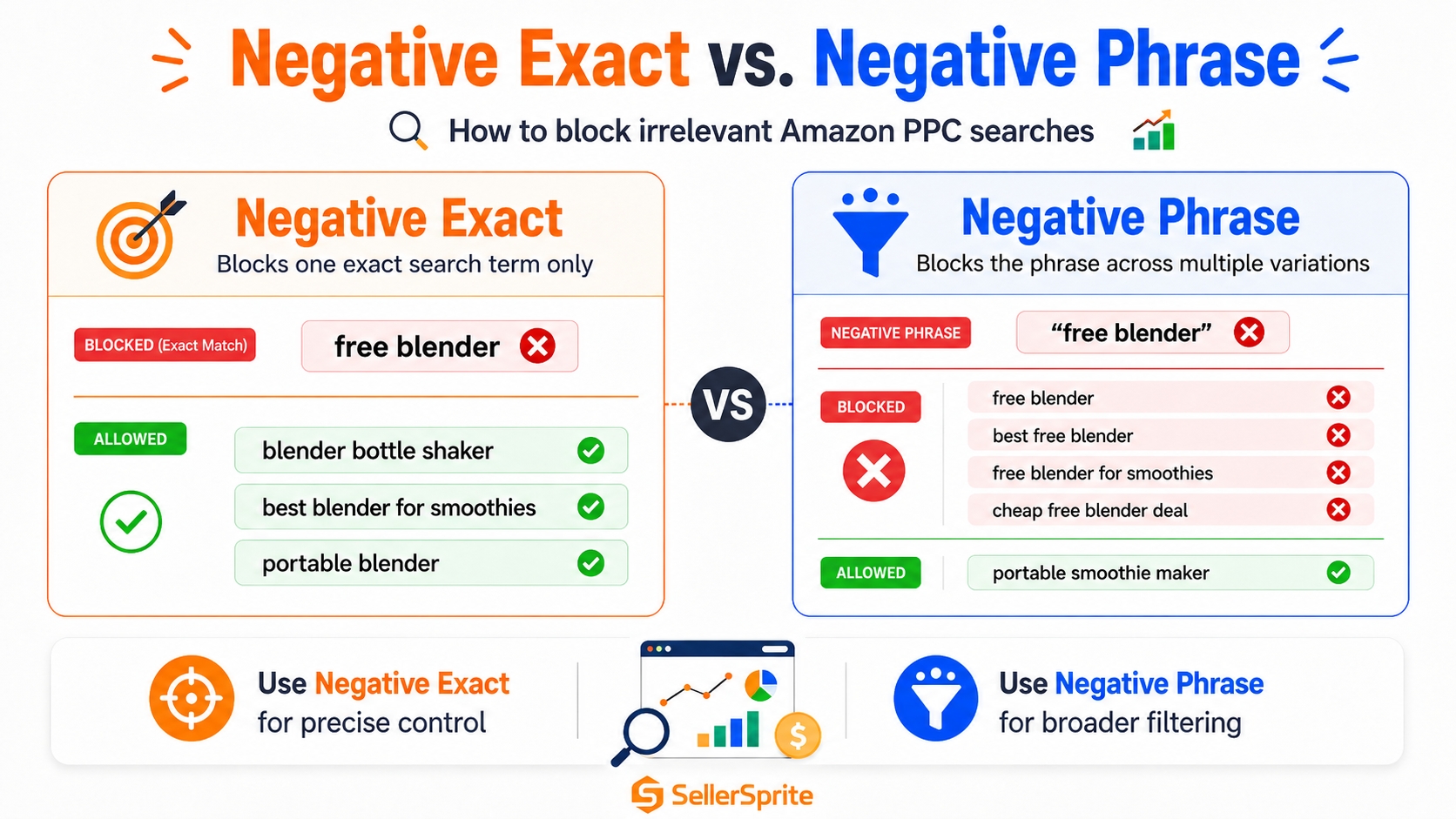
Negative Phrase: Block a Family of Similar Queries
Best for: Repeated irrelevant variations (e.g., "replacement", "refill")
Example: "replacement filter" blocks "HEPA replacement filter," "air purifier replacement filter," etc.
Where to Apply Negatives (Campaign Structure Best Practices)
Discovery campaigns: Heavy negatives to protect budget
Use broad match with strong negative lists to avoid irrelevant exposure.
Exact campaigns: Minimal negatives (avoid blocking winners)
These are high-intent. Only negate if data shows consistent waste.
Prevent cannibalization: Exact "owns" the term; negate it elsewhere
If you have an exact match campaign for "premium blender," negate that term in auto and broad campaigns to avoid self-competition.
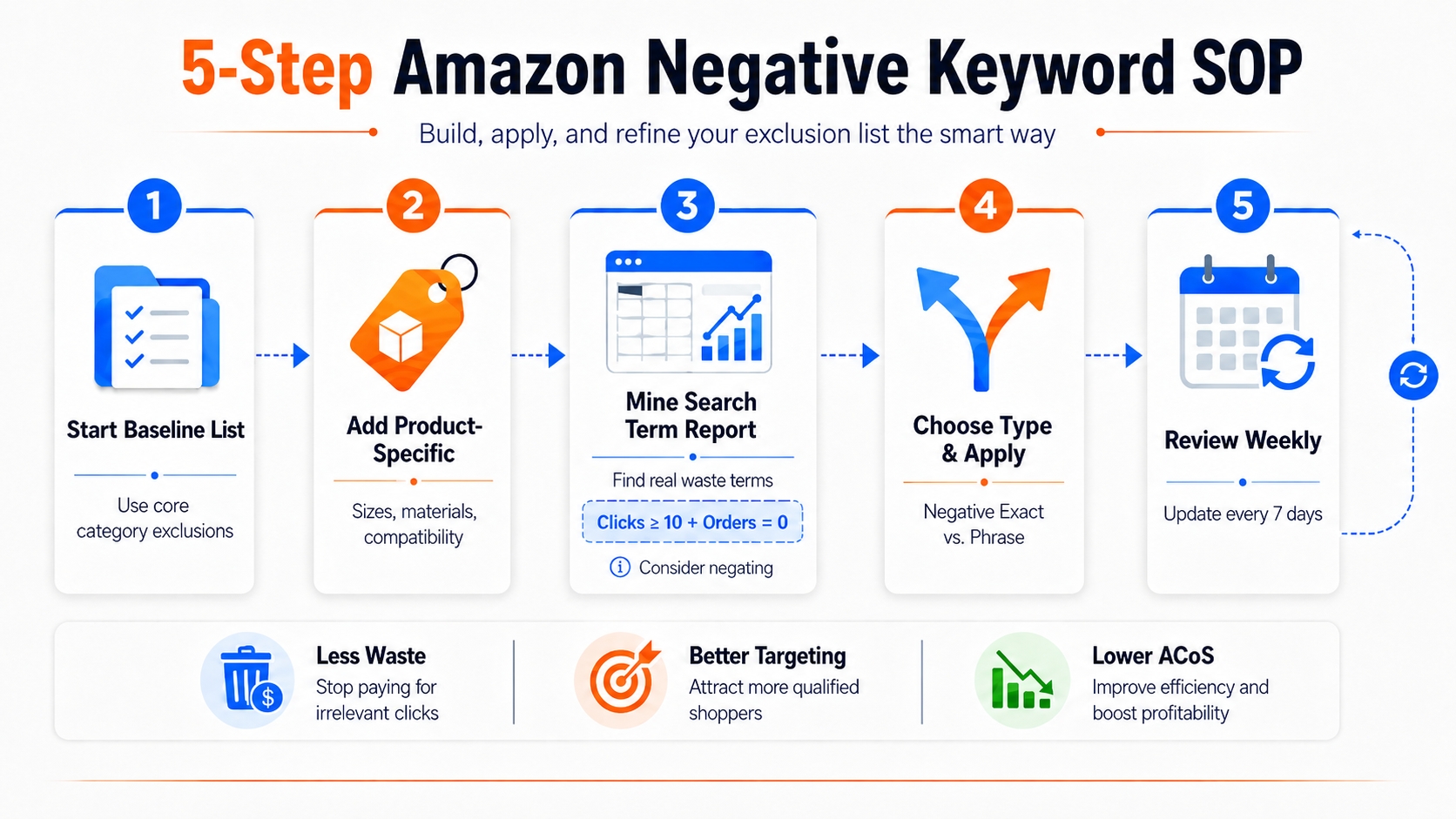
Step-by-Step: Build Your Negative Keywords List the Smart Way (Repeatable SOP)
Follow this standardized process to build and maintain an effective negative keyword strategy.
Step 1: Start with a Baseline Category Exclusion List
Use the copy/paste categories above as your foundation.
Step 2: Add Product-Specific Exclusions (Sizes, Materials, Compatibility)
Customize for your SKU. If you sell queen-size memory foam mattresses, exclude "king" and "latex."
Step 3: Mine Your Search Term Report for Real Waste Terms
Threshold rule: clicks ≥ 10 and orders = 0 → consider negating
Use a 10-click minimum to avoid overreacting to noise.
Step 4: Choose Negative Type (Exact vs. Phrase) and Apply
Apply at the campaign or portfolio level based on scope.
Step 5: Review Weekly and Refine (Don't "Set and Forget")
Update your list every 7 days. As markets change, your exclusions should too.
Examples: Common Negative Keywords by Category
Apparel Example (Size/fit/brand Pitfalls)
Exclude: "men's large," "plus size," "knockoff," "replica," "designer style."
Electronics Example (Compatibility/Accessory Traps)
Exclude: "for iPhone 17," "charger only," "screen protector," "refurbished."
Home & Kitchen Example (Replacement Parts/Refills/Bundle Mismatch)
Exclude: "coffee pod refill," "water filter replacement," "12-pack," "bulk lot."
Supplements/Health Example (Compliance-Safe Exclusions)
Exclude: "cure for," "treatment," "FDA approved," "medical grade," "prescription."
Common Mistakes With Negative Keywords (And How to Avoid Them)
Negating Too Aggressively (Blocking Future Winners)
Avoid blanket exclusions like "how to." Some informational terms convert (e.g., "how to use beard oil").
Using Phrase Negatives Without Checking Collateral Damage
"Replacement" might block "replacement parts" but also “original replacement compatible”, which could be valid.
Not Separating Discovery vs. Scaling Campaigns
Use heavy negatives in discovery, light in scaling. Mixing them hurts performance.
Forgetting to Revisit Exclusions After Listing Changes or New Variants
If you add a 12-pack option, remove "12-pack" from your negative list.
Treating Negatives as Universal (Marketplace/Category Differences)
"Wholesale" may be bad in US retail but valid in Amazon Business. Adjust by marketplace.
FAQ
What are the best negative keywords to use for Amazon PPC campaigns?
The best negative keywords depend on your product, but common high-impact exclusions include "free," "cheap," "replacement," "how to," "review," "wholesale," and competitor brand names (unless you're running conquesting ads). Always validate with your Search Term Report.
How to find negative keywords for my Amazon sponsored ads?
Use Amazon's Search Term Report to identify high-click, zero-conversion queries. You can also use tools like SellerSprite to analyze search intent and uncover irrelevant terms during research.
Should I use negative phrase or negative exact first?
Start with negative exact for precise, high-waste terms. Use negative phrase for broader patterns like "refill" or "replacement" once you've confirmed they're consistently irrelevant.
Why is a negative keyword list important for Amazon sellers?
A negative keyword list prevents wasted ad spend on irrelevant searches, improves campaign relevance, lowers ACoS, and increases conversion rates by ensuring your ads are shown only to high-intent buyers.
Next Steps
- Review your latest Search Term Report and add 5 new negative keywords this week.
- Get your 3-day free trial with SellerSprite today for advanced filtering and research techniques.
References
- Amazon Advertising Help: Negative Keywords View
- SellerSprite Blog: Negative Keywords Guide View
- SellerSprite Blog: Amazon Keyword Research Guide View
By SellerSprite Success Team
The SellerSprite Success Team combines hands-on Amazon ad optimization experience with data science to help sellers reduce wasted spend and scale profitably. Our strategies are tested across thousands of SKUs and updated with real-time marketplace trends.