TL;DR: Effective keyword research for Amazon PPC requires a transition from automated discovery to manual precision, focusing on high-intent "buying queries" to maximize ROAS and minimize wasted spend.
Key Takeaways
- PPC keywords prioritize purchase intent and profitability signals (ACoS/CVR) over mere search volume.
- Utilize a "graduation" workflow to move winning search terms from Auto campaigns to Manual Exact match groups.
- Ongoing negative keyword research is essential to prune non-converting traffic and protect your advertising budget.
Table of Contents
- PPC Keyword Research vs. Listing SEO
- Set Up Your Keyword Foundation
- Step 1: Build a PPC Keyword Universe
- Step 2: Auto Campaign Mining Workflow
- Step 3: Manual Keyword Architecture
- Step 4: PPC-Specific Qualification
- Step 5: Expand Efficiently with Modifiers
- Step 6: Product Targeting (ASIN/Category)
- Step 7: Ongoing Management & Hygiene
- Common PPC Keyword Mistakes
- FAQ
- References
Note on marketplaces: This guide is specifically optimized for the US market.
What Makes PPC Keyword Research Different From Listing SEO?
PPC keywords = "buying queries," not just relevant queries
In SEO, you want to rank for everything relevant to your product to cast a wide net. However, in Amazon advertising keyword research, every click costs money. You must focus on "buying queries", which means terms used by shoppers with their credit cards out, rather than those just browsing for information or inspiration.
The 3 PPC signals you're optimizing for (CTR, CVR, ACoS/ROAS)
Unlike organic SEO, which relies heavily on relevance and sales velocity, PPC optimization is a balancing act of Click-Through Rate (CTR), Conversion Rate (CVR), and Advertising Cost of Sales (ACoS). A high-volume keyword is useless for PPC if the CVR is too low to maintain a healthy ROAS.
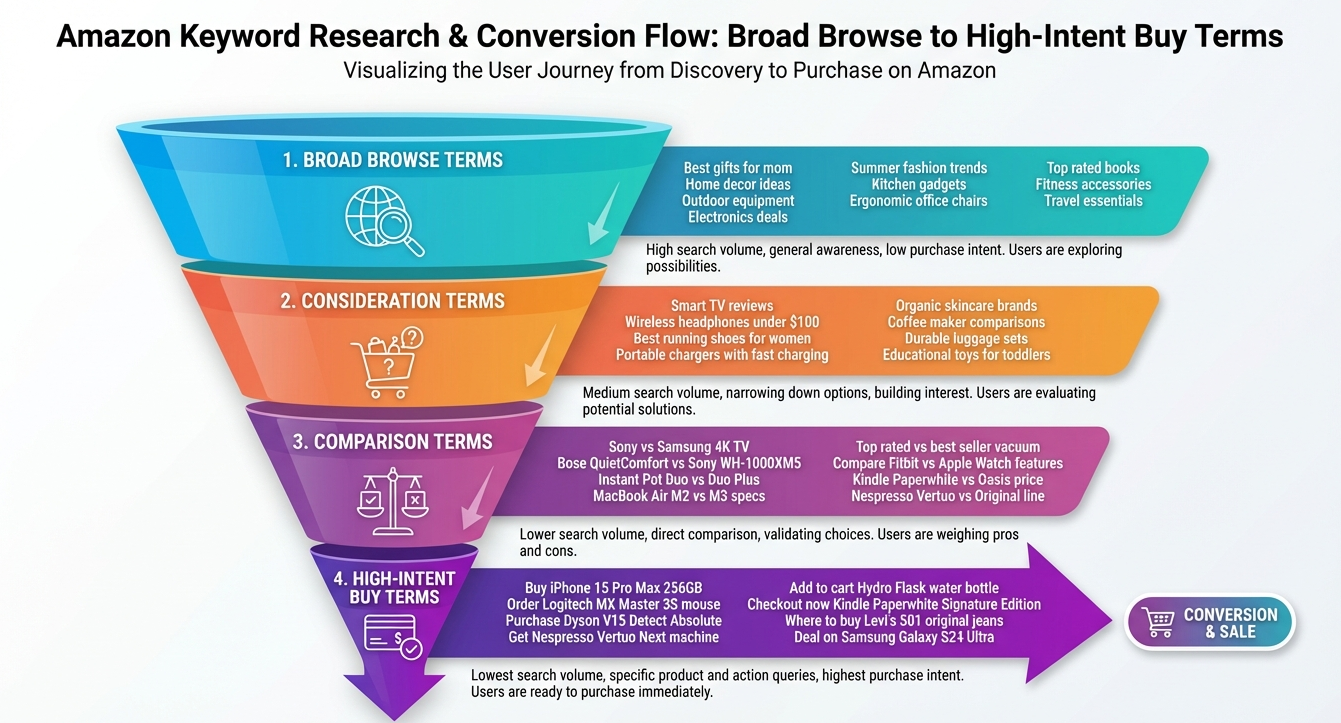
A simple intent ladder for Amazon ads (browse → compare → buy)
Keywords fall into different stages of the funnel. "Kitchen gadgets" is a browse term (low CVR, high cost). "Stainless steel garlic press" is a compare term. "Professional heavy duty garlic press" is a buy term. Your PPC strategy should prioritize the bottom of the ladder first.
Set Up Your Keyword Research Foundation (Before Launching Campaigns)
Build your Product Entity Sheet (attributes, compatibility, claims limits)
Before touching any tools, document your product's DNA. List its physical attributes (color, size, material), what it is compatible with, and its unique selling propositions (USPs). This sheet serves as the raw data for your Amazon PPC keyword list generation.
Define your "profit guardrails" (target ACoS, break-even ACoS, CPC ceiling)
Know your numbers. If your product margin is 30%, your break-even ACoS is 30%. Knowing this allows you to set a “CPC ceiling”, the maximum you can pay for a click without losing money on every sale.
Create a seed list using buyer modifiers (size, material, pack, "for/with/compatible")
Combine your core product name with modifiers that shoppers actually use. For example, instead of just "Yoga Mat," use "extra thick yoga mat for beginners" or "non-slip yoga mat 1/4 inch." For more on this, check out our comprehensive Amazon keyword research guide.
Step 1: Build a PPC Keyword Universe (3 Inputs You Should Always Combine)
Amazon native signals (autocomplete, category filters, bestseller language)
The Amazon search bar is a goldmine. Autocomplete suggestions are queries with real search volume. Also, look at the left-hand sidebar filters in your category, where Amazon only displays filters that are highly relevant to shoppers' search habits.
Competitor reverse-engineering for PPC
Don't guess what's working; see what's already driving traffic for your competitors. Use tools like Reverse ASIN to identify which terms competitors are successfully ranking for and where they are spending their ad dollars.
Customer language mining (reviews + Q&A) for long-tail expansion
Shoppers often use different language than sellers. Read your competitors' reviews and Q&A sections to find Amazon keywords buyers actually use. If customers keep mentioning "pet hair removal" for a vacuum, that's a high-intent PPC keyword.
Tag terms by type: Attribute / Use Case / Compatibility / Problem / Comparison
Organize your universe. Tagging keywords by type allows you to create highly targeted ad groups later, ensuring your ad copy matches the shopper's specific intent.
Step 2: The Auto Campaign Keyword Mining Workflow
Why auto campaigns are for discovery (and what NOT to expect)
Auto campaigns are your R&D department. Their primary goal is to find new search terms you didn't think of. Do not expect them to have the best ACoS; their value lies in the data they provide for your manual campaigns.
Launch setup for clean data collection (budgets, bids, placements, targeting groups)
Set up your Auto campaign with the four targeting buckets: Close match, Loose match, Substitutes, and Complements. This granularity allows you to see exactly which type of discovery is performing best and adjust bids accordingly.
Harvesting cadence: when to pull search terms (early vs. stable phase)
In the first 14 days, check your search term report twice a week to identify obvious waste. Once the campaign stabilizes, a weekly harvest is sufficient to find winning terms for graduation.
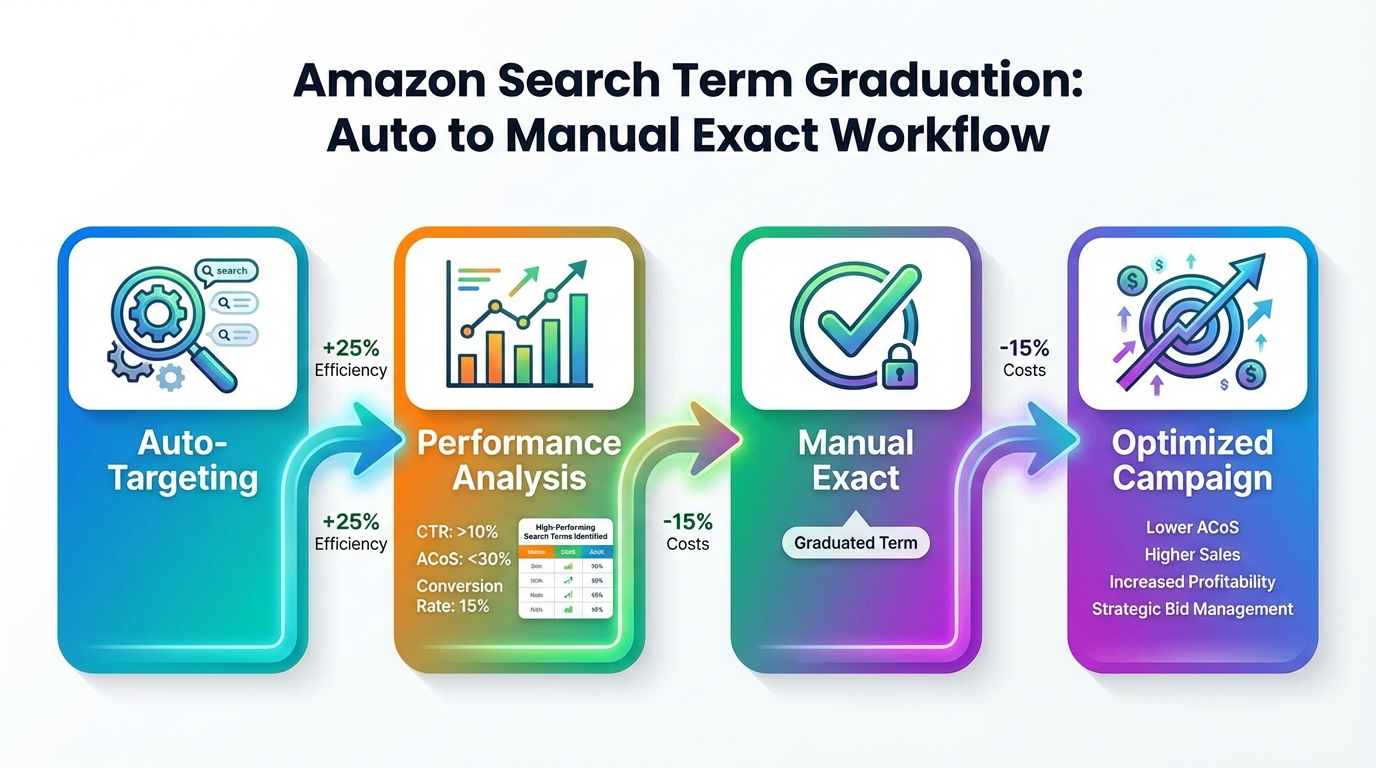
Promotion rules: when a search term "graduates" into manual
A term should graduate when it proves its worth. A common rule is 2+ orders and an ACoS below your target threshold over a 30-day period. This ensures you aren't chasing "lucky" one-off sales.
Blocking rules: negatives to prevent repeated waste
If a term has 10-15 clicks and zero sales, it's a candidate for negative targeting. Negative keyword research for Amazon is just as important as finding positive ones to ensure you aren't paying for the same bad traffic twice.
Step 3: Turn Search Terms Into a Manual Keyword Architecture
The "funnel" structure: Broad (discover) → Phrase (shape) → Exact (scale)
Think of match types as a filter. Broad match discovers variations. Phrase match captures more specific intent. Exact match is where you scale your winners with high bids to dominate the search results.
Segment by intent and economics (brand, generic, competitor, long-tail)
Divide your manual campaigns. Defend your brand terms, compete on generic terms, and use long-tail terms for efficient, lower-cost conversions. Competitor conquesting is a separate high-cost, high-reward strategy.
Keyword-to-adgroup mapping rules (one theme per ad group)
Keep your ad groups tightly themed. If you sell a "blue yoga mat," create an ad group for "blue" keywords and another for "non-slip" keywords. This allows you to tailor your ad copy to the specific benefit the shopper is looking for.
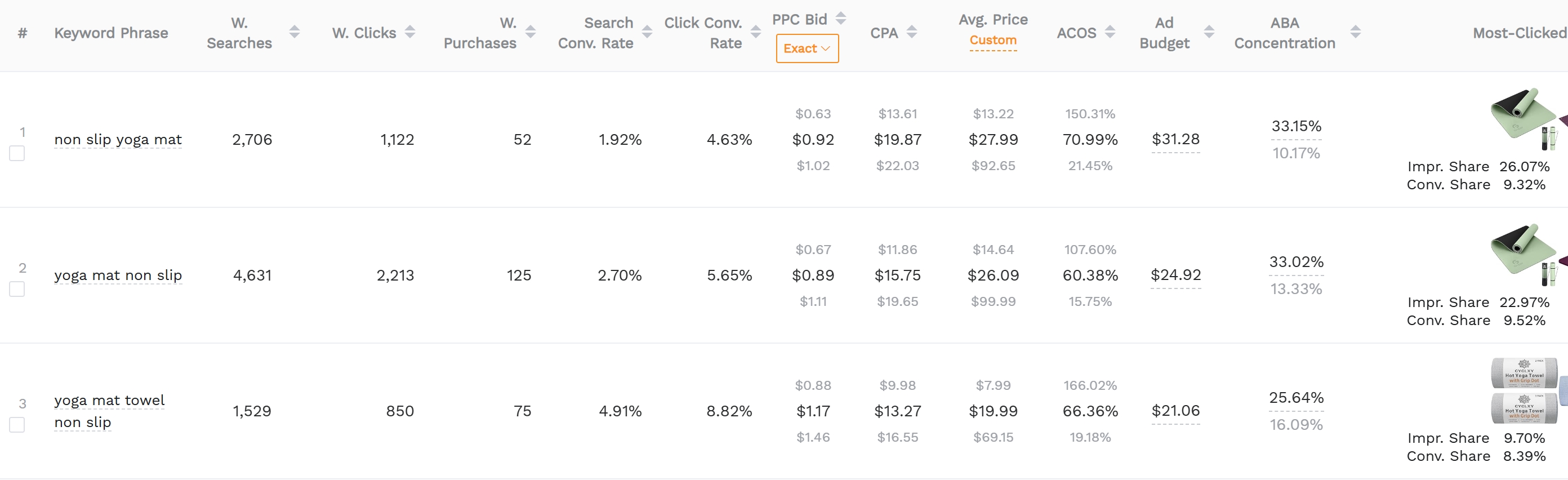
Step 4: PPC-Specific Keyword Qualification (Beyond Search Volume)
Relevance, Intent, and Competition tests
Does the query match your product's core function? Does it imply a purchase? Can you afford to win the click? If you have a $20 product and the CPC for a generic term is $5, you likely can't compete there profitably regardless of volume.
Build a keyword scoring model (copy/paste framework)
Use a simple scoring model: Score = Relevance (1-5) × Intent (1-5) × Profitability (1-5). Focus your highest bids on keywords that score 100+ points total in your matrix.
Step 5: Expand Efficiently: Long-Tails and Query Patterns
The 6 modifier families (size, material, pack, feature, audience, compatibility)
Systematically add these modifiers to your seed terms to generate hundreds of long-tail variations. For example, "Silicone (material) spatulas for non-stick cookware (compatibility) set of 3 (pack)."
"Problem → solution" phrasing for higher CVR
Target terms that describe the pain point your product solves, such as "how to stop snoring" for a mouthpiece. These often have lower CPCs than product-name keywords but very high conversion rates.
Step 6: Product Targeting Keyword Research (ASIN & Category)
When product targeting beats keyword targeting
Sometimes it's more effective to target a competitor's ASIN directly, especially if your product is cheaper or has better reviews. This "steals" the traffic right at the point of purchase.
How to choose ASIN targets (price band, review count, positioning)
Target ASINs where you have a clear advantage. If your product has 4.5 stars and the competitor has 3.8 stars, you are likely to convert their potential buyers. Use filters to target categories with higher price points than your own.
Step 7: Ongoing Keyword Management: Hygiene + Scaling
Weekly routine: harvest winners, negate losers, adjust bids
PPC is not "set and forget." A weekly audit of your Amazon search term report analysis is required to maintain profitability. Use the "3-bucket" cleanup: Irrelevant (negate), Relevant-but-unprofitable (lower bid/negate), and Profitable (promote/increase bid).
Scaling rules: raise bids vs. expand terms
Scale by raising bids on your top 10% of keywords that deliver 80% of your sales. Once those are capped by budget or position, begin expanding into new long-tail variations or experimental categories.
Common Mistakes (PPC Keyword Research Edition)
Mixing discovery and scaling in the same ad group
Putting broad and exact match keywords in the same group muddies your data. It's difficult to see which targeting type is actually driving the performance and makes bid optimization a nightmare.
Ignoring negatives until spend is already gone
Be proactive. If you sell high-end watches, add "cheap" and "plastic" as negative keywords on day one. Don't wait to lose money on traffic you know won't convert.
FAQ
How do I find high-converting keywords for my Amazon PPC campaigns?
Start by harvesting data from your Auto campaigns and identifying search terms that have already resulted in multiple sales. Additionally, use competitor research tools to see which terms are driving the most traffic for the best-selling products in your niche.
What is the difference between broad, phrase, and exact match keywords in Amazon advertising?
Broad match allows your ad to show for variations and related terms. Phrase match requires the keyword phrase to be present in the specified order (but can have words before/after). Exact match only shows your ad when the shopper's query exactly matches your keyword, offering the most control over spend.
How often should I update my keyword list for Amazon PPC to maintain profitability?
You should perform a "hygiene check" weekly to negate non-performing terms and a deeper expansion check monthly to find new long-tail opportunities. Consistent optimization is the key to maintaining a low ACoS over time.
Next Steps
- Run a Reverse ASIN lookup on your top 3 competitors to find their primary traffic drivers.
- Launch an Auto campaign with separated targeting groups to start mining for data.
- Sign up for SellerSprite to access advanced PPC optimization tools.
References
By SellerSprite Success Team
The SellerSprite Success Team is composed of veteran Amazon sellers and data analysts dedicated to helping brands master the art of data-driven e-commerce. With years of experience in PPC optimization and market trend analysis, they provide actionable insights for scaling businesses on Amazon.