





亚马逊选品思路大全:20+种基于大数据分析的选品方法
2026/03/27 阅读数 (273,429) 评论数 (27)
大数据选品,是通过一定的逻辑,对收集来的海量数据进行处理,把Listing的各项数据结构化地呈现,帮助卖家找到符合自己预期定位的产品。
卖家精灵独家总结了20+条大数据选品思路,并归纳为关键词大数据选品、产品大数据选品、类目大数据选品三大类。各选品模式下的筛选条件仅供参考,具体数值请大家根据自身情况按需填写。
关键词大数据选品
买家在亚马逊的每一次搜索都代表着对某类产品的需求。关键词选品就是基于买家搜索行为来发现潜在市场,通过关键词洞察出买家的真实需求,再去寻找能满足需求的产品。
1、基于市场趋势选品
头部关键词所指向的细分市场,要么已经市场成熟,要么就是爆款,对大部分卖家来说是可望而不可及的。所以建议大家:轻头部,重趋势。关键词周数据,更能反映市场趋势的实时变化。
筛选条件:选择一个一级类目,设置排名增长量近4周>10000,排名增长率近4周>10%,即可筛选出该类目下搜索排名较大,且近4周持续增长的关键词细分市场。
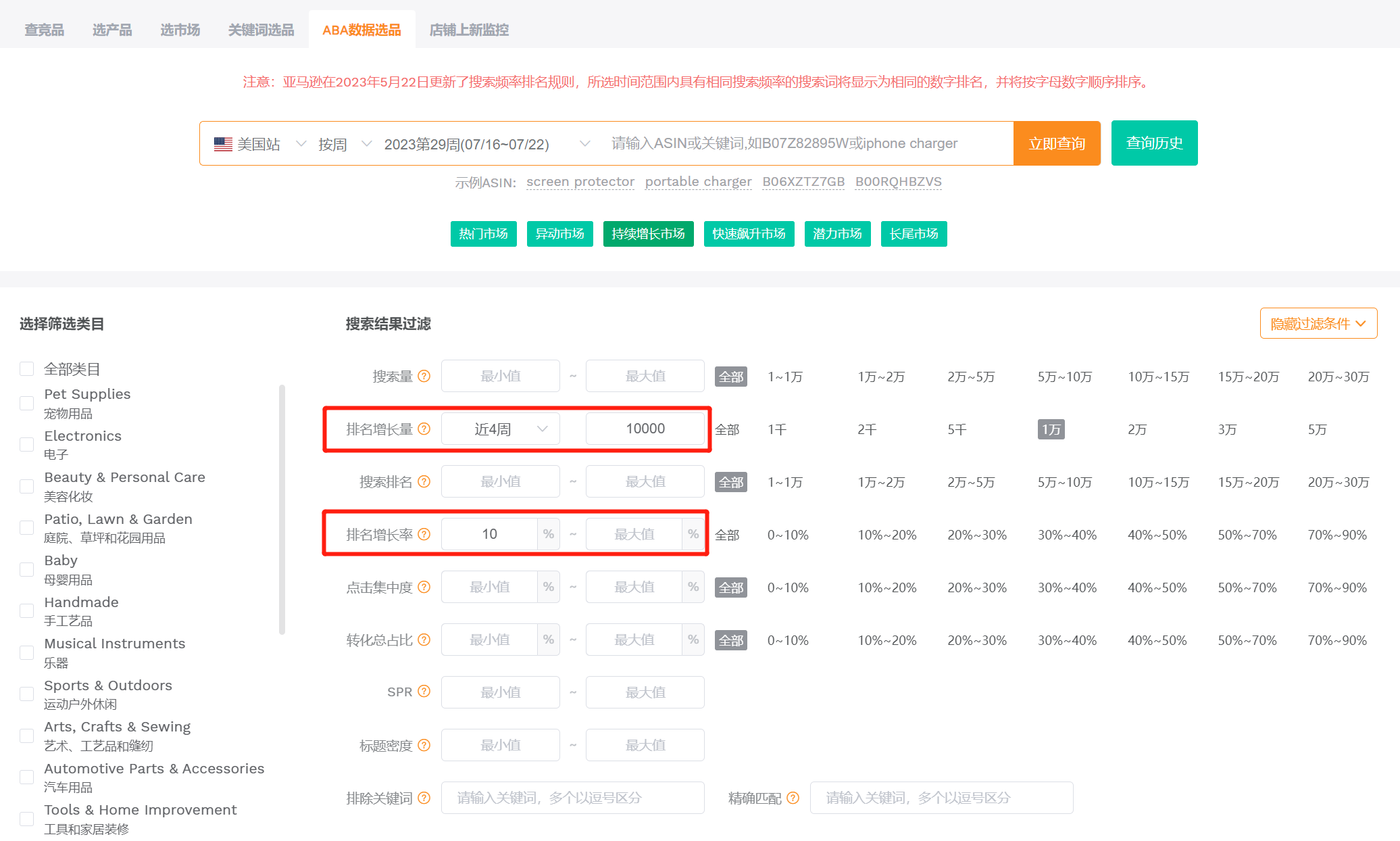
(图片来源于卖家精灵ABA数据选品)
2、基于市场需求选品
搜索排名Top10000的关键词,代表需求最大的前10000个细分市场。
这类关键词所指向的细分市场需求高、流量大,但也意味着竞争相对更加激烈,更适合有一定实力的卖家。
筛选条件:选择一个一级类目,设置关键词搜索排名最大值为10000。查询结果默认按照排名升序排列,排名越靠前,搜索量越大。
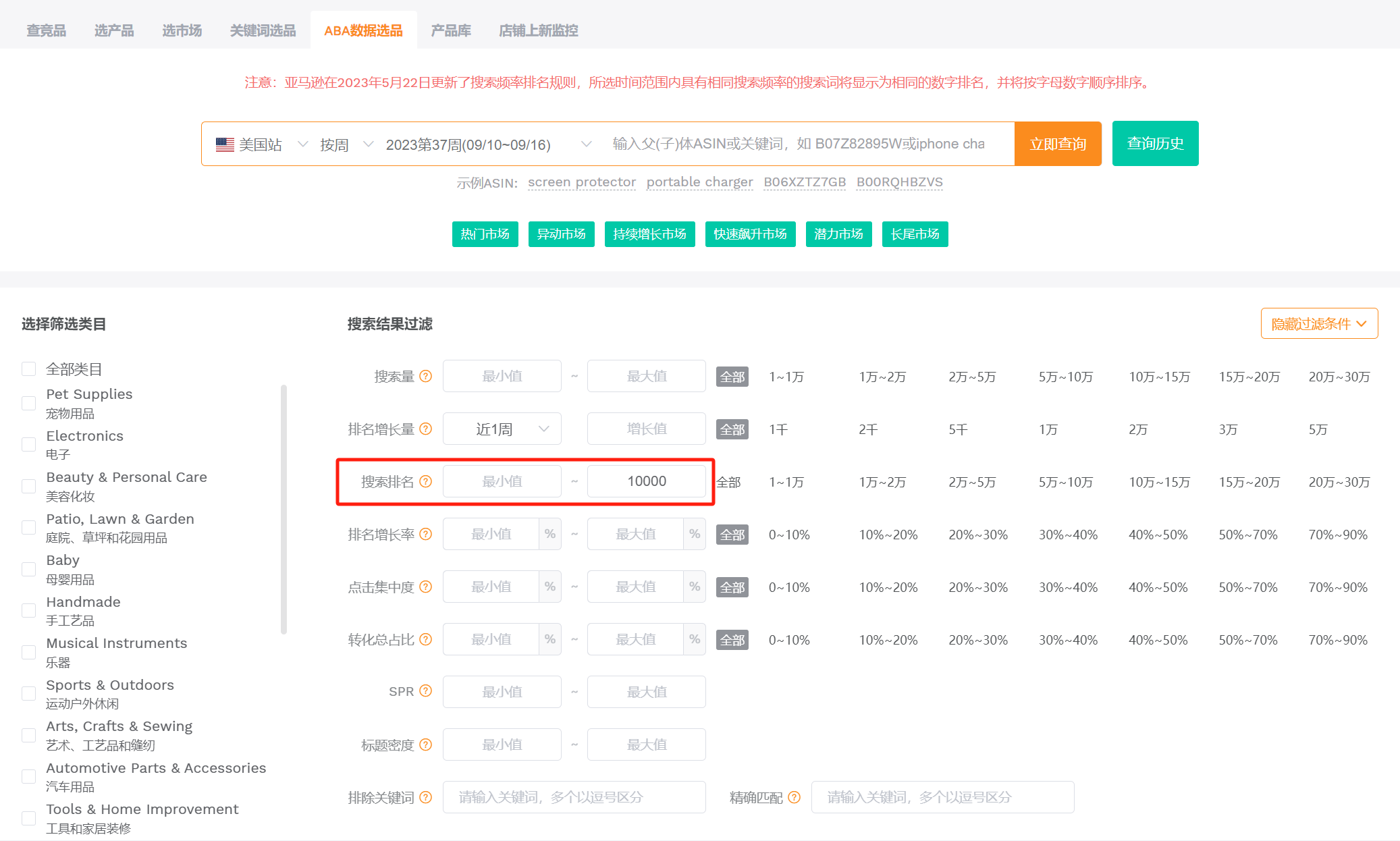
(图片来源于卖家精灵ABA数据选品)
3、基于市场潜力选品
这类关键词搜索排名不错且有一定的增长,但又没有特别靠前,对应的细分市场竞争相对也没有那么激烈,更适合中小卖家。
筛选条件:选择一个一级类目,设置搜索排名为20000-100000名,排名增长率近1周大于20%。
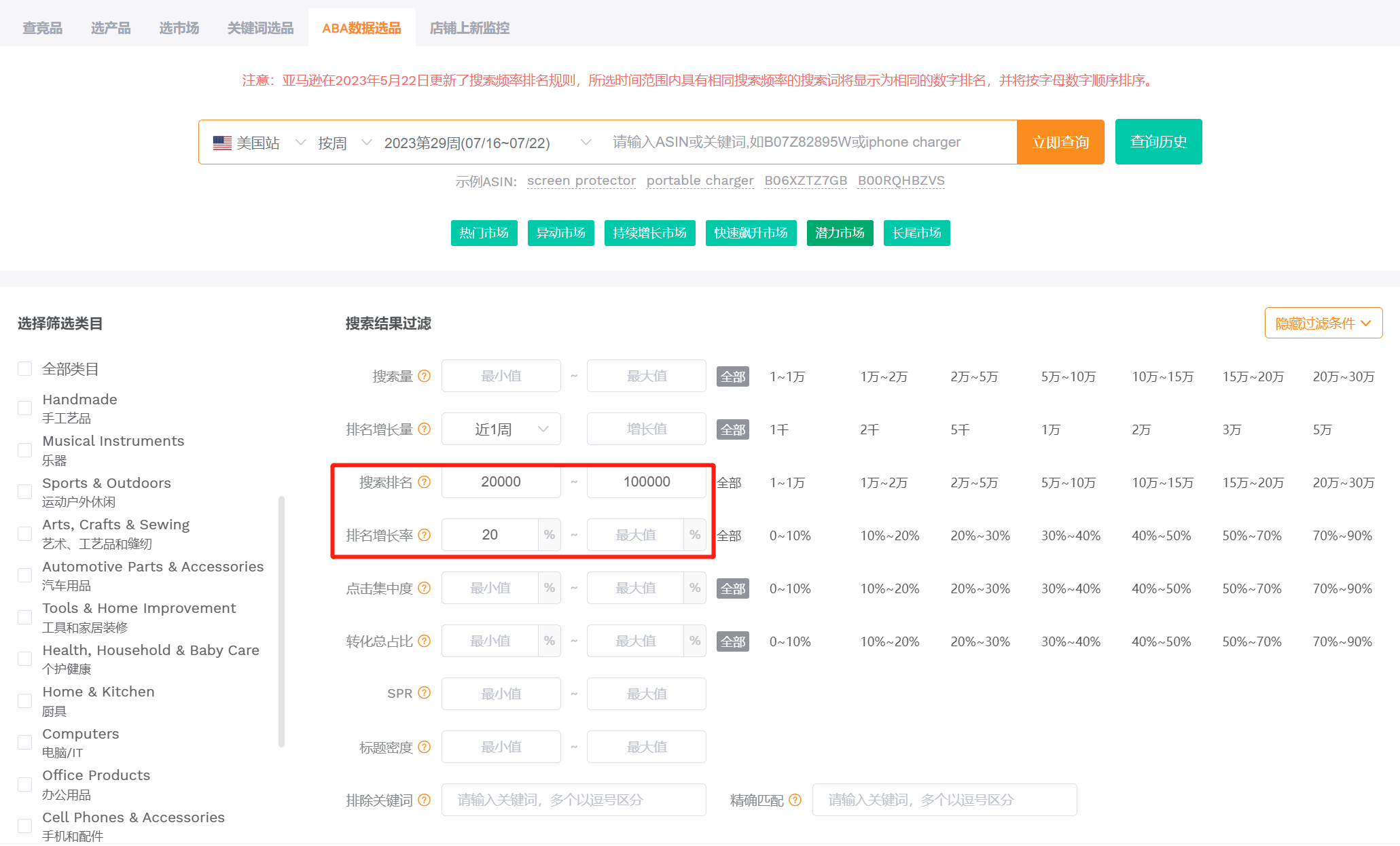
(图片来源于卖家精灵ABA数据选品)
4、基于搜索飙升选品
关键词的搜索排名飙升,说明市场需求非常急迫。
可能是季节性、节日性产品,也可能是萌芽中的潜力产品,可以结合排名趋势或Google Trends具体判断。
筛选条件:选择一个一级类目,设置排名增长率近1周大于50%。
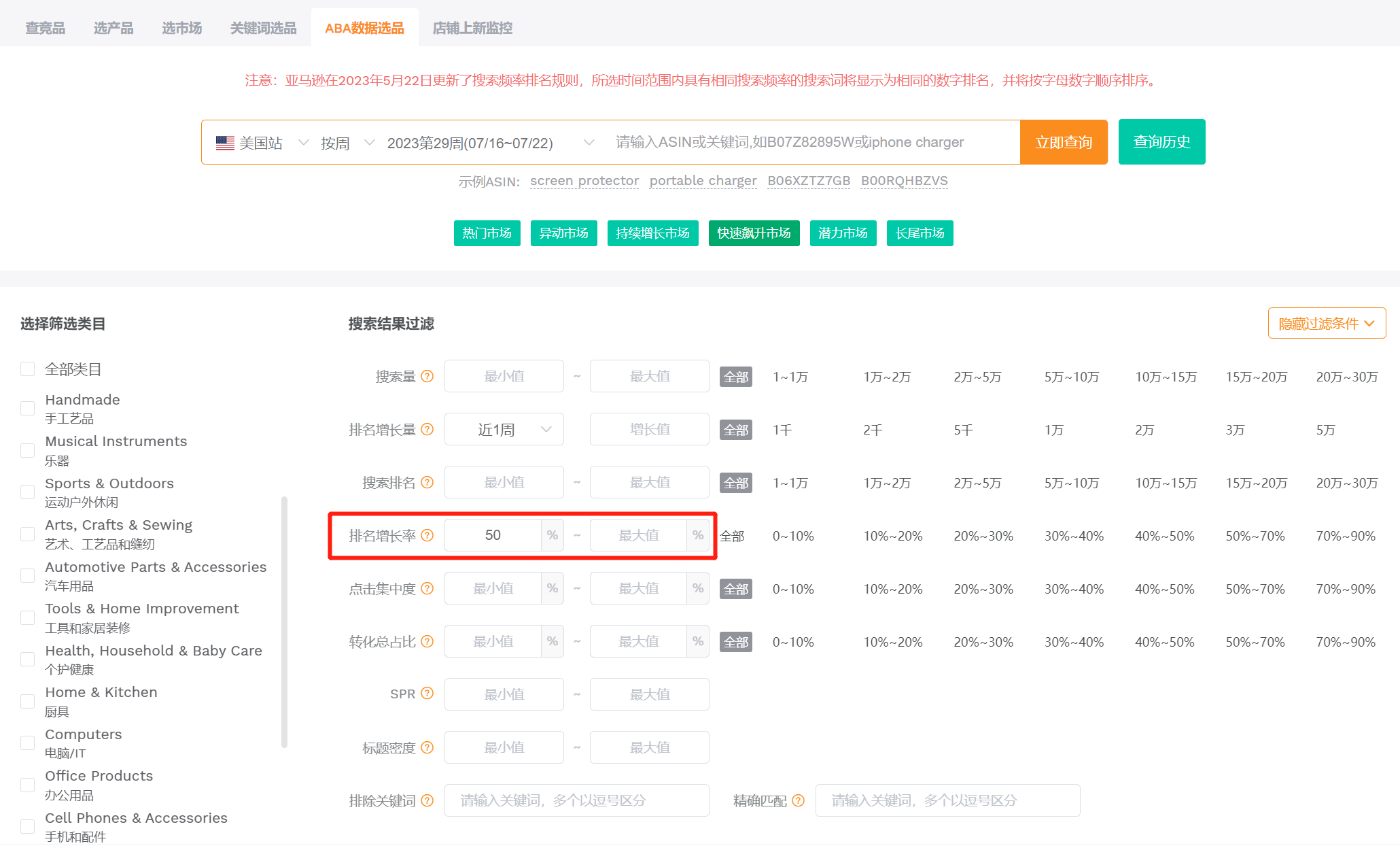
(图片来源于卖家精灵ABA数据选品)
5、基于市场容量选品
每个关键词都对应一个细分市场,关键词搜索量的大小直接反映了市场需求和容量大小,也是卖家选择竞争赛道时的重要参考指标。
对于实力雄厚的卖家,关键词月搜索量低于10万的市场,他们看不上,因为体量太小,不符合他们的销量预期;对于刚入场的中小卖家,则会优先选择月搜索量较小的市场,因为月搜索量大的市场,往往也意味着竞争更大。
筛选条件:设置月搜索量>100000,月搜索量增长率>10%,再根据自己的实力和偏好,叠加其它筛选条件。比如有资金优势的卖家,可以选择高客单价的产品切入,以利润取胜。
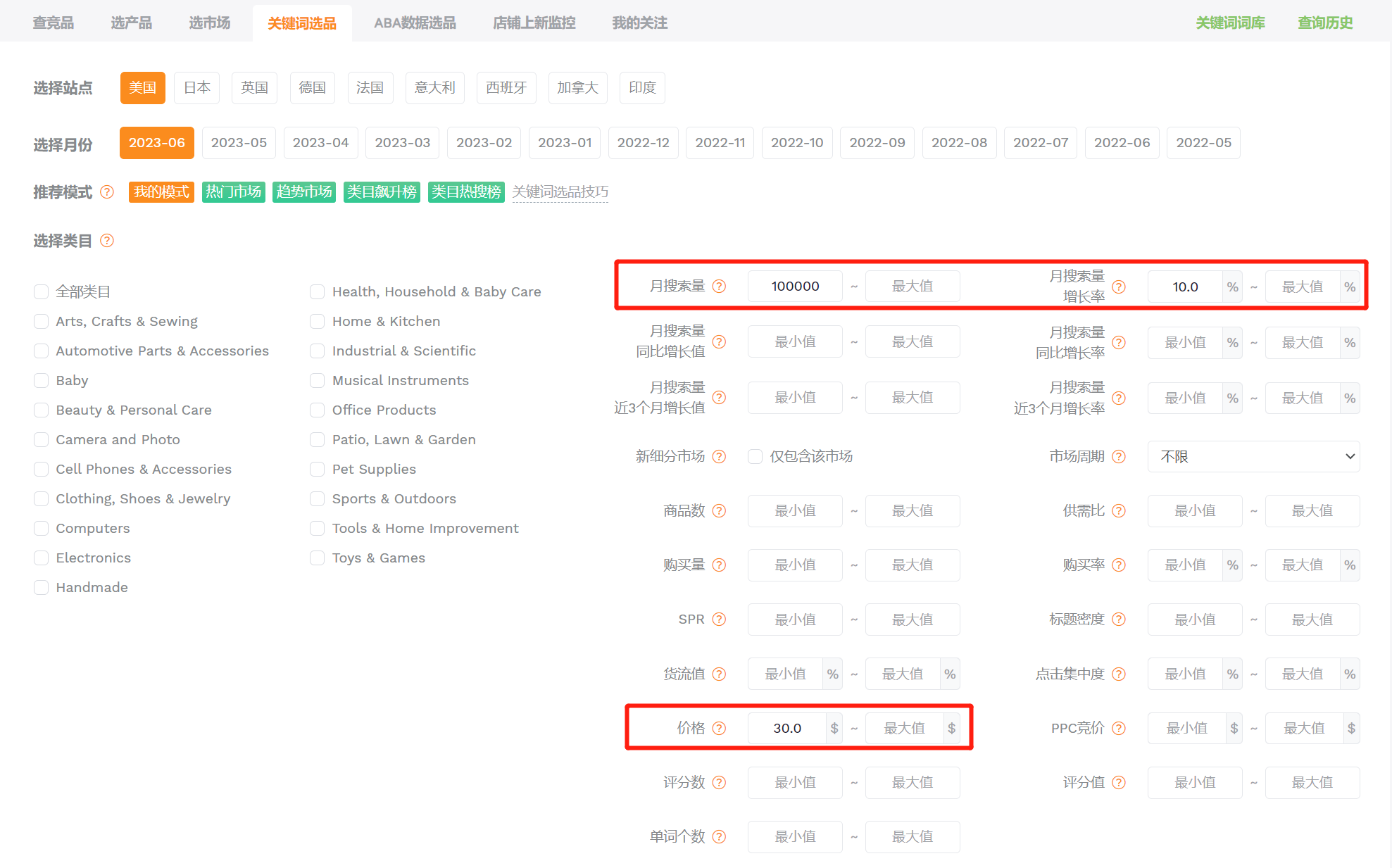
(图片来源于卖家精灵关键词选品)
6、基于市场竞争选品
关键词的点击集中度,指的是某关键词搜索结果页点击量前三ASIN的点击量在该关键词总点击量中的占比,一定程度上反映了关键词在细分行业(搜索结果页)的垄断情况,垄断程度越低,市场竞争越小。
筛选条件:选择一个一级类目,设置点击集中度小于50%,或直接将搜索结果按照点击集中度升序排列,即可筛选出市场垄断度较低的关键词市场。
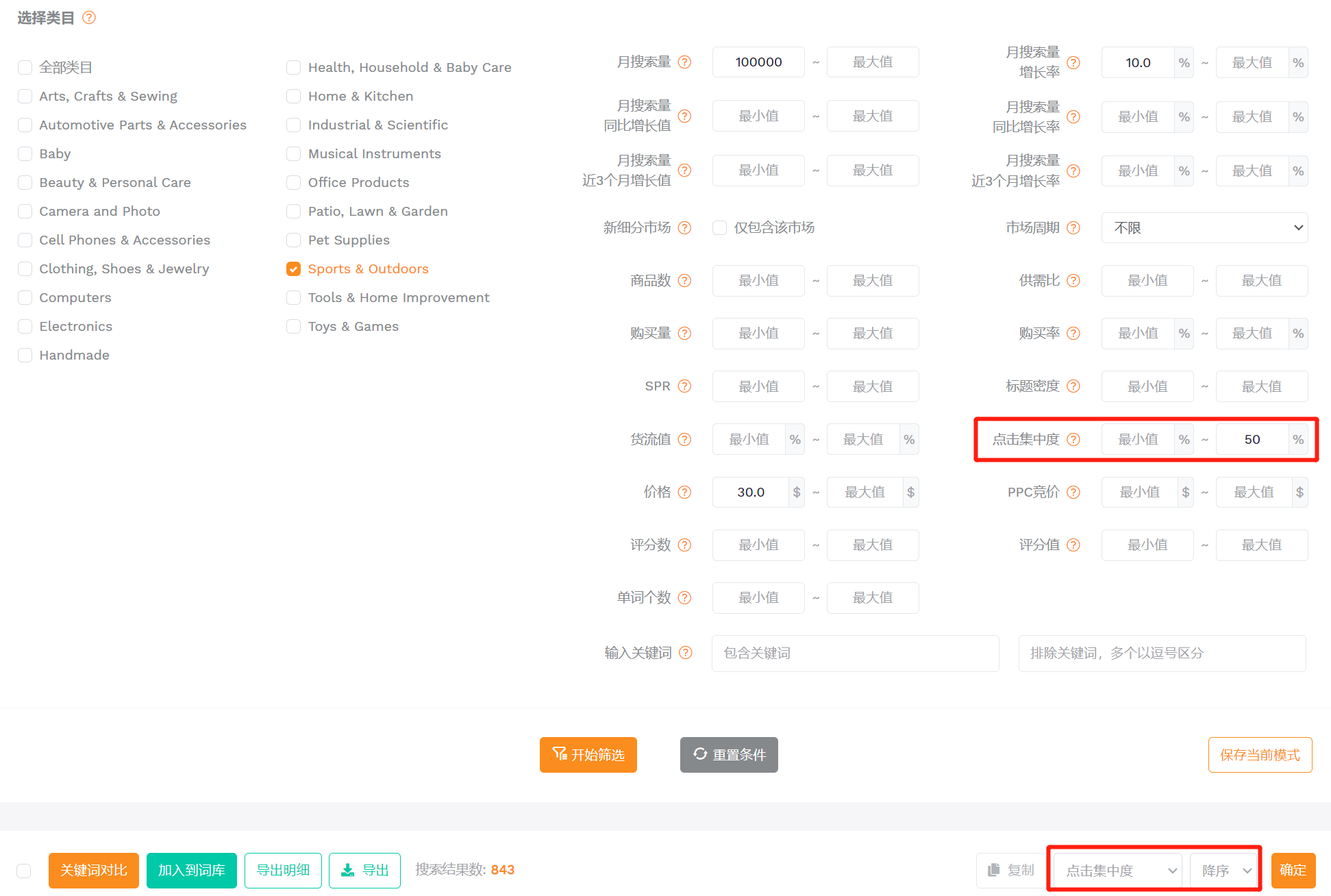
(图片来源于卖家精灵关键词选品)
7、基于新型市场选品
其原理是筛选出(今年)当月有该关键词的搜索量,而去年该月没有该关键词的搜索量的市场,这一指标可以跟其它过滤条件结合起来筛选出新型市场。当市场进入红海阶段,从存量市场中挖掘增量市场就变得尤为重要。这种以前没有,今年才出现的市场,无疑就是增长发力的新型市场。
筛选条件:设置月搜索量>10000,月搜索量增长率>10%,再勾选【新细分市场】,即可筛选出某类目下去年还未出现、近期搜索增长较快的新兴热门市场。
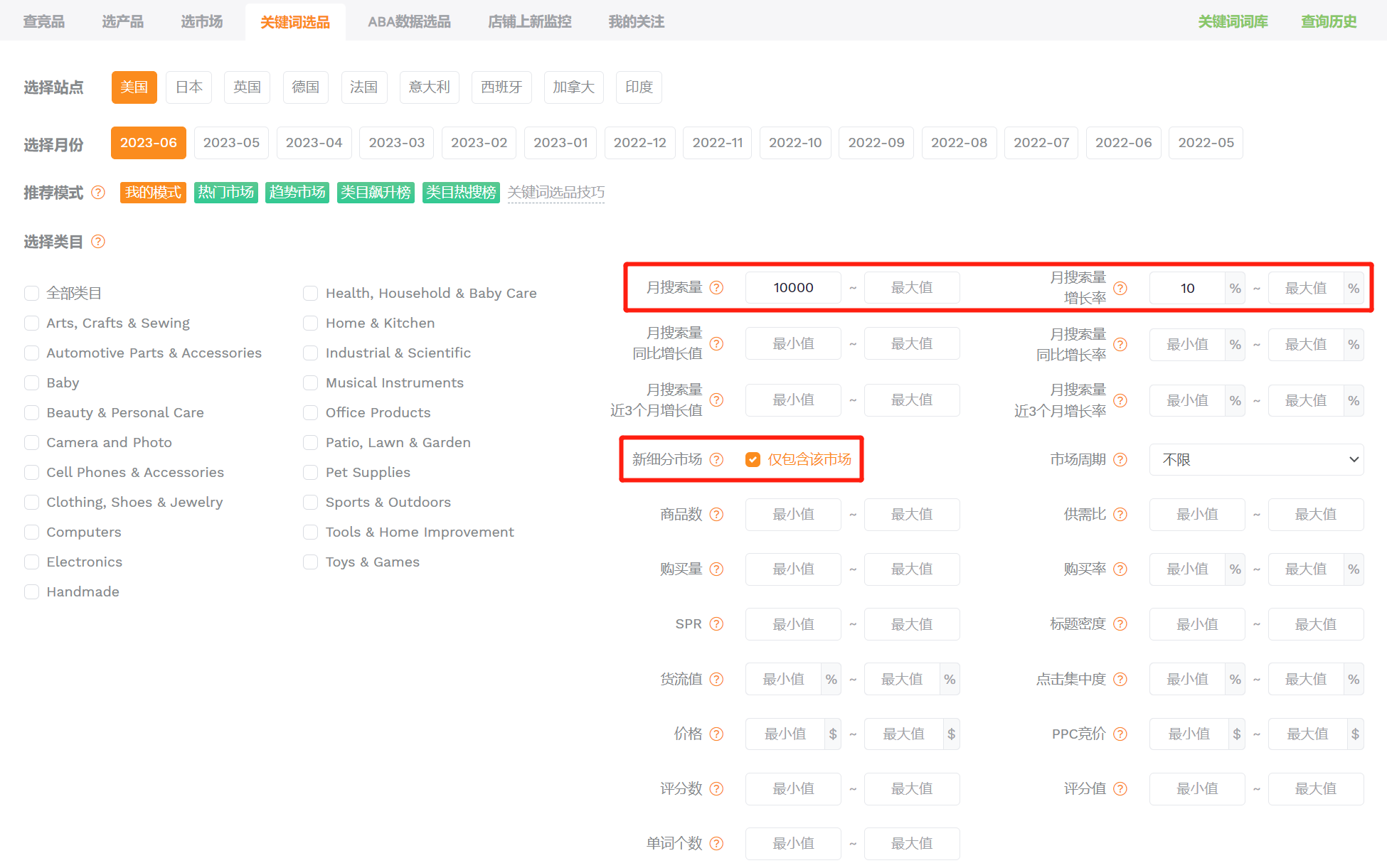
(图片来源于卖家精灵关键词选品)
8、基于季节性/节日性选品
季节性产品有快进快出的特点,可以更快速、更轻松地带来利润。但另一方面也要求卖家有洞察市场的能力。参考产品主要关键词的历史搜索数据,就能掌握买家的需求变化,帮助卖家提前布局产品,给产品准备、Listing打造留出充足的时间。
筛选条件:选择一个一级类目,根据【市场周期】选择不同的月份,就能找到该类目下在对应月份中搜索量高于平时的关键词市场。
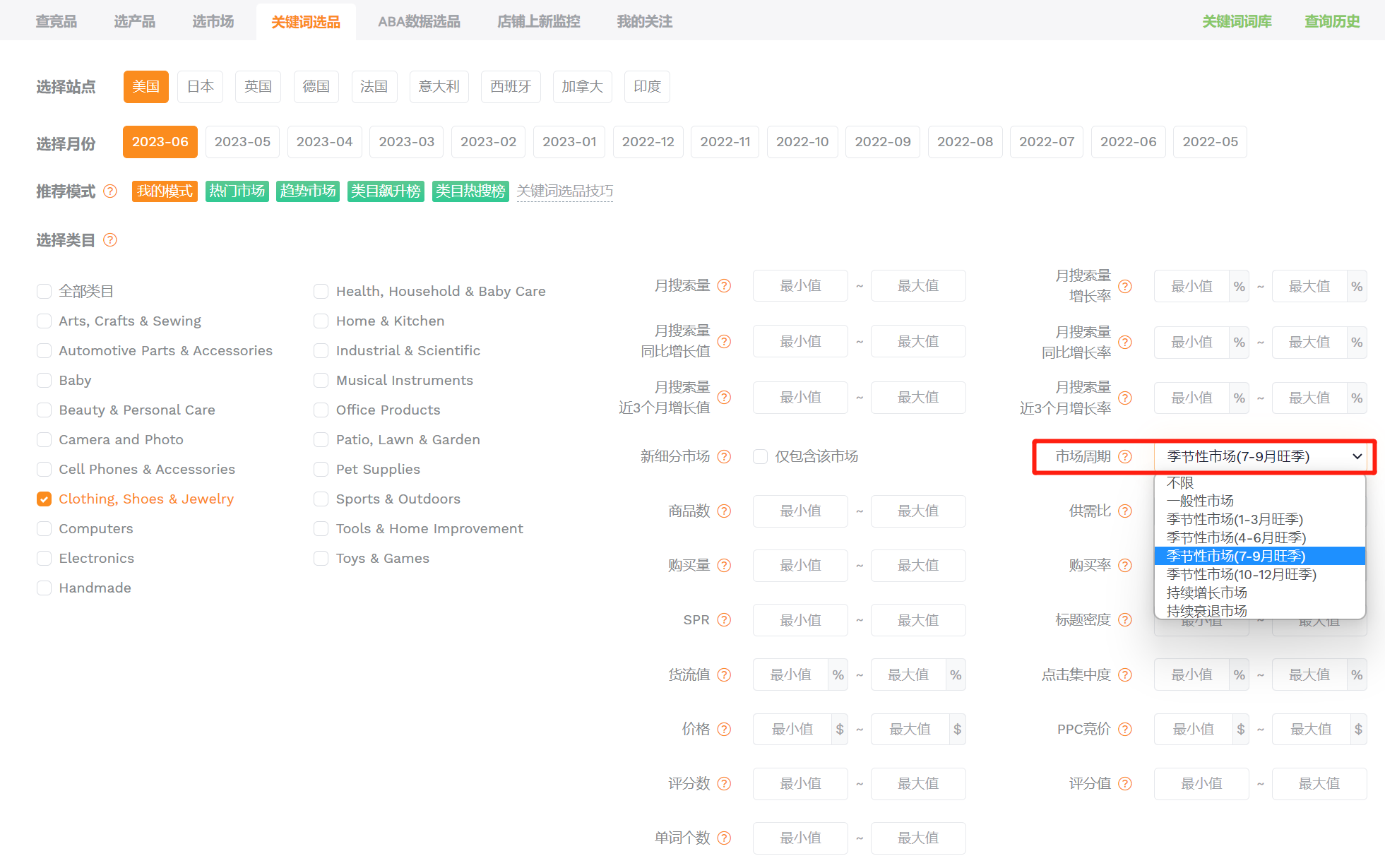
(图片来源于卖家精灵关键词选品)
9、基于营销成本选品
货流值代表销售同样货值的商品,需要的流量成本大小。计算规则:货流值=PPC价格/商品均价,比如关键词iphone 13 case的PPC竞价为$4.57,商品均价为$20.62,则货流值为4.57/20.62*100%=22.1%,代表每销售100美金货值的商品,单次流量成本是22.1美金。
一般来说,货流值越低,意味着该细分行业引流成本越低,竞争越小,同时也可能意味着该词对应的细分市场还处于蓝海。
筛选条件:将某一类目下的细分市场按照货流值升序排列,筛选出营销成本相对更低的细分市场。
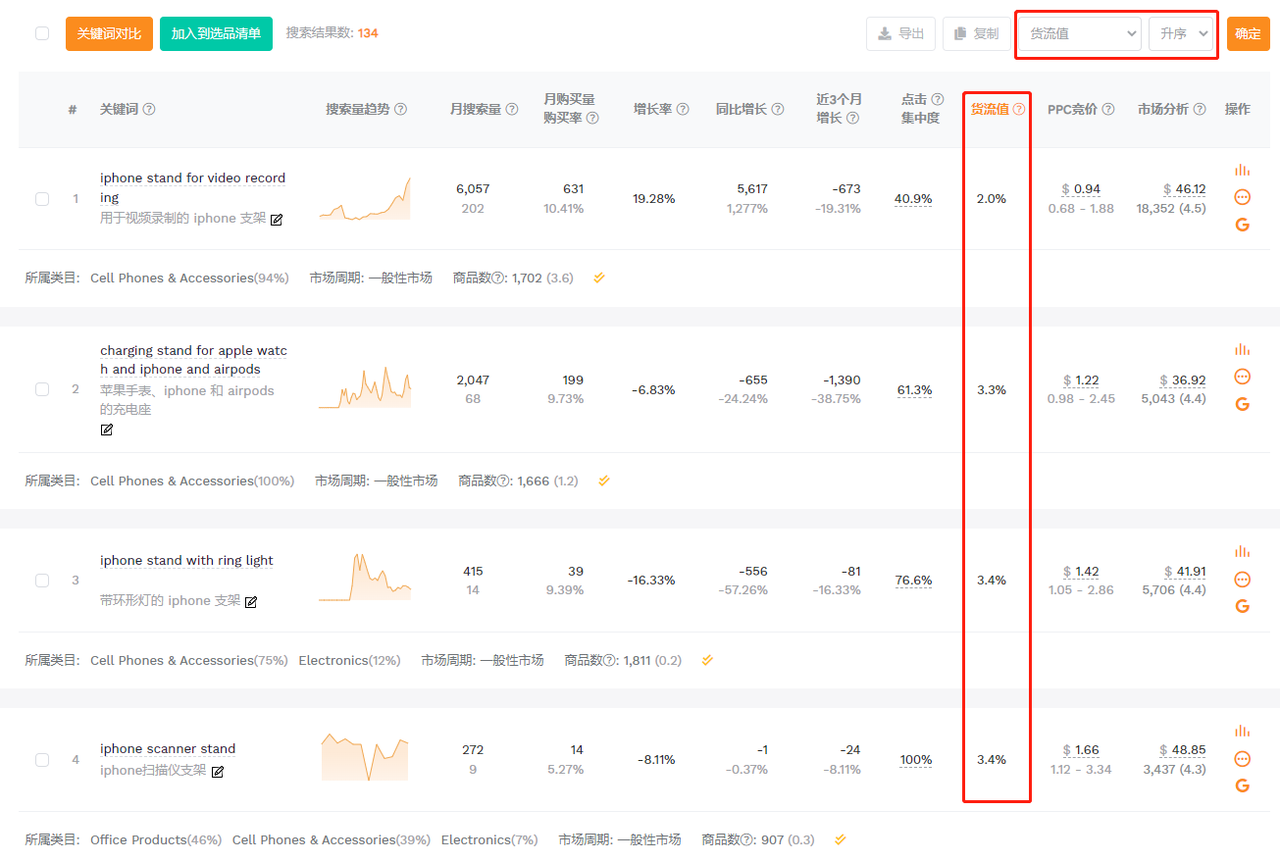
(图片来源于卖家精灵关键词选品)
10、基于长尾细分市场选品
一个类目下的关键词一般可以分为核心词和长尾词。核心大词流量虽大,往往也意味着竞争更激烈。长尾关键词一般是指单词数大于等于3的关键词词组。使用长尾关键词进行搜索的买家虽然不多,受众范围较小,但它指向的搜索内容更为具体,能快速锁定购买人群,流量更为精准,转化率相对更高。
所以,对于中小卖家来说,主打竞争小流量获取更容易的长尾词来切入细分市场,提升流量的转化率,才是新市场逆袭的关键。
筛选条件:选择一个一级类目或者输入一个类目的核心关键词,单词个数最小值设置为3,可以筛选出该类目下的长尾细分市场。
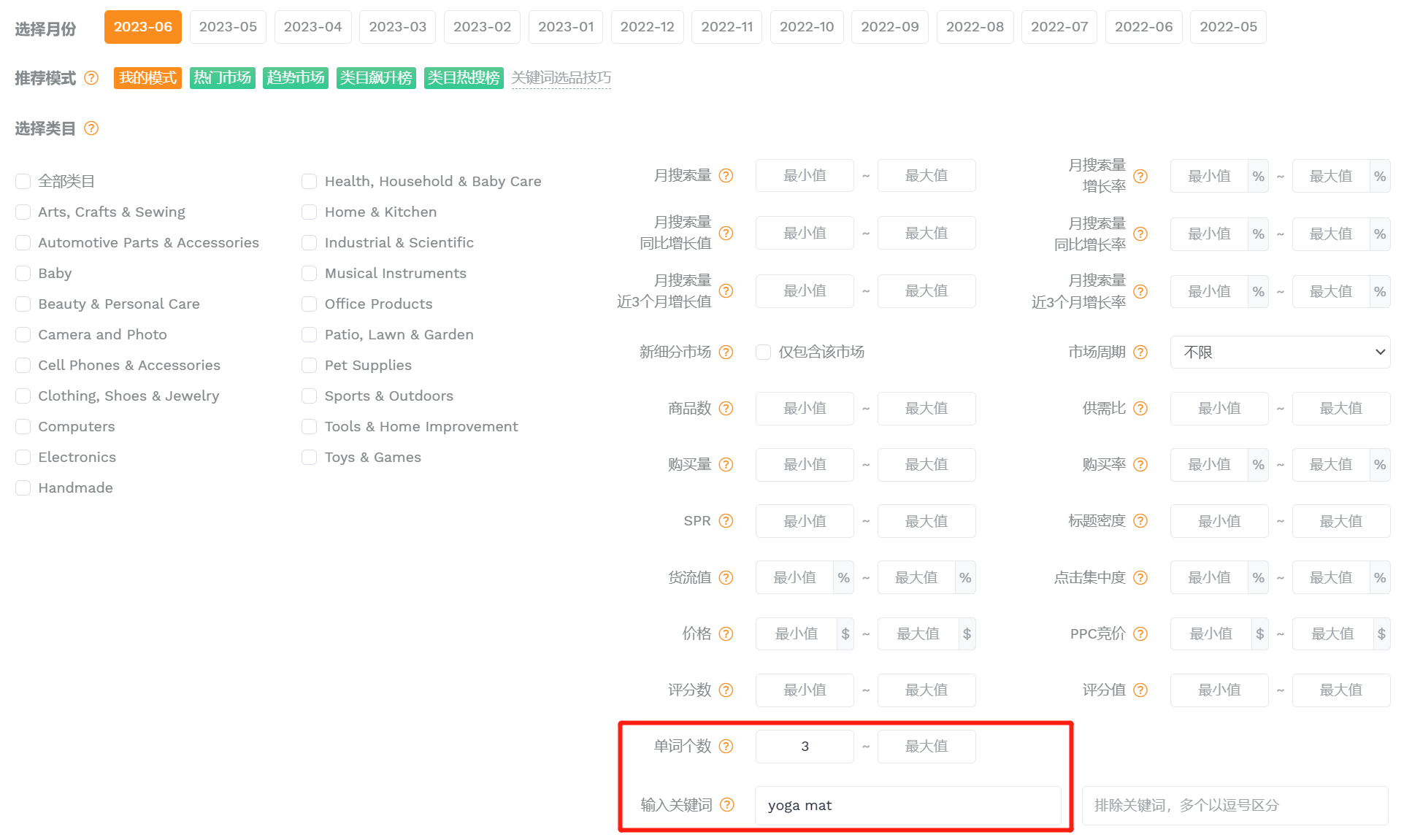
(图片来源于卖家精灵关键词选品)
产品大数据选品
微观选品、选个例,集成亚马逊上所有有动销产品的数据,通过销量增长率、评论增长数等过滤条件,帮助卖家发现产品。
11、基于产品潜力选品
最佳潜力市场是高需求低竞争的市场。但要找出这样的市场未免过于理想化。所以退而求其次,我们可以筛选出目前不算太“爆”,但未来有上涨潜力的“潜力股”产品。
筛选条件:设置月销量<600,月销量增长率>10%,上架日期为近半年。月销量目前不算太大但处于增长趋势,上架时间短代表新品也能在短期内打入市场,适合贸易型中小卖家。
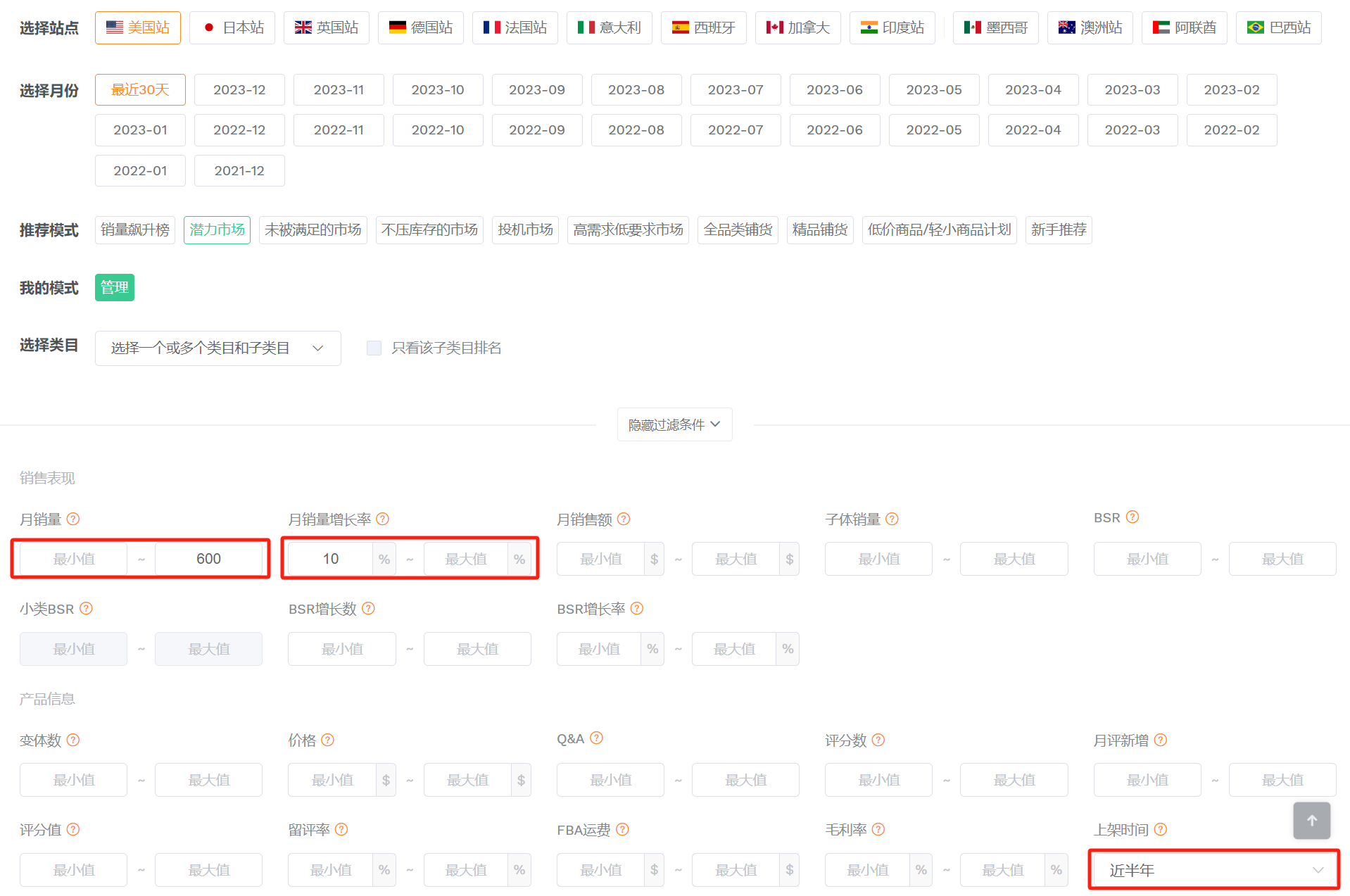
(图片来源于卖家精灵选产品)
12、基于产品成熟度选品
工厂型卖家一般拥有较强的生产和研发能力,但由于生产线的限制,往往产品品类会比较单一。所以建议这类卖家针对自己的品类进行深入研究,比如可以结合卖家精灵的评论分析进行细化分析。基于产品成熟度,包括材质、尺码、颜色、款式等各方面的细节属性,找到可以改进的地方,充分了解产品的品质状况和买家诉求后进行产品升级上架或者在产品细节上做出差异化。
筛选条件:月销量>1000,评分值<3.7,这类产品整体销量不错,但评分较差,说明产品有一定的改进空间。
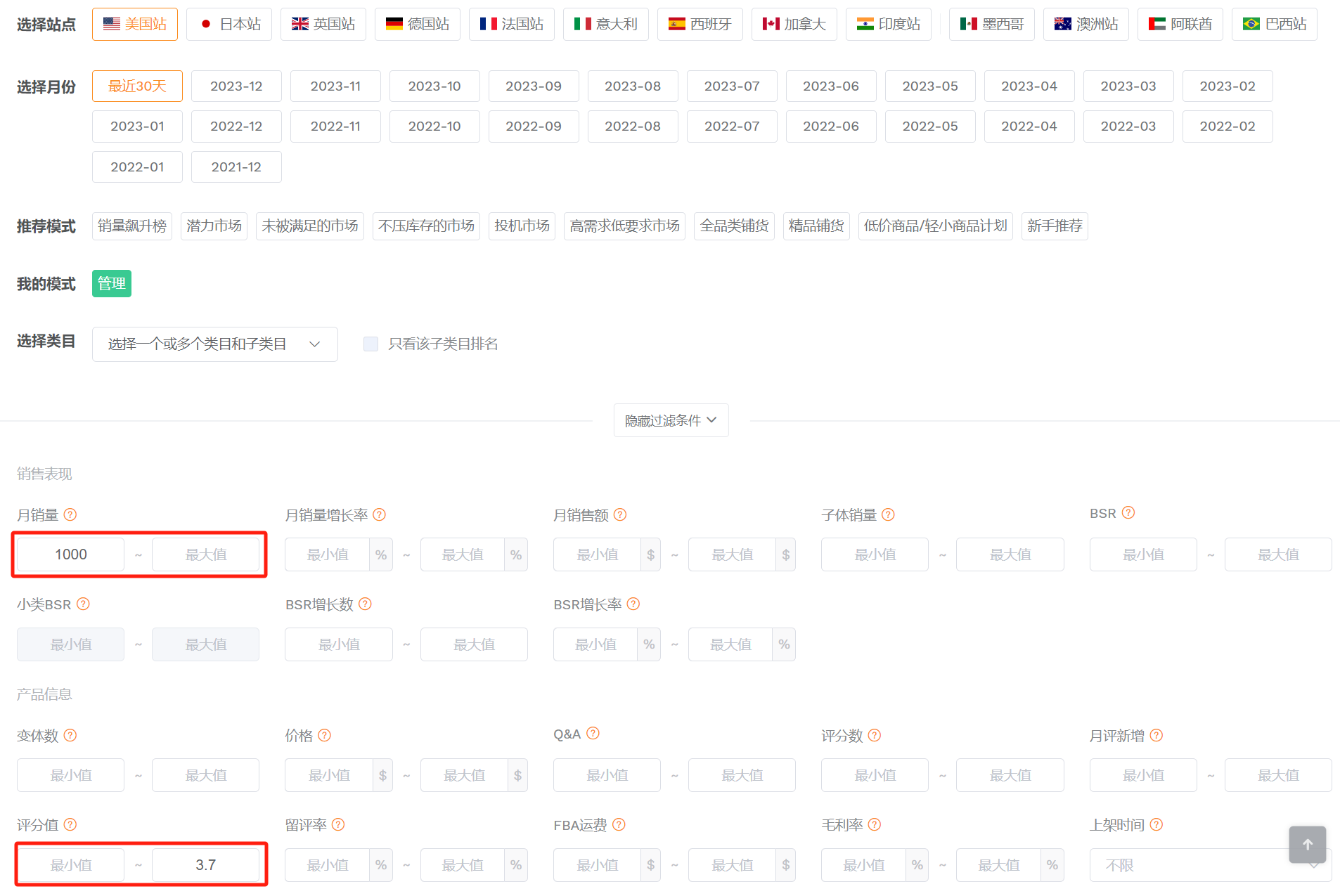
(图片来源于卖家精灵选产品)
13、基于资金周转选品
一个爆款的诞生往往建立在多次测款失败的基础上,对于那些在亚马逊仓库里蒙了灰尘的滞销品,放弃了心有不甘,不放弃又对高额的仓储费心有余悸。还有更悲催的是,产品销量不错,但利润全压在库存里,特别是旺季备货时,资金周转仍然是中小卖家的痛。所以如果您初入亚马逊想练练手或者想尝试零库存的转卖销售,不妨尝试一下这类产品。
筛选条件:月销量>1000,配送方式为FBM。可以筛选出某类目下有一定销量但以自发货为主的产品。
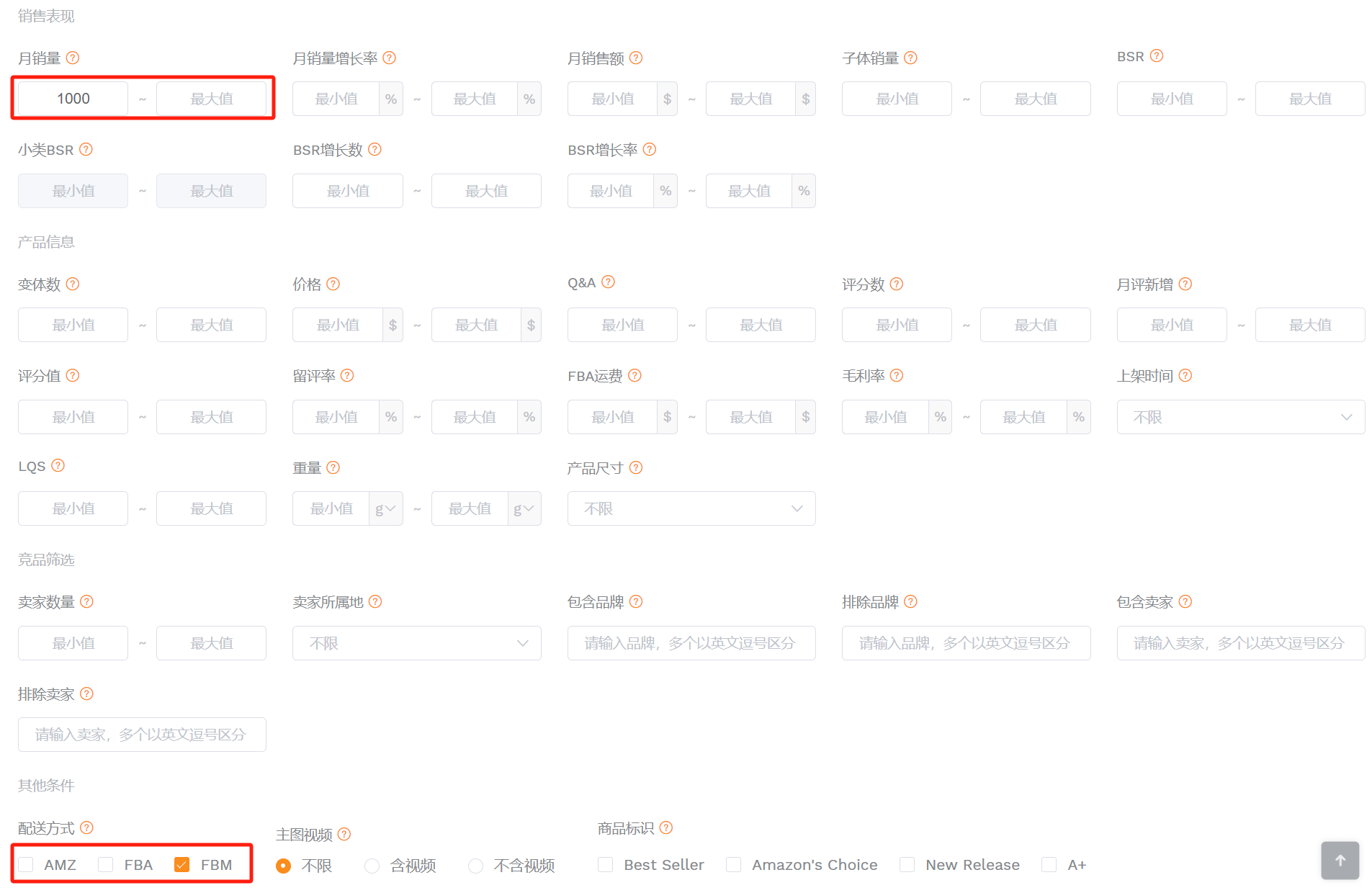
(图片来源于卖家精灵选产品)
14、基于投机市场选品
对于一些没有流量、连购物车都没有的新店铺,跟卖也不失为一种好的引流方法。瘦死的骆驼比马大,即使存在多个跟卖卖家,销量较大的情况下也可以分到蛋糕。
筛选条件:月销量>1000,卖家数量>3。一般来说,亚马逊有品牌、版权或专利的产品无法跟卖,此条件可初步过滤出某类目下销量不错,且允许跟卖的产品。
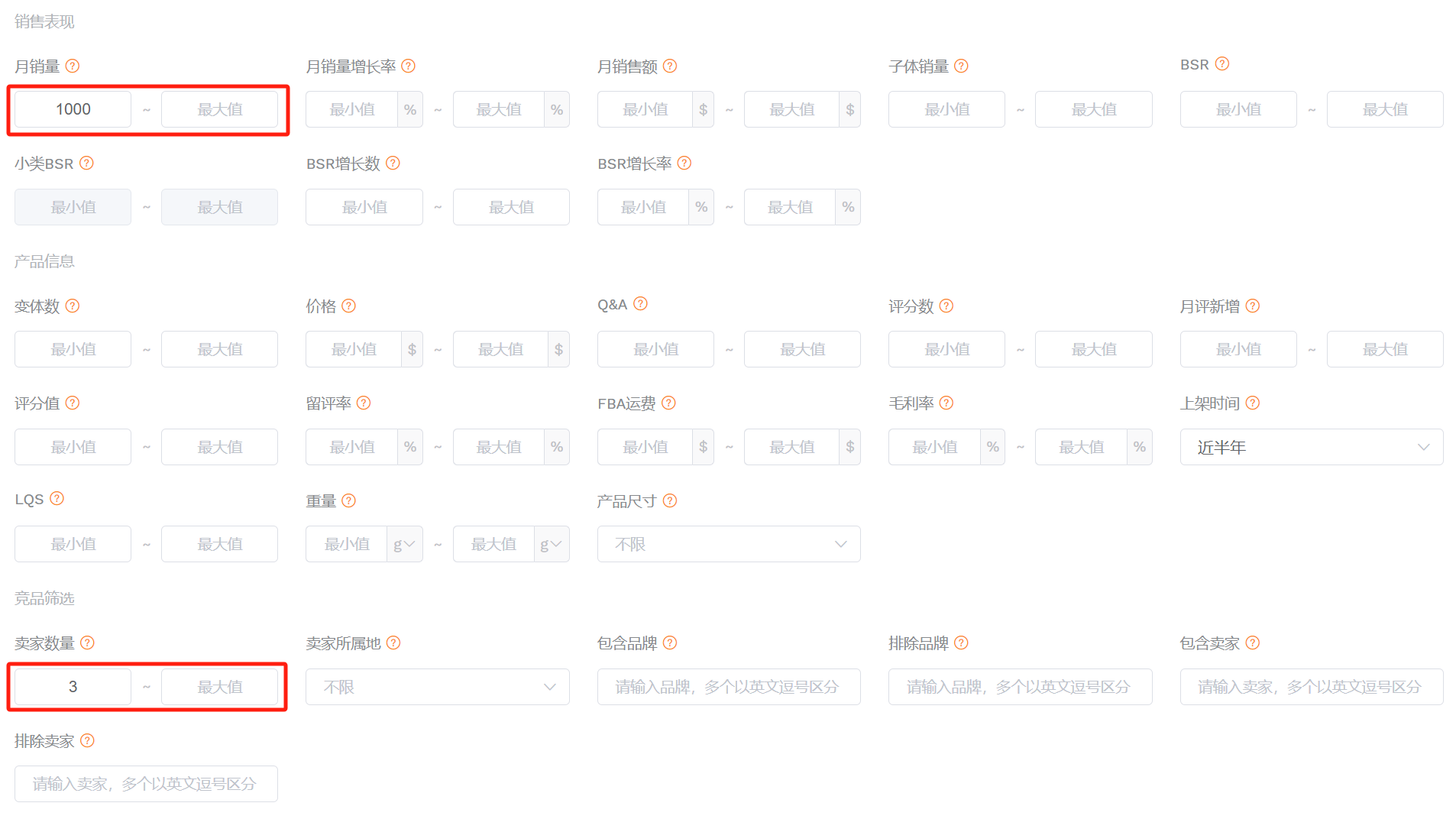
(图片来源于卖家精灵选产品)
15、基于售后成本选品
这类产品有一定的销量,但排名不算太靠前,不容易被其他卖家盯上。且评分较高,问答数较少,表示产品简单易操作,售后问题较少。适合泛铺、精铺的卖家。
筛选条件:月销量>1000,BSR排名在5000~10000范围内,评分值>4.0,Q&A数<5,可以筛选出销量不错且售后成本较低的产品。
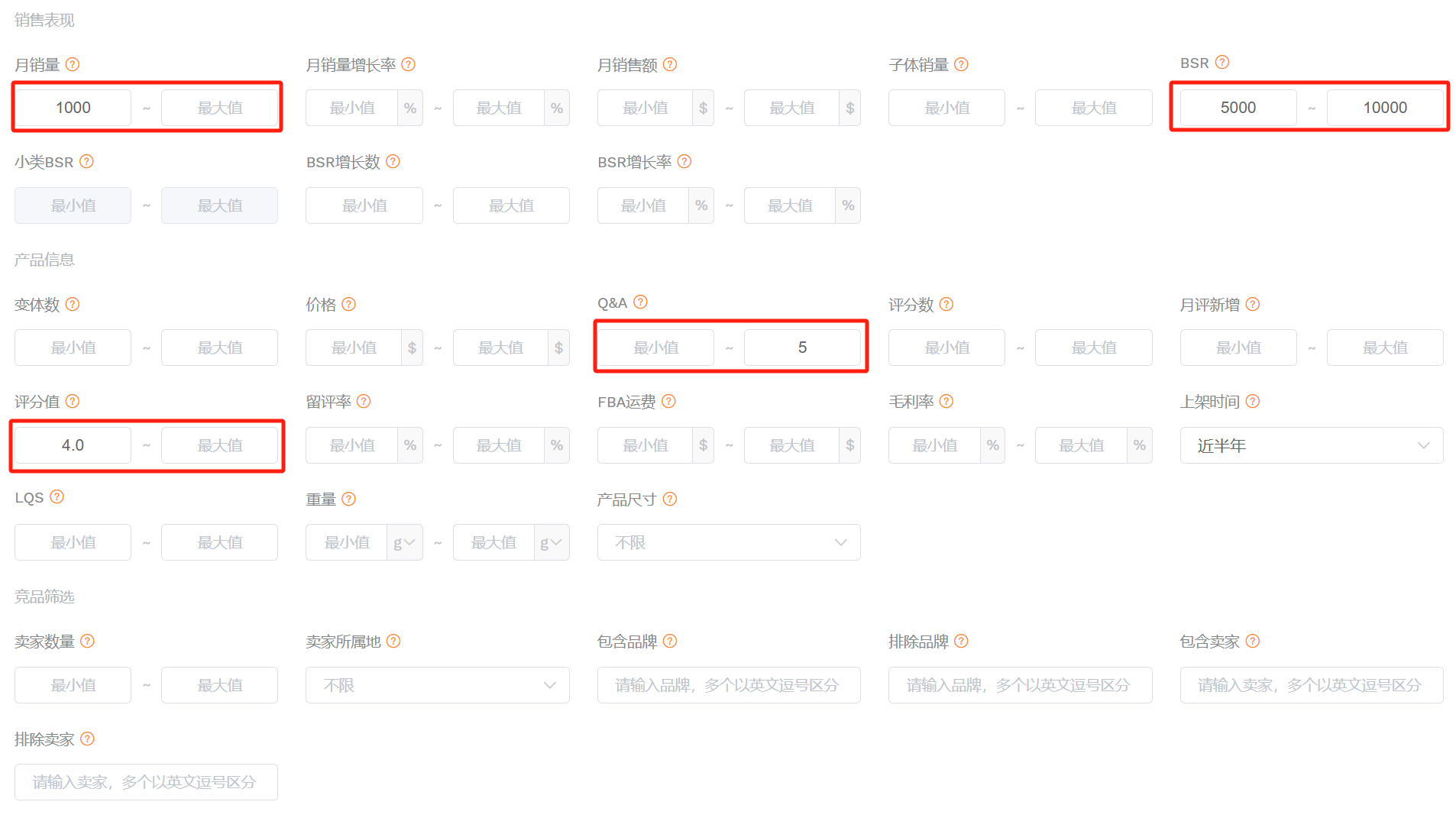
(图片来源于卖家精灵选产品)
16、基于榜单潜力产品选品
能进入亚马逊榜单的产品,说明其产品潜力得到了市场认可;上架时间短、评分积累少,给新卖家的进入留出了空间。
筛选条件:在亚马逊榜单页面选择一个自己的优势类目,使用卖家精灵插件筛选出上架时间为近3个月,评分数<50的产品。
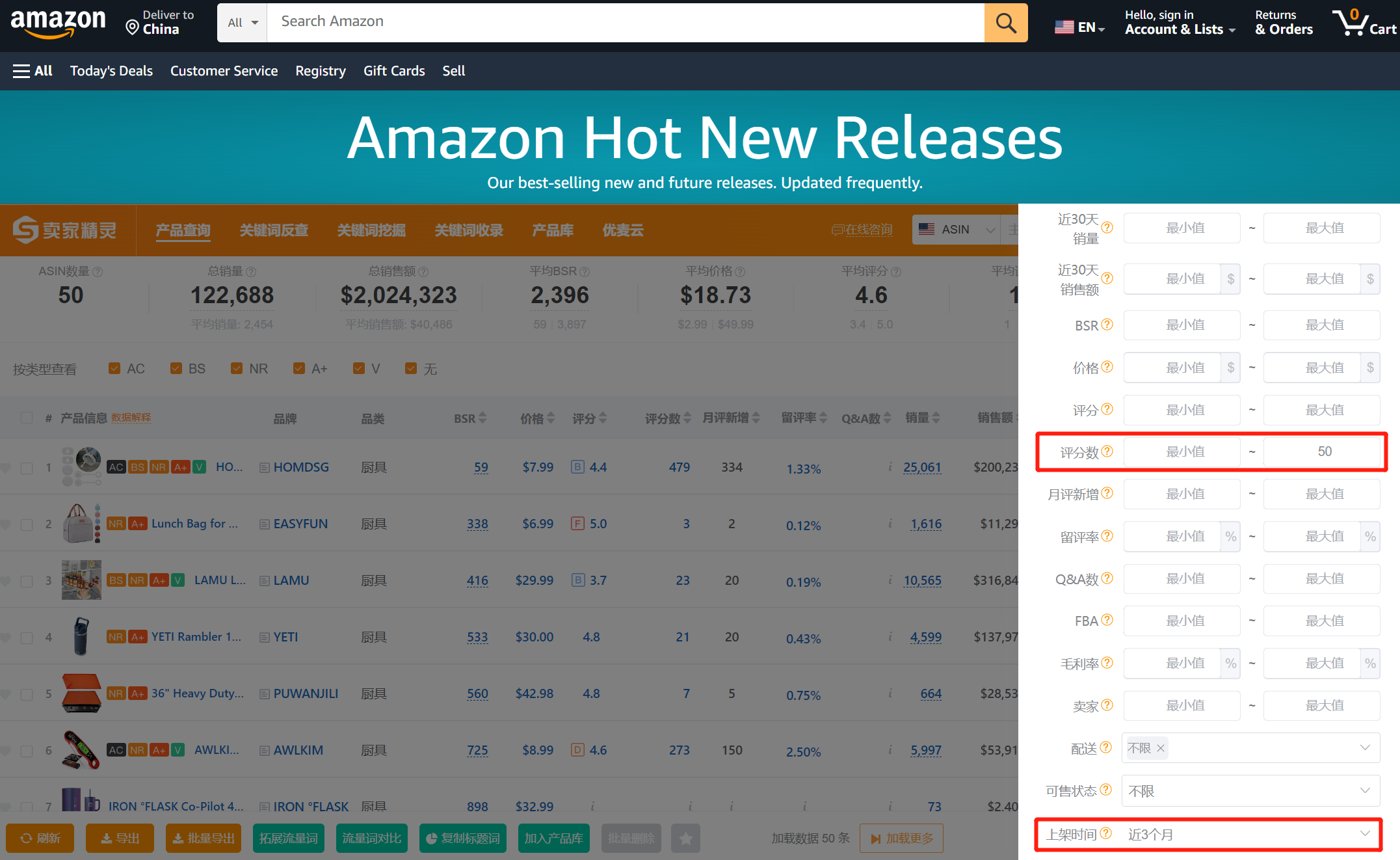
(图片来源于卖家精灵插件)
17、基于店铺上新监控选品
对于有竞争力的店铺,他们的产品选择都是经过深思熟虑的,推爆的概率较大,他们产品还在摇篮状态就去跟进,比他们打爆后再跟进更能够抢占市场先机。
筛选条件:通过监控优秀标杆店铺的每日上新情况,分析选出其中最有潜力的产品进行跟进,更适合供应链较强的卖家。
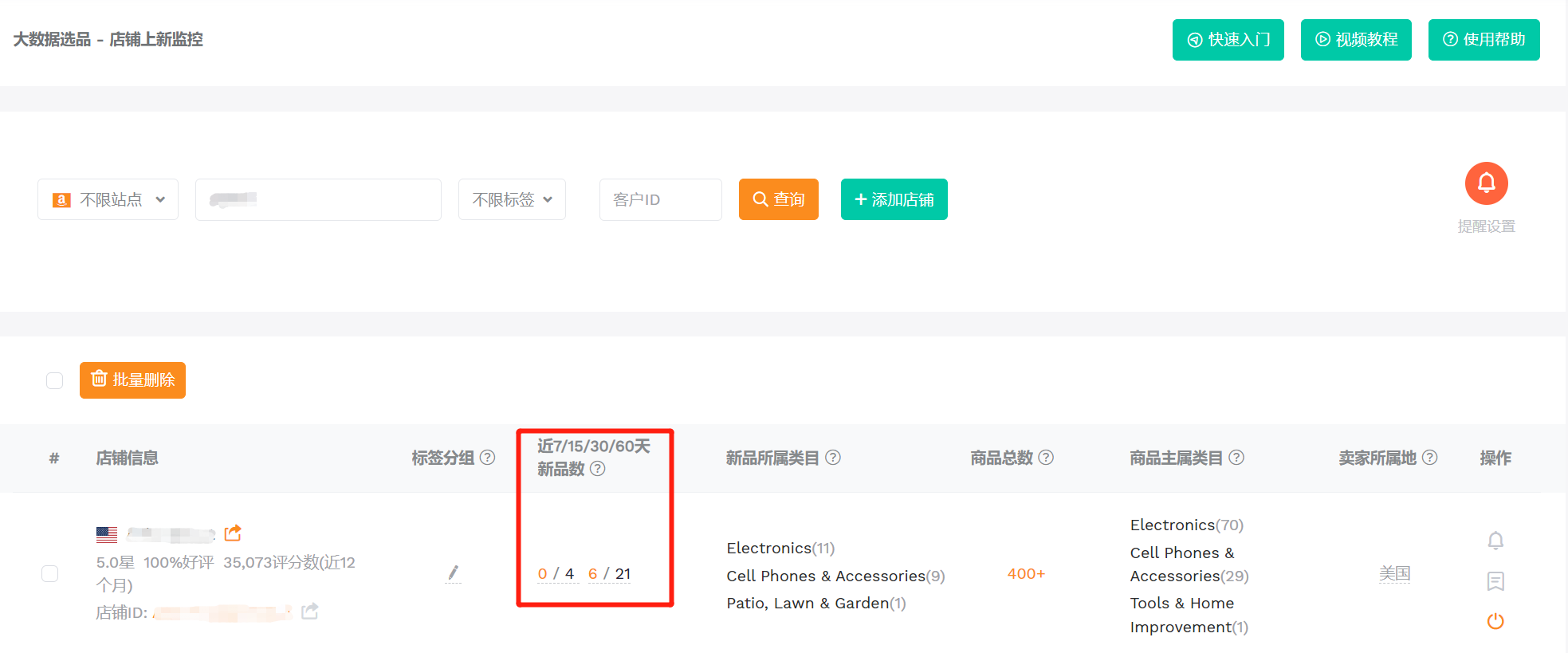
(图片来源于卖家精灵插店铺上新监控)
18、基于品牌上新监控选品
与店铺上新监控同理,更适合供应链较强的卖家。但可能涉及到品牌侵权等问题,需要在产品细节上做出差异。
筛选条件:输入品牌名称,将查询结果按照上架时间降序排列,即可得到该品牌下最新上架的产品。
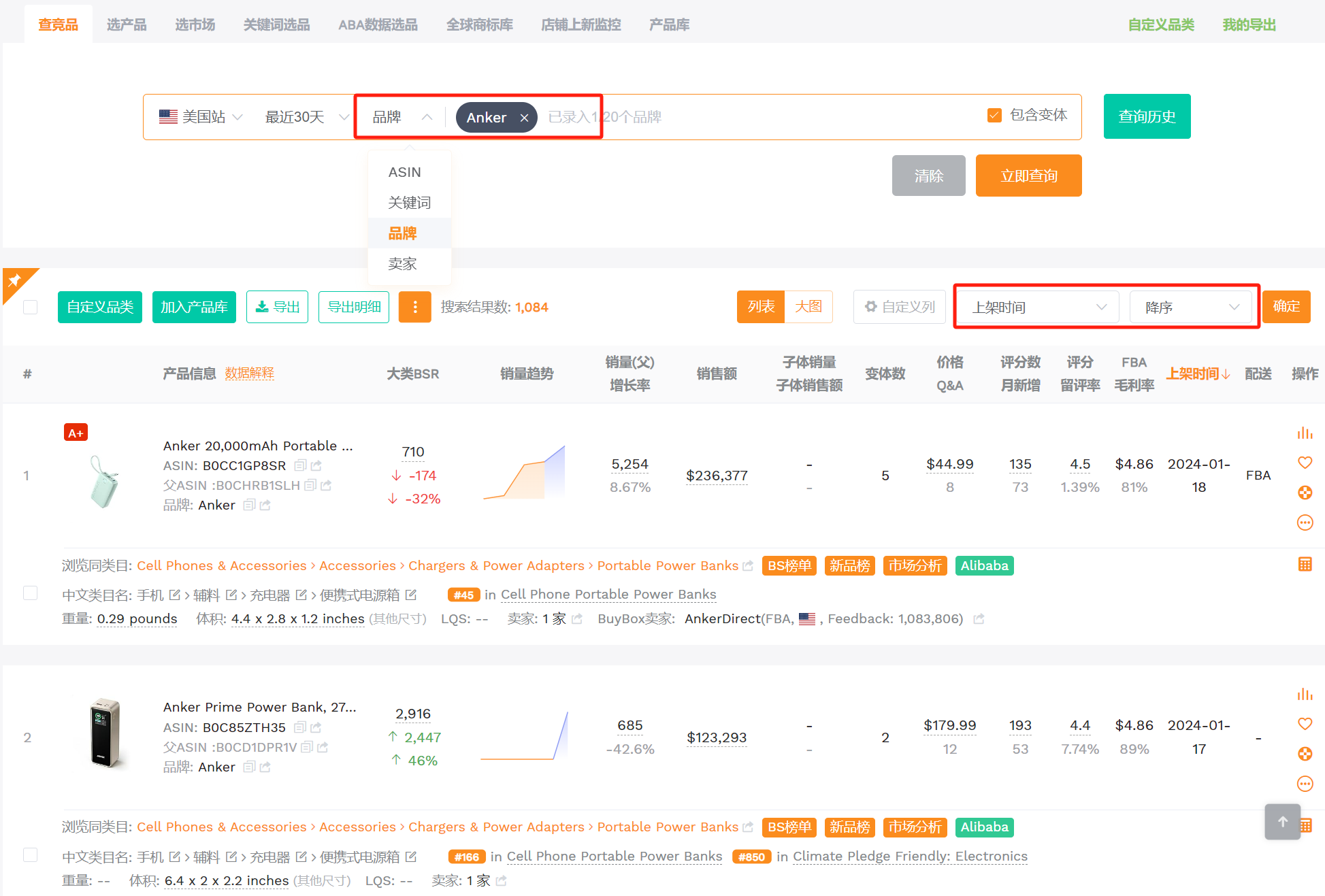
(图片来源于卖家精灵查竞品)
19、基于产品尺寸选品
产品的发货重量及尺寸决定了亚马逊FBA配送费用,这也是产品成本中的一项重要支出。对于一般的中小卖家,适合做轻小产品或标准尺寸产品(小号标准尺寸、大号标准尺寸),配送费用少,前期投入成本低。
如果有物流优势或海外仓优势,则可以选择大件产品,门槛较高,但竞争相对来说会小很多。
筛选条件:月销量>1000(有足够的市场需求),根据自己的需求选择不同的产品尺寸,大件产品可以叠加FBM的配送方式。
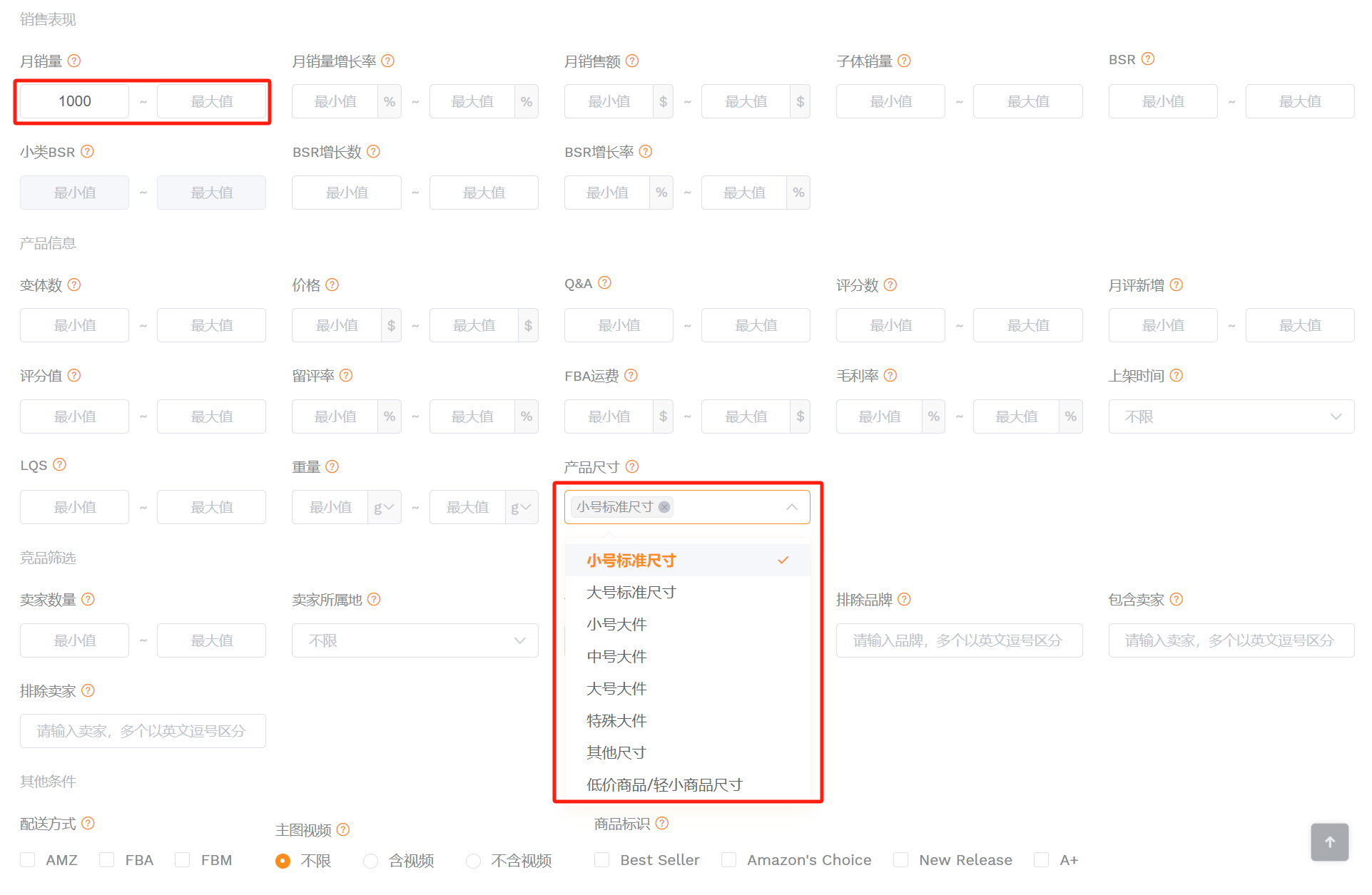
(图片来源于卖家精灵选产品)
20、基于Listing质量选品
Listing Quality Score,Listing质量得分。计算方法:从商品图片、商品描述及评价三大维度对Listing进行质量分析得出的分数。得分越高,Listing质量越好。(10分为满分)
Listing的标题和五点描述内容越详尽、A+页面产品占比越高、图片越精美,说明对手越成熟,卖家品牌意识更强,市场竞争度越高。反之,如果Listing质量不高,销量却仍旧很高,说明是高需求、低竞争的潜力产品。
筛选条件:月销量>1000,LQS<5,可以筛选出某类目下有一定销量,Listing质量较差的产品,通过对比优化Listing去超越它。
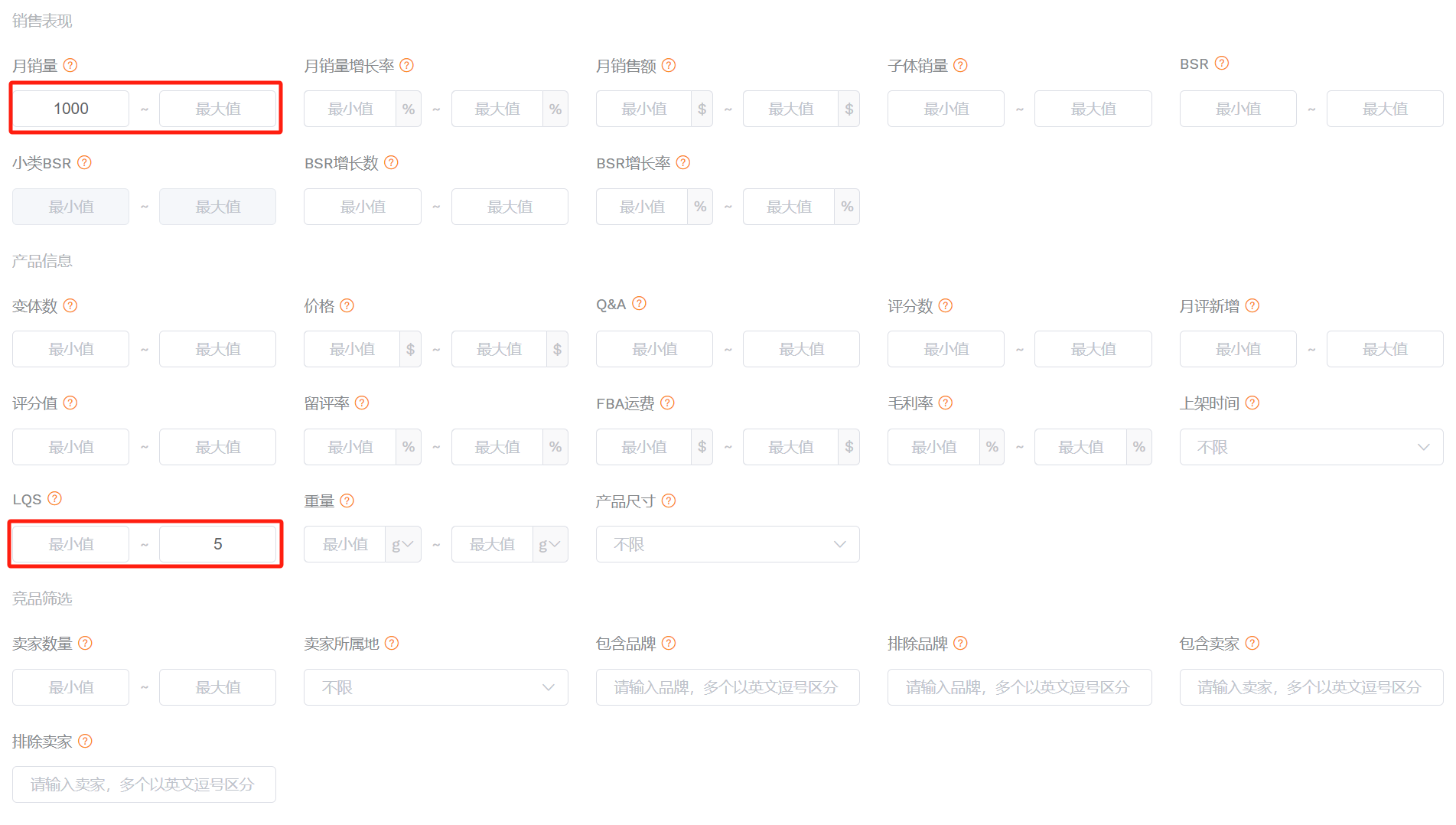
(图片来源于卖家精灵选产品)
21、基于卖家类型选品
亚马逊自营掌握着亚马逊最全、最新的趋势数据,可以说是最了解市场需求的“卖家”。大树底下好乘凉,跟着亚马逊自营走或许可以分一口“汤”喝。
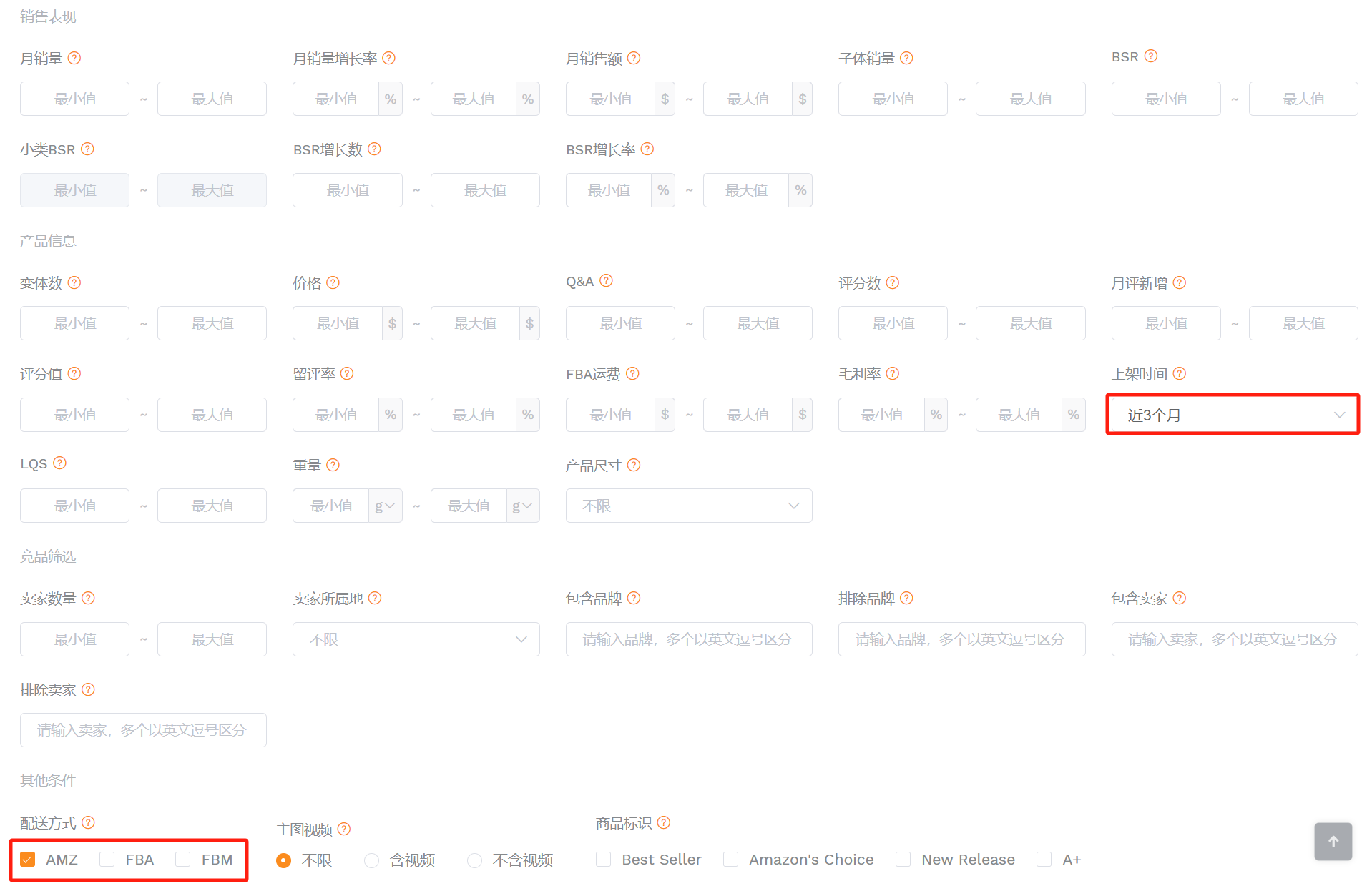
筛选条件:选择一个一级类目,设置配送方式为AMZ(亚马逊自营),上架日期为近3个月。
(图片来源于卖家精灵选产品)
22、基于薄利多销选品
低价格的产品资金需求小,试错成本和风险相对更小。但同时需要有足够的销量支撑才能赚取可观的利润。评分数较少,前期需要投入的营销成本较低,对新卖家来说更容易追上或者超越。
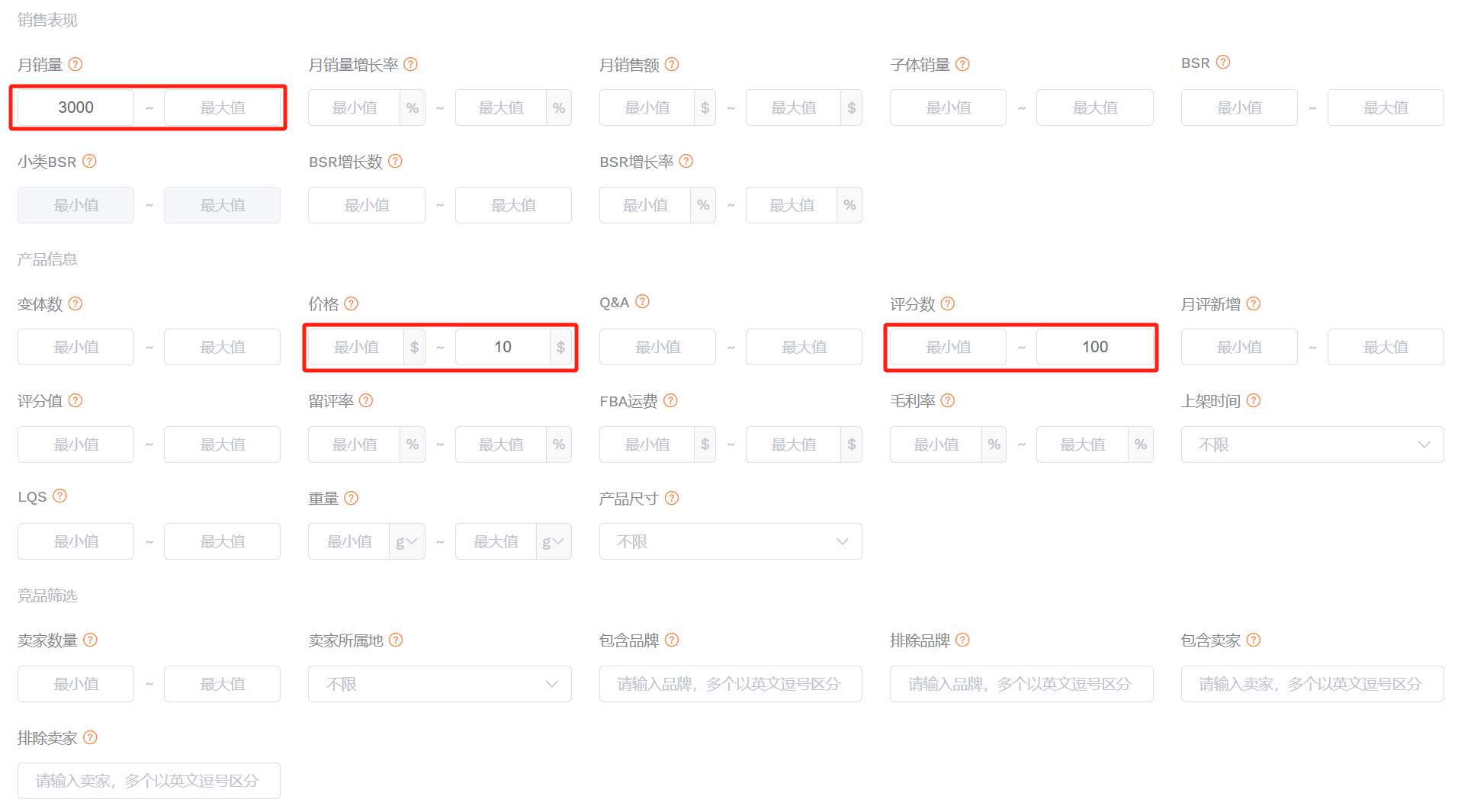
筛选条件:月销量>3000,评分数<100,价格<$10。
(图片来源于卖家精灵选产品)
23、基于垂直品类选品
如果卖家对某个类目的产品感兴趣且已经具备了一定的资源优势,就可以选择对该类目进行纵深挖掘。当专注于某个细分类目时,一方面可以更好地把握用户痛点,另一方面还可以帮助卖家沉淀经验、积累用户,集中资源、降低供应链成本,打造自己的竞争壁垒,这些反过来又能为产品差异化和研发奠定基础。
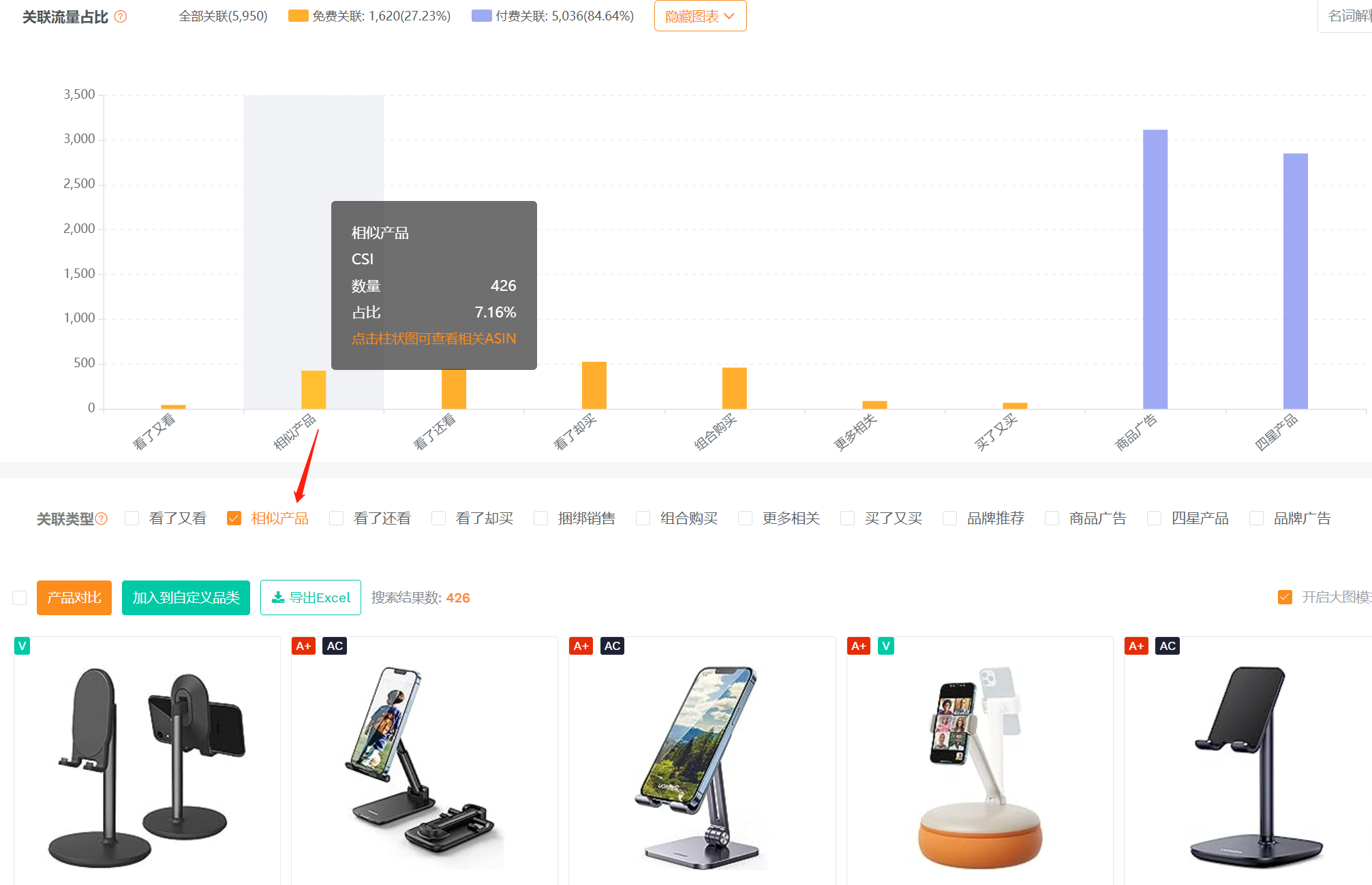
比如做手机桌面支架的卖家,可以扩展到带有储物功能的手机支架,或者满足不同使用场景的落地手机支架。
筛选条件:在【关联流量】功能中输入产品ASIN,点击相似产品,可以快速筛选出相关产品。
(图片来源于卖家精灵关联流量)
24、基于产品组合选品
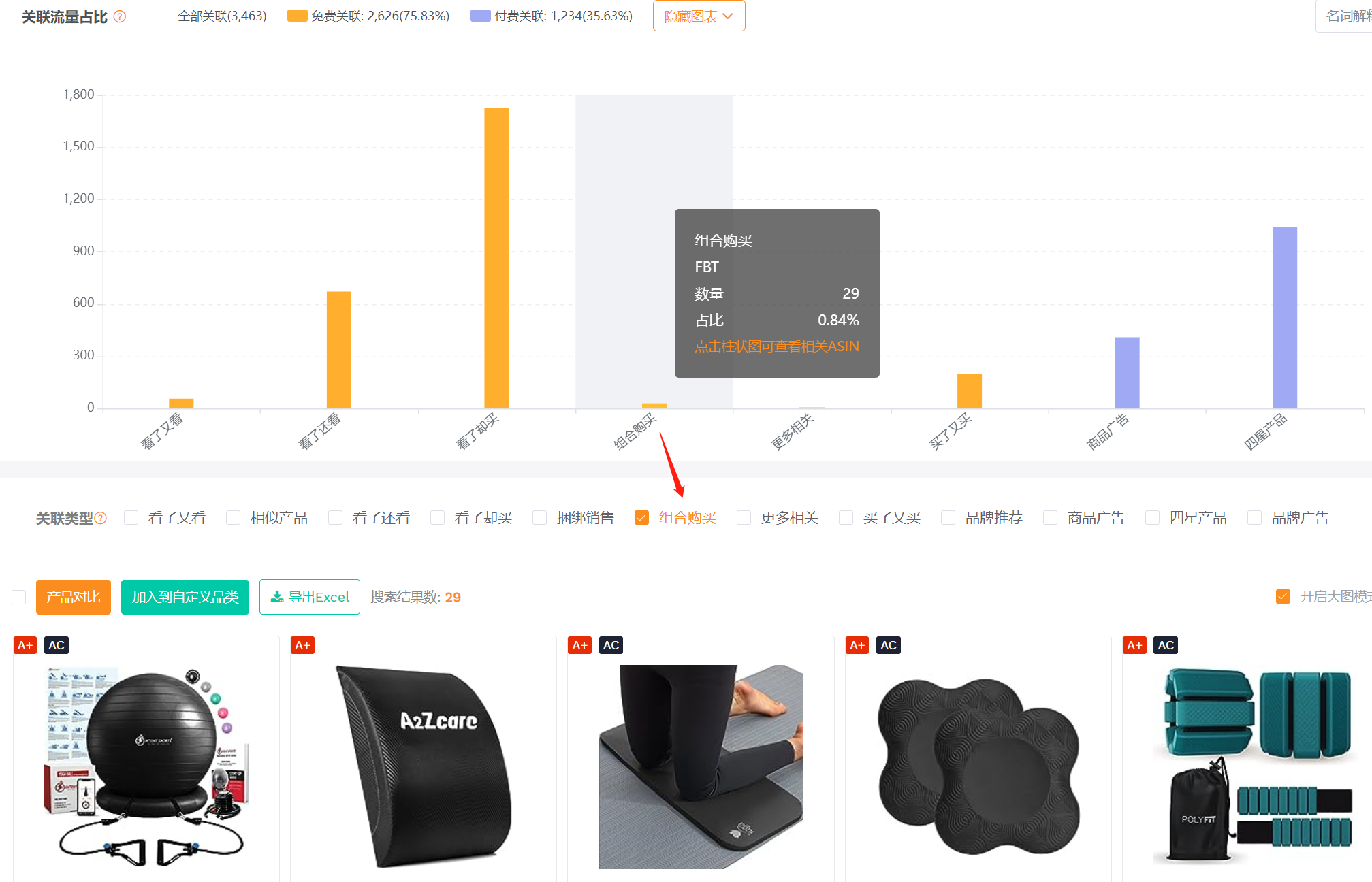
比如做瑜伽垫的卖家,可以扩展到瑜伽护膝、瑜伽砖等产品。卖家同时布局这些产品线有利于打造产品流量闭环,因为它们满足的都是相同使用人群在相同场景下的不同需求。
筛选条件:在【流量分析】功能中输入产品ASIN,点击组合购买,可以快速筛选出互补产品。
(图片来源于卖家精灵关联流量)
类目大数据选品
亚马逊的每个类目节点,本质上就是一个细分市场。通过比对、分析和过滤多个市场各维度的数据指标,帮助卖家选出最适合自身定位及优势的细分市场。
25、基于市场垄断选品
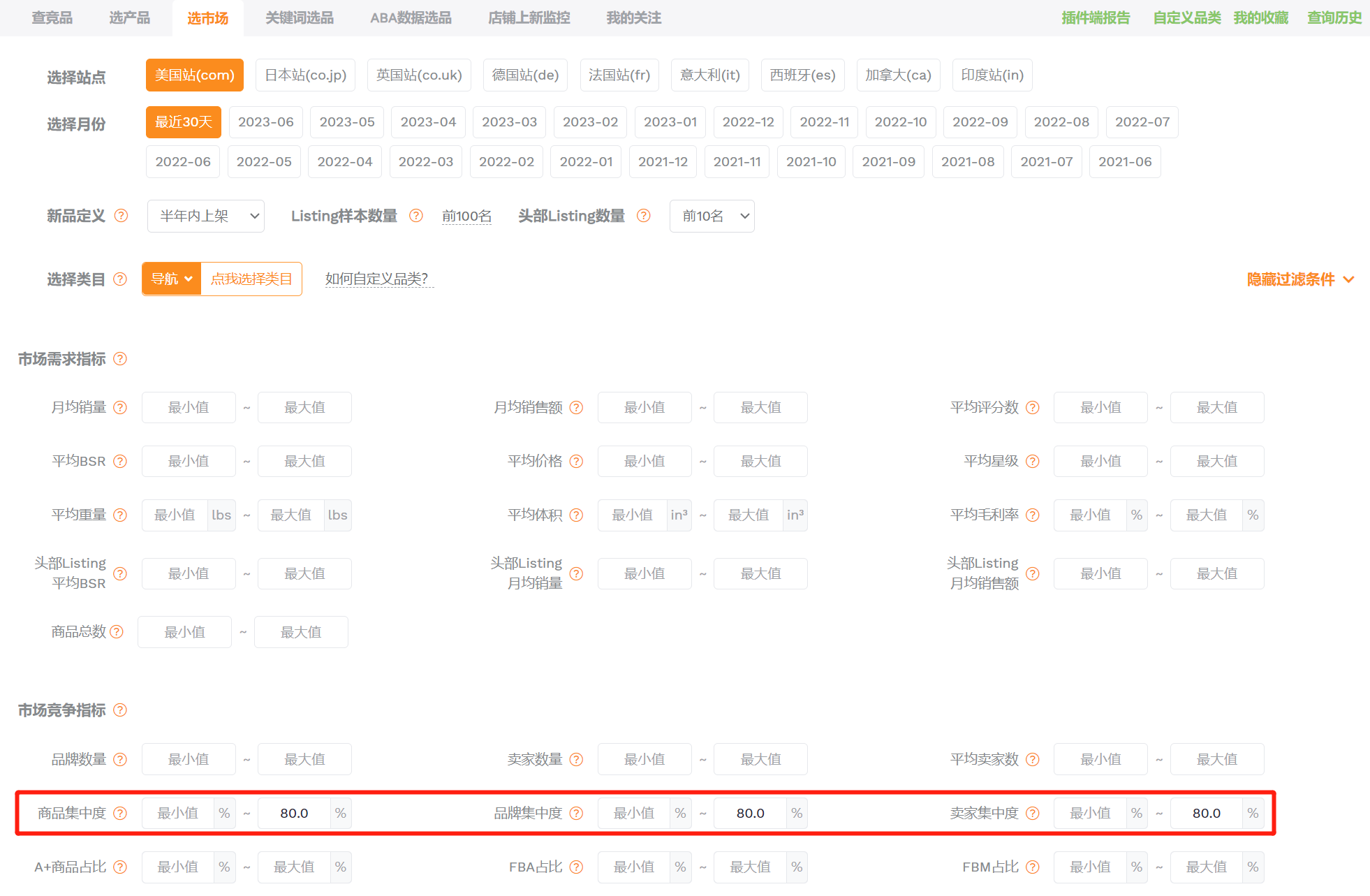
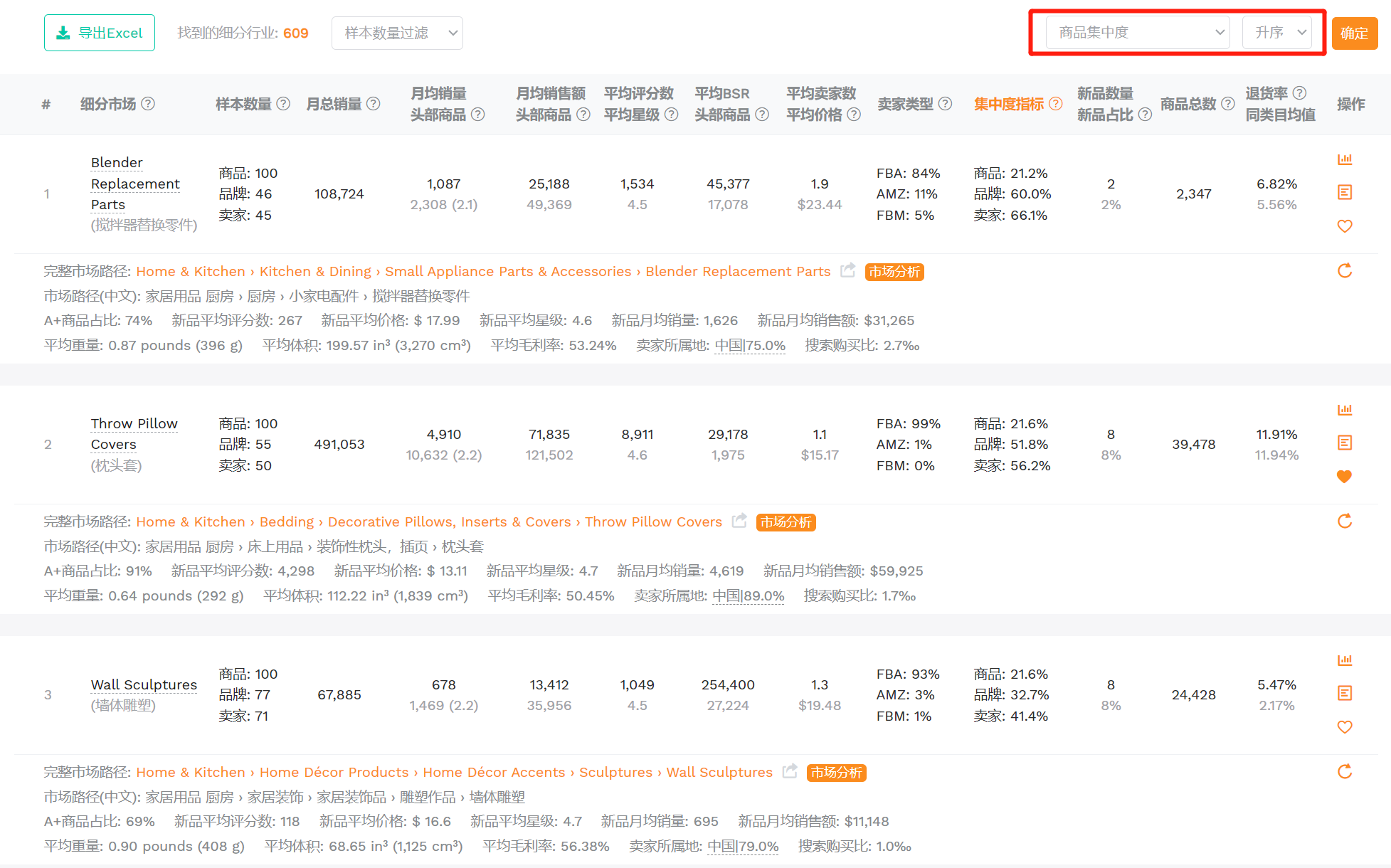
Listing垄断性、品牌垄断性、卖家垄断性,一般体现在某个细分市场下的商品中,表现较好的Listing、品牌和卖家的销量占比,如果该市场的销量都集中在少数的某几个Listing、品牌或卖家中,则说明市场垄断性高。一般来说,集中度越低,说明销量分布较为分散,竞争度不高,越有机会突破。
筛选条件:在【选市场】功能的市场竞争指标中设置过滤条件:商品集中度、品牌集中度、卖家集中度最大值为80%。或者直接将查询结果按照集中度升序排列,可以快速筛选出某类目下低竞争度的细分市场。
(图片来源于卖家精灵选市场)
(图片来源于卖家精灵选市场)
26、基于市场波动选品
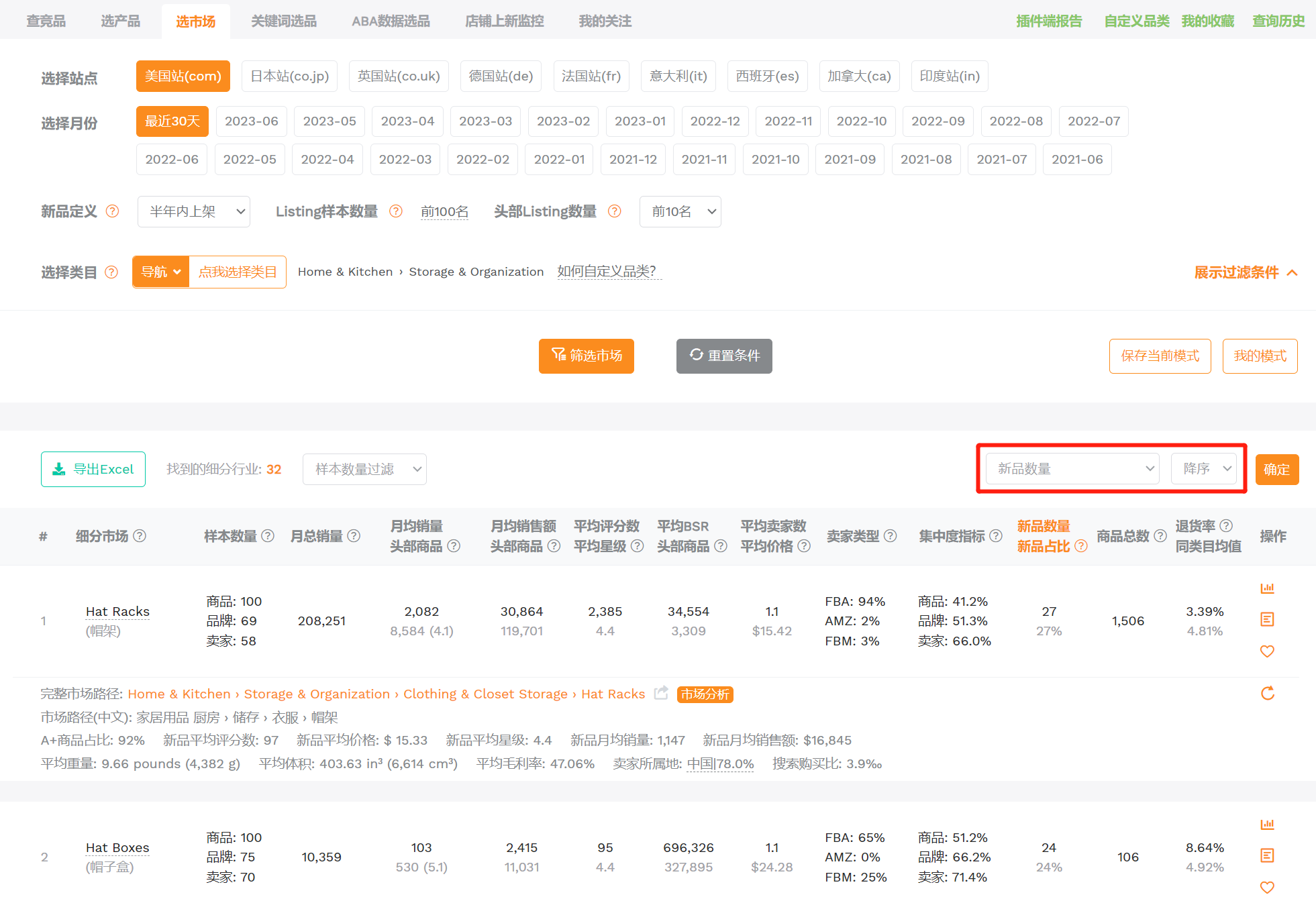
市场波动率越大,说明产品更新迭代较快,对新品的进入是友好的。但因为也可能是不成熟的市场,新品会很容易因为盈利达不到预期而出局。还有一些细分市场新品数量占比很大,但产品生命周期会较短,比如服饰类,不断地有新款式推陈出新,如果没有深入了解不建议新手卖家进入这一类市场。
通过某个细分市场下新品的表现情况,就可以大致判断出新卖家进入该市场的难易程度以及存活难度。
筛选条件:在【选市场】功能下,选择一个大类或二级类目后,将查询结果按照新品数量降序排列,
新品数量占比越大,说明市场机会越大,能快速找出潜力市场。
(图片来源于卖家精灵选市场)

- 1
- 2